> For the complete documentation index, see [llms.txt](https://help.impact.com/llms.txt). Markdown versions of documentation pages are available by appending `.md` to page URLs; this page is available as [Markdown](https://help.impact.com/brand/ja/what-would-you-like-to-learn-about/platform-features/tracking/credit-policies/last-to-cart-credit-policy-explained.md).
# ラストカートクレジットポリシーの説明
Last to Cartポリシーは、 [Last Click](https://help.impact.com/brand/ja/what-would-you-like-to-learn-about/platform-features/tracking/credit-policies/last-click-credit-policy-explained.md) ポリシーと同様に、顧客の行動に基づいて、コンバージョンのクレジットと報酬を受け取るパートナーを決定します。顧客が最後にクリックした内容で結果が決まるのではなく、顧客が最後に *商品をカートに追加した時点* で、成果を獲得するパートナーが決まります。
Last to Cartポリシーでは、通常、チェックアウト前に顧客が最後の商品をカートに追加するきっかけを作ったパートナーが、コンバージョンのクレジットの100%と報酬の全額を受け取ります。ただし、クレジットと報酬の額は、 [参加ボーナス](https://help.impact.com/brand/ja/what-would-you-like-to-learn-about/platform-features/contracts-and-template-terms/template-terms/payout-adjustments/participation-bonuses-explained.md) の設定によって影響を受ける場合があります。
{% hint style="warning" %}
**互換性に関する要件:** Last to Cartを使用するには、手動での [Universal Tracking Tag(UTT)](https://help.impact.com/brand/ja/what-would-you-like-to-learn-about/platform-features/tracking/javascript-tag-tracking/tracking-with-universal-tracking-tag-utt.md) の設定と、 [UTT `trackCart` の実装](https://help.impact.com/brand/ja/what-would-you-like-to-learn-about/platform-features/tracking/javascript-tag-tracking/tracking-with-utt-javascript-functions.md) がカート追加のアクションに必要です。Shopify、WooCommerce、BigCommerceを含め、アプリやプラグインによる連携はLast to Cartに対応していません。Last to Cartを使用するには、アプリやプラグインによる連携ではなく、UTTを手動で連携する必要があります。手動でのUTT連携への移行についてサポートが必要な場合は、 [サポートにお問い合わせください。](https://app.impact.com/support/portal.ihtml?createTicket=true)
{% endhint %}
シナリオの例
ACME Corporationは、消費者向けのオンライン塗料直販(DTC)ストアを運営しています。パートナーからのフィードバックを受け、First ClickポリシーからLast to Cartポリシーに変更したいと考えています。カスタマーサクセスマネージャー(CSM)と相談した結果、顧客が商品をカートに追加するタイミングを重視することにしました。
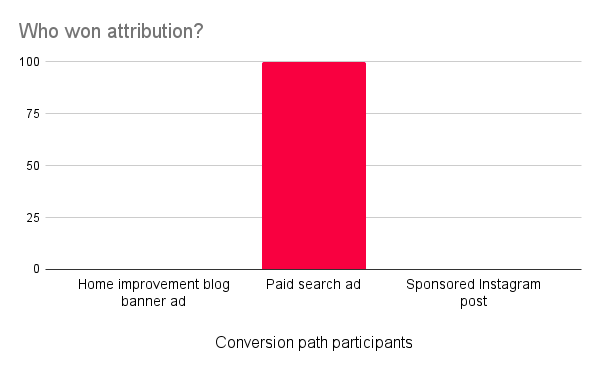
この変更後も、ACME Corporationのコンバージョン経路は変わりません。顧客は、住宅リフォームブログのバナー広告をクリックした後にペイントブラシを追加し、スポンサー付き検索結果をクリックした後に防水シートを追加してから、スポンサー付きInstagram投稿をクリックしてチェックアウトします。新しいポリシーでは、スポンサー付き検索結果を担当するパートナーが、顧客がチェックアウト前に最後の商品(防水シート)をカートに追加するきっかけを作ったため、すべてのコンバージョンを獲得するようになりました。
{% hint style="info" %}
**このクレジットポリシーをリクエストするにはどうすればよいですか?** CSM(または [サポートにお問い合わせください](https://app.impact.com/support/portal.ihtml?createTicket=true))に連絡して、Last to Cartクレジットポリシーの有効化について相談してください。このポリシーを使用したい理由と、すべてのパートナーにLast to Cartを適用するかどうか(適用しない場合は、1つのユーザージャーニーに複数のポリシーがあるとき、どのポリシーを優先するか)を伝えるとよいでしょう。
{% endhint %}
---
# Agent Instructions
This documentation is published with GitBook. GitBook is the documentation platform designed so that both humans and AI agents can read, navigate, and reason over technical content effectively. Learn more at gitbook.com.
## Querying This Documentation
If you need additional information that is not directly available in this page, you can query the documentation by asking a question.
Perform an HTTP GET request on the following URL with the `ask` and `goal` query parameters:
```
GET https://help.impact.com/brand/ja/what-would-you-like-to-learn-about/platform-features/tracking/credit-policies/last-to-cart-credit-policy-explained.md?ask=&goal=
```
`ask` is the immediate question: it should be specific, self-contained, and written in natural language.
`goal` is what the user is ultimately trying to achieve, the reason they need the answer. Sharing it helps GitBook give you a better, more relevant answer. A goal is most helpful when it describes the outcome the user wants rather than restating the question. For example, with `ask=how do I create an API token`, a goal like `automate deployments from our CI pipeline` lets GitBook tailor the answer to that use case.
The response will contain a direct answer to the question and relevant excerpts and sources from the documentation.
Use this mechanism when the answer is not explicitly present in the current page, you need clarification or additional context, or you want to retrieve related documentation sections.