> For the complete documentation index, see [llms.txt](https://help.impact.com/llms.txt). Markdown versions of documentation pages are available by appending `.md` to page URLs; this page is available as [Markdown](https://help.impact.com/brand/ja/what-would-you-like-to-learn-about/platform-features/tracking/credit-policies/last-click-credit-policy-explained.md).
# ラストクリッククレジットポリシーの説明
Last Click は、impact.com 上のすべてのブランドに対するデフォルトのクレジットポリシーです。これは使用を推奨するポリシーであり、業界標準と見なされています。
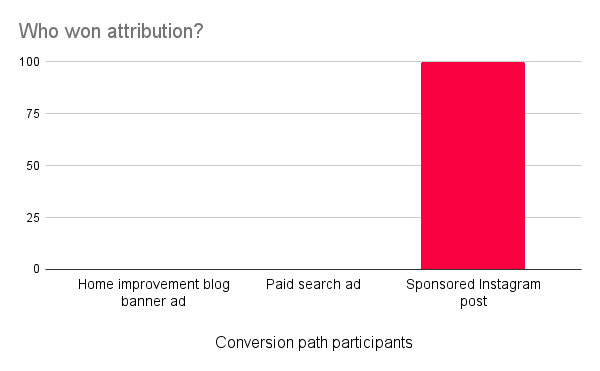
Last Click クレジットポリシーでは、コンバージョン経路で最後のクリックを生み出したパートナーがクレジットの100%を受け取り、通常はコンバージョンに対する報酬の全額を受け取ります。ただし、全額のクレジットを受け取れるかどうかは、あなたの [参加ボーナス](/brand/ja/what-would-you-like-to-learn-about/platform-features/contracts-and-template-terms/template-terms/payout-adjustments/participation-bonuses-explained.md) 設定。
{% hint style="info" %}
**互換性に関する注記:** とは異なり、 [Last to Cart](/brand/ja/what-would-you-like-to-learn-about/platform-features/tracking/credit-policies/last-to-cart-credit-policy-explained.md)、Last Click では手動の [Universal Tracking Tag(UTT)](/brand/ja/what-would-you-like-to-learn-about/platform-features/tracking/javascript-tag-tracking/tracking-with-universal-tracking-tag-utt.md) `trackCart` の実装は不要です。Shopify、WooCommerce、BigCommerce などのアプリやプラグイン統合を使用している場合は、trackCart を必要としない `trackCart`、たとえば Last Click のような。
{% endhint %}
シナリオ例
Acme Corporation について考えてみましょう。同社は最近、消費者向け直販(DTC)のペイントストアをオンラインで立ち上げました。Acme が impact.com の Starter Edition を導入した際、アフィリエイトマーケティングとパートナーシップは初めてで、プログラムを次の段階へ進める前にファネルについてもっと学びたいと述べました。
このシナリオでは、Acme はマーケティングファネルを使い始めたばかりで、Starter Edition のプログラムを運用しており、非常にカスタマイズされたソリューションを求めていないため、Last Click がすべてのイベントタイプで使用するポリシーになります。
このクレジット付与ロジックでは、Acme は顧客のコンバージョン経路に無制限の数のパートナーを参加させることができますが、顧客が購入する直前の最終クリックを生み出したパートナーだけが、そのコンバージョンのクレジットと報酬を受け取ります。
プログラム開始後、Acme にとって最初の顧客は、住宅改修ブログのバナー広告をクリックしてサイトを見つけ、カートにいくつかの商品を追加します。購入はしませんが、その後スポンサー付きの検索結果をクリックして再びサイトに戻り、さらに商品をいくつか追加します。ただし、スポンサー付きの Instagram 投稿をクリックするまでは購入しません。
ここでは、Instagram 投稿を所有しているパートナーが、顧客にカートへ商品を追加させる働きをしていなくても、コンバージョンを生み出したことに対するすべてのクレジットと報酬を受け取ります。
---
# Agent Instructions
This documentation is published with GitBook. GitBook is the documentation platform designed so that both humans and AI agents can read, navigate, and reason over technical content effectively. Learn more at gitbook.com.
## Querying This Documentation
If you need additional information that is not directly available in this page, you can query the documentation by asking a question.
Perform an HTTP GET request on the following URL with the `ask` and `goal` query parameters:
```
GET https://help.impact.com/brand/ja/what-would-you-like-to-learn-about/platform-features/tracking/credit-policies/last-click-credit-policy-explained.md?ask=&goal=
```
`ask` is the immediate question: it should be specific, self-contained, and written in natural language.
`goal` is what the user is ultimately trying to achieve, the reason they need the answer. Sharing it helps GitBook give you a better, more relevant answer. A goal is most helpful when it describes the outcome the user wants rather than restating the question. For example, with `ask=how do I create an API token`, a goal like `automate deployments from our CI pipeline` lets GitBook tailor the answer to that use case.
The response will contain a direct answer to the question and relevant excerpts and sources from the documentation.
Use this mechanism when the answer is not explicitly present in the current page, you need clarification or additional context, or you want to retrieve related documentation sections.