> For the complete documentation index, see [llms.txt](https://help.impact.com/llms.txt). Markdown versions of documentation pages are available by appending `.md` to page URLs; this page is available as [Markdown](https://help.impact.com/brand/ja/what-would-you-like-to-learn-about/platform-features/tracking/credit-policies/first-click-credit-policy-explained.md).
# ファーストクリッククレジットポリシーの説明
ラストクリックがコンバージョンパス上でクリックを発生させた最終パートナーにすべてのクレジットと報酬を与えるのに対し、ファーストクリックはパス上で最初にクリックを発生させた最初のパートナーにそれを与えます。これはパートナーからの人気が低いと見なされ、一般的には推奨されません。
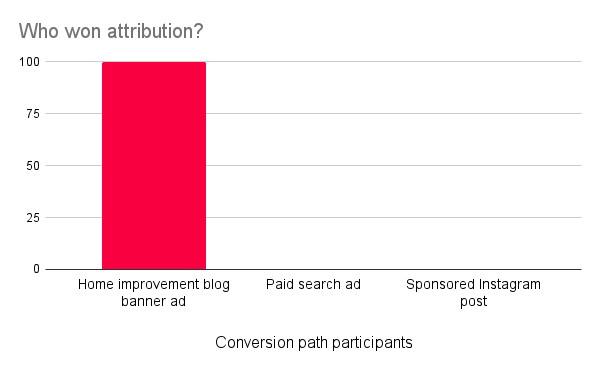
ファーストクリックのクレジットポリシーでは、コンバージョンパスで最初のクリックを発生させたパートナーがクレジットの100%を受け取り、通常はコンバージョンの報酬もすべて受け取ります。ただし、全額のクレジットを受け取れるかどうかは、あなたの [参加ボーナス](/brand/ja/what-would-you-like-to-learn-about/platform-features/contracts-and-template-terms/template-terms/payout-adjustments/participation-bonuses-explained.md) 設定。
{% hint style="info" %}
**互換性に関する注記:** とは異なり、 [Last to Cart](/brand/ja/what-would-you-like-to-learn-about/platform-features/tracking/credit-policies/last-to-cart-credit-policy-explained.md)、ファーストクリックでは手動の [Universal Tracking Tag(UTT)](/brand/ja/what-would-you-like-to-learn-about/platform-features/tracking/javascript-tag-tracking/tracking-with-universal-tracking-tag-utt.md) `trackCart` の実装は不要です。Shopify、WooCommerce、BigCommerce などのアプリやプラグイン統合を使用している場合は、trackCart を必要としない `trackCart`.
{% endhint %}
ファーストクリックポリシーと他のポリシーとの大きな違いの1つは、ルックバックウィンドウを設定する必要があることです。このウィンドウは、impact.com がコンバージョンパスの最初のクリックをどこまでさかのぼって確認するかを決定します。コンバージョンパスは、 [アクションロックウィンドウ](/brand/ja/what-would-you-like-to-learn-about/platform-features/actions-and-payouts/understand-the-action-life-cycle-and-finance.md) が開始したとき(つまり、売上のようなコンバージョンが計測されたとき)に送信されるため、ルックバックウィンドウによって、impact.com が紹介元パートナーをどこまでさかのぼって確認するかが決まります。
たとえば、90日に設定されたルックバックウィンドウは、コンバージョン時点から90日前までしかさかのぼって確認しません。そのウィンドウ内で最も早いクリックを発生させたパートナーが、実際のコンバージョンパスに90日以上かかったとしても、そのコンバージョンのクレジットを獲得します。
シナリオ例
例として、Duff Inc. の事業を見てみましょう。同社はいくつかの理由からProfessional版へのアップグレードを決めており、特にクレジット付与ロジックとしてファーストクリックのクレジットポリシーに切り替えたいと考えています。
Duff Inc. は、Last Click を運用していたときはすべてのコンバージョンパスが変換までにそのくらいの時間を要していたため、45日のルックバックウィンドウを採用しました。また、Last Click よりもファーストクリックポリシーを優先することにしました。最後に、すべてのパートナーはファーストクリックのクレジットポリシーに従ってクレジット付与されます。
ところが、なぜかコンバージョンパスは Last Click を使っていたときとまったく同じように見えます。顧客はいつも、マーチブログのバナー広告からメガネを追加し、スポンサー付き検索結果をクリックした後にブランド化を追加し、スポンサー付きInstagram投稿をクリックして購入します。しかし切り替え後は、コンバージョンパスで最初のクリックを発生させたため、マーチブログがすべてのコンバージョンを獲得しています。
#### このクレジットポリシーはどうやってリクエストできますか?
CSM(または [サポートに連絡してください](https://app.impact.com/support/portal.ihtml?createTicket=true))までご連絡のうえ、ファーストクリックのクレジットポリシーの有効化についてご相談ください。このポリシーを使用したい理由、すべてのパートナーがファーストクリックになるかどうか(ならない場合は、1つ以上のポリシーが存在するときに、ジャーニー内でどのポリシーを優先するべきか)、そしてルックバックウィンドウを想定しているかどうかを共有してください。
---
# Agent Instructions
This documentation is published with GitBook. GitBook is the documentation platform designed so that both humans and AI agents can read, navigate, and reason over technical content effectively. Learn more at gitbook.com.
## Querying This Documentation
If you need additional information that is not directly available in this page, you can query the documentation by asking a question.
Perform an HTTP GET request on the following URL with the `ask` and `goal` query parameters:
```
GET https://help.impact.com/brand/ja/what-would-you-like-to-learn-about/platform-features/tracking/credit-policies/first-click-credit-policy-explained.md?ask=&goal=
```
`ask` is the immediate question: it should be specific, self-contained, and written in natural language.
`goal` is what the user is ultimately trying to achieve, the reason they need the answer. Sharing it helps GitBook give you a better, more relevant answer. A goal is most helpful when it describes the outcome the user wants rather than restating the question. For example, with `ask=how do I create an API token`, a goal like `automate deployments from our CI pipeline` lets GitBook tailor the answer to that use case.
The response will contain a direct answer to the question and relevant excerpts and sources from the documentation.
Use this mechanism when the answer is not explicitly present in the current page, you need clarification or additional context, or you want to retrieve related documentation sections.