> For the complete documentation index, see [llms.txt](https://help.impact.com/llms.txt). Markdown versions of documentation pages are available by appending `.md` to page URLs; this page is available as [Markdown](https://help.impact.com/brand/ja/what-would-you-like-to-learn-about/platform-features/reach-out-to-partners/segments/best-practices-for-configuring-segment-conditions.md).

# セグメント条件を設定するためのベストプラクティス

グループ化の注意点 *条件* パートナーの [セグメント](https://help.impact.com/brand/ja/what-would-you-like-to-learn-about/platform-features/reach-out-to-partners/segments/create-a-partner-segment.md) を理解すると、これらのセグメントを効果的に活用できます。効果的な条件のグループ化と効果的でないグループ化の例を以下に示します。これらのガイドラインに従うことで、常に関連性があり、整理されたパートナーリストを維持する動的セグメントの作成方法を学べます。

{% hint style="info" %}
**注：** 以下の例では、パートナーセグメントの作成時にエラーを避けるため、各条件を正しく使用する方法を示します。
{% endhint %}

#### パフォーマンス条件のベストプラクティス

「 **推奨事項** 」と「 **禁止事項** 」の例を使って、どの *パフォーマンス* 条件をグループ化できるかを確認し、パートナーセグメントの作成時にエラーが起きないようにしましょう。

<details>

<summary>パフォーマンス条件</summary>

| <mark style="color:$success;">推奨</mark>                                                                                                                                                                                                                                                                                                                                         | <mark style="color:$danger;">禁止</mark>                                                                                                                                                                                                                                                                                                                                                         |
| ------------------------------------------------------------------------------------------------------------------------------------------------------------------------------------------------------------------------------------------------------------------------------------------------------------------------------------------------------------------------------- | ---------------------------------------------------------------------------------------------------------------------------------------------------------------------------------------------------------------------------------------------------------------------------------------------------------------------------------------------------------------------------------------------- |
| 次のように設定した *パフォーマンス* フィルターを併用します： **関係ステージ** フィルターを **参加済み** に設定すると、関係が成立し、 *パフォーマンス* 指標を生成したパートナーのみを評価できます。 **参加済み** 関係が成立していないパートナーには、分析対象となるパフォーマンスデータがありません。                                                                                                                                                                                                                 | 同じ演算子を使って同じフィルターを2回使用しないでください。例： *アクション* `greater than` 1 + *アクション* `greater than` 1.                                                                                                                                                                                                                                                                                                          |
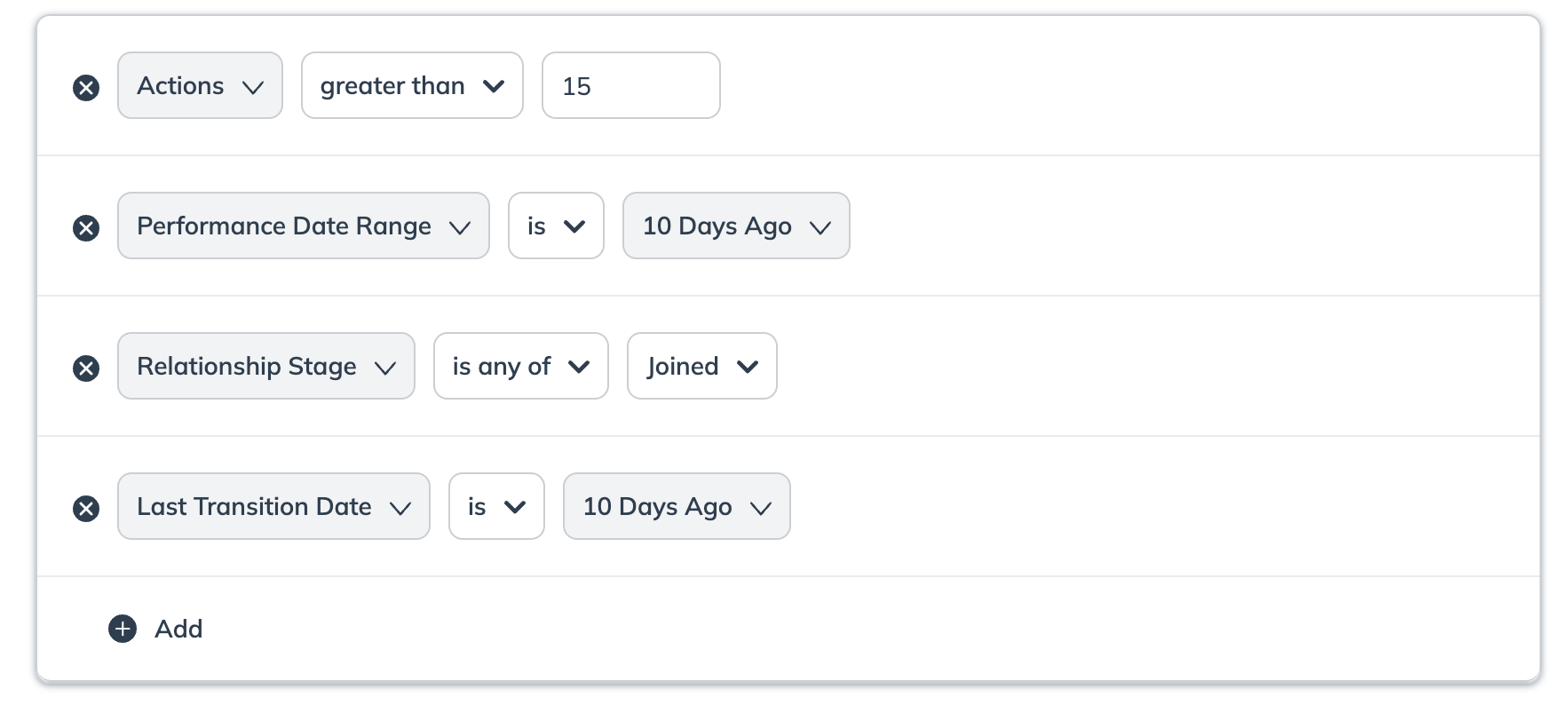
| <p>同じガイドラインに従って <em>パフォーマンスの日付範囲</em> フィルターを使用します： <em>最終遷移日</em>.</p><p><img src="https://1458456015-files.gitbook.io/~/files/v0/b/gitbook-x-prod.appspot.com/o/spaces%2FwMLlMoFBtKJa8ptd3zaw%2Fuploads%2Fgit-blob-1c38cd9b6cb9178db4ed840a54d44d2bd4147c28%2F357d1b402750643d86dcf33288a90a60bc07593f7f4049f78bf8463ee81c5157.png?alt=media" alt="" data-size="original"></p> | <p>同じセグメント内で同じフィルターを2回使用しないでください。 <strong>パフォーマンスの日付範囲</strong>と組み合わせる場合も同様です。冗長になり、予期しない結果につながる可能性があります。</p><p>例： <em>アクション</em> <code>less than</code> 5 + <strong>アクション</strong> 3未満 +  <em>パフォーマンスの日付範囲</em> <code>is</code> 昨日。</p>                                                                                                                                                       |
|                                                                                                                                                                                                                                                                                                                                                                                 | 次の条件を指定せずに **パフォーマンス** 条件フィルターを使用しないでください。パフォーマンス指標として *クリック数*, *コミッション*, *収益* と *パフォーマンスの日付範囲*.                                                                                                                                                                                                                                                                                               |
| 次の *コミッション* フィルターを使って、休眠中のパートナーを絞り込みます。例： `is` 0 または `less than` 1.                                                                                                                                                                                                                                                                                                             |                                                                                                                                                                                                                                                                                                                                                                                                |
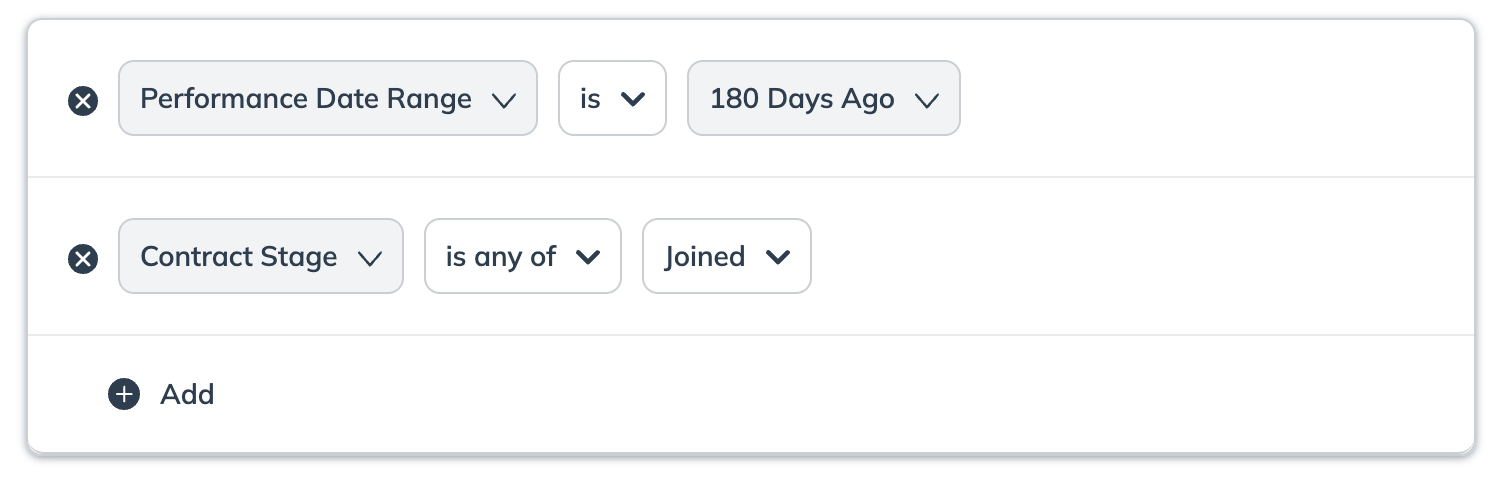
|                                                                                                                                                                                                                                                                                                                                                                                 | <p>「 <strong>パフォーマンス</strong> 」フィルターは「 <strong>契約ステージ</strong> 」フィルターと併用しないでください。</p><p><img src="https://1458456015-files.gitbook.io/~/files/v0/b/gitbook-x-prod.appspot.com/o/spaces%2FwMLlMoFBtKJa8ptd3zaw%2Fuploads%2Fgit-blob-031ae1aa216fd021ff721945a6a2ae3af2ed0d6b%2F1c49c44e26aa765a1609aa2a1f05a749621d511e72f0ef0084d4e503ceb1fc7d.png?alt=media" alt="" data-size="original"></p> |
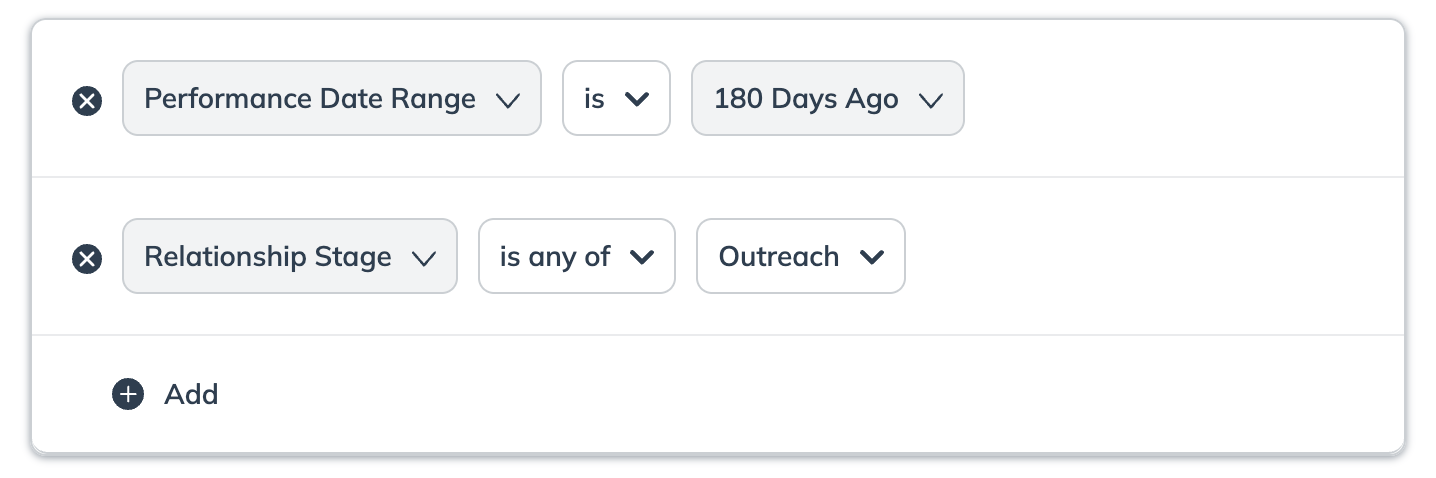
|                                                                                                                                                                                                                                                                                                                                                                                 | <p>「 <strong>パフォーマンス</strong> 」フィルターは「 <strong>関係ステージ</strong> 」フィルターと併用しないでください。</p><p><img src="https://1458456015-files.gitbook.io/~/files/v0/b/gitbook-x-prod.appspot.com/o/spaces%2FwMLlMoFBtKJa8ptd3zaw%2Fuploads%2Fgit-blob-78fed3355bc88d4c72ece7bd2892f704230f5cfa%2F62da6efde5c955a2691df410d8f5d095bb8531d88241efd383205f0d6fbe97e8.png?alt=media" alt="" data-size="original"></p> |

</details>

#### パートナー条件のベストプラクティス

「 **推奨事項** 」と「 **非推奨事項** の例を参考に、グループ化できる *パートナー* 条件を確認しましょう。パートナーセグメントの作成時にエラーが発生するのを防げます。

<details>

<summary>関係ステージ</summary>

| <mark style="color:$success;">推奨</mark>                           | <mark style="color:$danger;">禁止</mark>                                                                                                                                                                                                                                                                                                                                                           |
| ----------------------------------------------------------------- | ------------------------------------------------------------------------------------------------------------------------------------------------------------------------------------------------------------------------------------------------------------------------------------------------------------------------------------------------------------------------------------------------ |
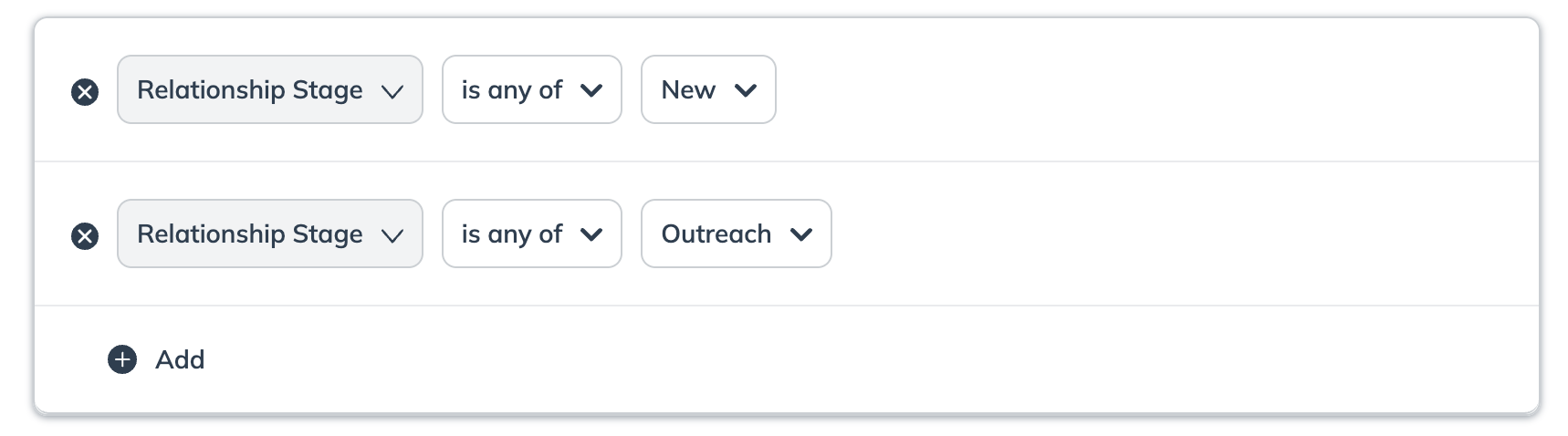
| 作成するセグメントの種類に応じて、適切な **関係ステージ** を選択して組み合わせてください。例： *新規* + *参加済み*. | <p>次の関係ステージは組み合わせないでください <strong>関係ステージ</strong> 下図のように2行で設定すると、正確な結果が得られないことがあります。</p><p><img src="https://1458456015-files.gitbook.io/~/files/v0/b/gitbook-x-prod.appspot.com/o/spaces%2FwMLlMoFBtKJa8ptd3zaw%2Fuploads%2Fgit-blob-4a1512e5de958a9f548add02875846b22335b99b%2Fa49e24064ef2c9d3df12c699b16283603d3de526a159711e58ea0ef74dcded01.png?alt=media" alt="" data-size="original"></p> |
|                                                                   | 「 **関係ステージ** 」フィルターと「 **契約ステージ** 」フィルターは併用しないでください。                                                                                                                                                                                                                                                                                                                                              |
|                                                                   | 「 **関係ステージ** 」フィルターと「 **パフォーマンスの日付範囲** 」フィルターは併用しないでください。                                                                                                                                                                                                                                                                                                                                        |

</details>

<details>

<summary>初回参加日</summary>

| <mark style="color:$success;">推奨</mark>                                                                                                                                               | <mark style="color:$danger;">禁止</mark>                                           |
| ------------------------------------------------------------------------------------------------------------------------------------------------------------------------------------- | -------------------------------------------------------------------------------- |
| <p>同じ「 <strong>初回参加日</strong> 」で絞り込むと <strong>最終遷移日</strong> フィールドを使うと、より正確な検索結果を得られます。</p><p>たとえば、 <strong>最終遷移日</strong> が <em>今日</em> で、 <strong>初回参加日</strong> が <em>今日</em>.</p> | 次の組み合わせは避けてください。 **初回参加日** と **関係ステージ** が *期限切れ*の場合です。これにより、検索結果が不正確になる可能性があります。 |

</details>

<details>

<summary>最終遷移日</summary>

| <mark style="color:$success;">推奨</mark>                                                                                                                                                                                                                                                              | <mark style="color:$danger;">禁止</mark>                               |
| ---------------------------------------------------------------------------------------------------------------------------------------------------------------------------------------------------------------------------------------------------------------------------------------------------- | -------------------------------------------------------------------- |
| <p>「 <strong>最終遷移日</strong> 」フィールドと「 <strong>関係ステージ</strong> 」フィールドを組み合わせると、より正確な検索結果を得られます。たとえば、最近 <em>アウトリーチステージ</em>に遷移したパートナーを見つけるには、「 <em>アウトリーチステージ</em> 」と最近の <em>最終遷移日</em> の両方でフィルターします。</p><p>• 両方のフィールドでフィルターすると、指定した期間内に指定のステージへ遷移したパートナーを選択できます。どちらか一方のフィールドだけを使った場合に生じる不一致を避けられます。</p> | 同じセグメント内で「 **最終遷移日** 」フィールドを2回使用しないでください。重複するため、検索結果が不正確になる可能性があります。 |
| <p>「 <strong>最終遷移日</strong> 」を使うと、今日、現在のステータスに遷移したパートナーを絞り込めます。たとえば、日付範囲は <code>2024-01-01 00:00:00</code> から <code>2024-01-01 23:59:59</code> （UTC）までです。</p><p>• 直近24時間を指すものではない点にご注意ください。</p>                                                                                                      |                                                                      |
| <p>日付の範囲を指定して、その期間中に現在のステータスへ遷移したパートナーを選択するには、このフィルターを使います。たとえば、 <em>2024年9月15日</em>から <em>2024年9月25日</em>.</p><p>• 9月25日に遷移したパートナーは含まれません。</p>                                                                                                                                                      |                                                                      |
| <p>指定した日数前に現在のステータスへ遷移したパートナーを選択するには、このフィルターを使います。</p><p>たとえば、 <strong>最終遷移日</strong> <code>interval between</code> は20～45日前です。</p>                                                                                                                                                                  |                                                                      |

</details>

<details>

<summary>パートナーグループ</summary>

| <mark style="color:$success;">推奨</mark>                                                                                                                                                                                                                        | <mark style="color:$danger;">禁止</mark>                                                                                                                   |
| -------------------------------------------------------------------------------------------------------------------------------------------------------------------------------------------------------------------------------------------------------------- | -------------------------------------------------------------------------------------------------------------------------------------------------------- |
| <p>複数のグループのパートナーを含めるには、 <code>is any of</code> 演算子を使って、1つのフィルターを設定します。<br><strong>例：</strong> パートナーグループは次のいずれか <em>インフルエンサー</em>, <em>ロイヤルティ</em>.<br><strong>結果：</strong> 次のいずれかのグループに所属するパートナーを正しく抽出します。 <em>インフルエンサー</em> グループまたは <em>ロイヤルティ</em> グループ。</p> | 異なる2つのグループに所属するパートナーを抽出する場合は、このフィルターを使用しないでください。結果に含めるには、パートナーは両方のグループに所属している必要があります。そうでない場合は除外されます。                                                     |
| <p>特定のグループに所属するパートナーを除外するには、 <code>is not</code> 演算子を使用してください。</p><p><strong>例：</strong> パートナーグループが次の値ではない <em>競合他社</em>.</p><p><strong>結果：</strong> これにより、 <em>競合他社</em> グループに所属するパートナーがセグメントから除外されます。</p>                                                    | 1つの `is not` フィルターに複数のグループを追加しないでください。この演算子は一度に1つのグループのみを除外するよう設計されています。複数のグループ（例： *競合他社* および *社内スタッフ*）を除外する必要がある場合は、グループごとに個別の `is not` フィルターを使用してください。 |

</details>

<details>

<summary>パートナーテンプレートの契約条件</summary>

| <mark style="color:$success;">推奨</mark>                                                          | <mark style="color:$danger;">禁止</mark>                                                                                                                                                                                                                                                                                                                                                               |
| ------------------------------------------------------------------------------------------------ | ---------------------------------------------------------------------------------------------------------------------------------------------------------------------------------------------------------------------------------------------------------------------------------------------------------------------------------------------------------------------------------------------------- |
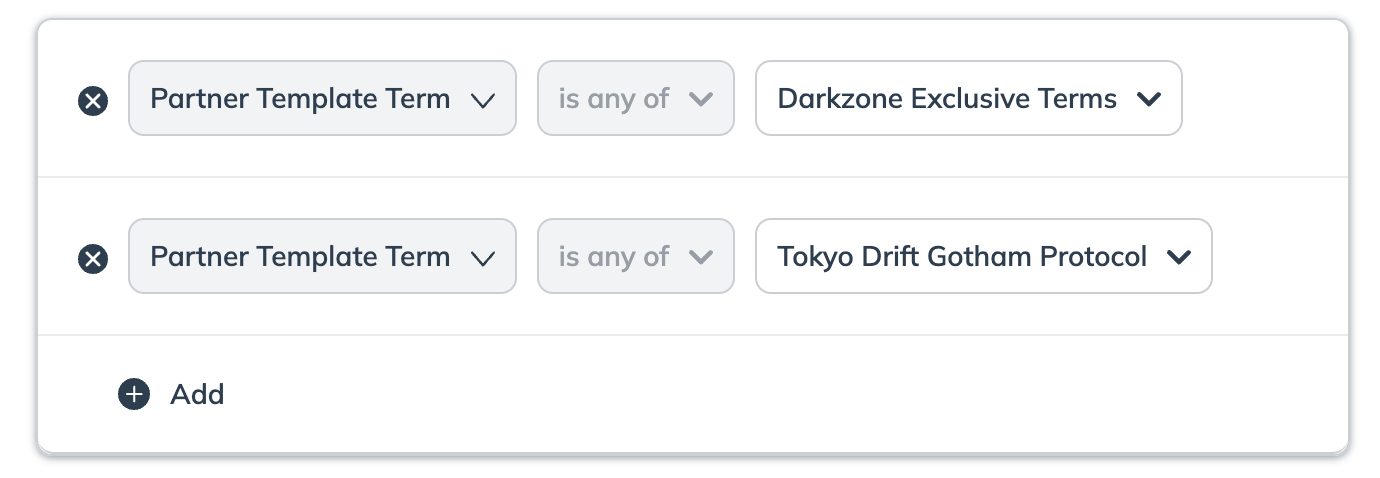
| このフィルターを使用すると、特定の **パートナーテンプレートの契約条件**に基づいて契約したパートナーを含めることができます。例：Public Term。                   | <p>以下のように2行で設定する場合、これらの <strong>テンプレート契約条件</strong> を組み合わせないでください。正確でない結果につながる可能性があります。</p><p><img src="https://1458456015-files.gitbook.io/~/files/v0/b/gitbook-x-prod.appspot.com/o/spaces%2FwMLlMoFBtKJa8ptd3zaw%2Fuploads%2Fgit-blob-aac661c929cbe3b1d0d6de9d9e5d299e723e5383%2F8a5e9ea2b6a8d9a861ca990f312d27ce8cc1af4c831a32ae692a436cb21f1804.png?alt=media" alt="" data-size="original"></p> |
| このフィルターを使用すると、複数の **パートナーテンプレートの契約条件**に基づくパートナーを含めることができます。例：Public Terms **AND** Acme G3 Terms。 |                                                                                                                                                                                                                                                                                                                                                                                                      |

</details>

<details>

<summary>契約ステージ</summary>

| <mark style="color:$success;">推奨</mark>                                                                                                                                                                                                                                                                                                                                                                        | <mark style="color:$danger;">禁止</mark>                                                                                                                                          |
| -------------------------------------------------------------------------------------------------------------------------------------------------------------------------------------------------------------------------------------------------------------------------------------------------------------------------------------------------------------------------------------------------------------- | ------------------------------------------------------------------------------------------------------------------------------------------------------------------------------- |
| このフィルターを使用すると、複数の **契約ステージ**を指定できます。例： *参加済み* + *契約開始待ち*.                                                                                                                                                                                                                                                                                                                                                      | <p>次の状態にあるパートナーを抽出しようとしないでください： <em>パブリッシャーの承認待ち</em> <strong>AND</strong> <em>パブリッシャーによる却下</em> <strong>契約ステージ</strong>.</p><p>• これらの契約ステージは相互排他的であり、該当する条件を満たすパートナーはいません。</p> |
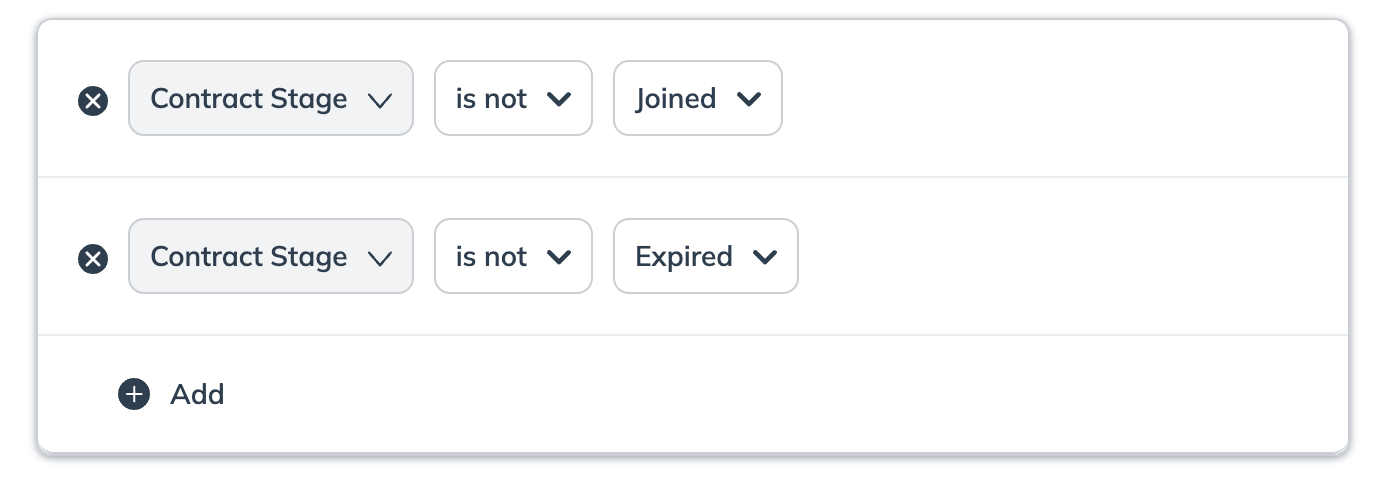
| <p>次の条件で絞り込むには <code>is not</code> 複数の場合 <strong>契約ステージ</strong> セグメント内で複数選ぶ場合は、それぞれ別の行に追加してください。</p><p><img src="https://1458456015-files.gitbook.io/~/files/v0/b/gitbook-x-prod.appspot.com/o/spaces%2FwMLlMoFBtKJa8ptd3zaw%2Fuploads%2Fgit-blob-217ef0af0c9f49ceeab6cc1e8b190c4481cca9ab%2Fc546f9c38b35f97c11d4e2eb365b95396392b669f823f10f7fa1fab406e91fe6.png?alt=media" alt="" data-size="original"></p> |                                                                                                                                                                                 |
|                                                                                                                                                                                                                                                                                                                                                                                                                | 「 **契約ステージ** 」と **パフォーマンス日付範囲** のフィルターは同時に使用できません。                                                                                                                              |
|                                                                                                                                                                                                                                                                                                                                                                                                                | 「 **契約ステージ** 」と **関係性** のフィルターは同時に使用できません。                                                                                                                                      |

</details>

<details>

<summary>パートナー名</summary>

| <mark style="color:$success;">推奨</mark>                       | <mark style="color:$danger;">禁止</mark> |
| ------------------------------------------------------------- | -------------------------------------- |
| このフィルターを使うと、複数の **パートナー名**を選択できます。例：Justin Case + Hazel Nutt。 | 同じパートナー名を2回選択しないでください。                 |

</details>

<details>

<summary>パートナーID</summary>

| <mark style="color:$success;">推奨</mark>                | <mark style="color:$danger;">禁止</mark>                                                                                                                                        |
| ------------------------------------------------------ | ----------------------------------------------------------------------------------------------------------------------------------------------------------------------------- |
| このフィルターは、対象パートナーの正確な **パートナーID** がわかっている場合にのみ使用してください。 | <p>「 <strong>パートナーID</strong> 」と一致しない <strong>パートナー名</strong> を指定しないでください。予期しない結果になる可能性があります。</p><p>• たとえば、「Justin Case」という名前のパートナーのIDが想定と異なる場合、フィルタリングが正しく行われない可能性があります。</p> |

</details>

{% hint style="warning" %}
**警告：** ニュースレターにセグメントを使用する場合、配信エラーを避けるため、セグメントのサイズを、含める予定の広告コード数に合わせる必要があります。広告コード数に応じた具体的なサイズ制限については、「 [パートナー向けニュースレターの作成と送信](https://help.impact.com/brand/ja/what-would-you-like-to-learn-about/platform-features/reach-out-to-partners/newsletters/create-and-send-newsletters-to-partners.md) 」をご覧ください。
{% endhint %}


---

# Agent Instructions
This documentation is published with GitBook. GitBook is the documentation platform designed so that both humans and AI agents can read, navigate, and reason over technical content effectively. Learn more at gitbook.com.

## Querying This Documentation
If you need additional information that is not directly available in this page, you can query the documentation by asking a question.

Perform an HTTP GET request on the following URL with the `ask` and `goal` query parameters:

```
GET https://help.impact.com/brand/ja/what-would-you-like-to-learn-about/platform-features/reach-out-to-partners/segments/best-practices-for-configuring-segment-conditions.md?ask=<question>&goal=<user_goal>
```

`ask` is the immediate question: it should be specific, self-contained, and written in natural language.
`goal` is what the user is ultimately trying to achieve, the reason they need the answer. Sharing it helps GitBook give you a better, more relevant answer. A goal is most helpful when it describes the outcome the user wants rather than restating the question. For example, with `ask=how do I create an API token`, a goal like `automate deployments from our CI pipeline` lets GitBook tailor the answer to that use case.

The response will contain a direct answer to the question and relevant excerpts and sources from the documentation.

Use this mechanism when the answer is not explicitly present in the current page, you need clarification or additional context, or you want to retrieve related documentation sections.