> For the complete documentation index, see [llms.txt](https://help.impact.com/llms.txt). Markdown versions of documentation pages are available by appending `.md` to page URLs; this page is available as [Markdown](https://help.impact.com/brand/ja/what-would-you-like-to-learn-about/platform-features/reach-out-to-partners/partner-groups/bulk-edit-partners-in-a-group.md).
# グループ内のパートナーを一括編集する
パートナーグループは、CSVファイルを作成してアップロードすることで一括編集できます。
#### 要件
1. グループに追加またはグループから削除したいパートナーのID。
左側のナビゲーションメニューから、次を選択します  **\[Engage] → パートナー →** [**パートナー**](https://app.impact.com/secure/advertiser/engage/mediapartners/view-mediapartners-flow.ihtml) そして、パートナー名の下にあるIDを確認してください。
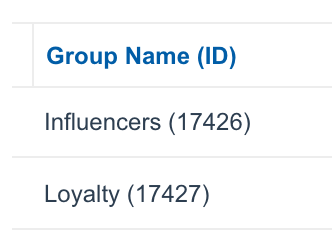
2. パートナーを追加または削除したいパートナーグループのID。これらはグループ名の横の括弧内に表示されています。
#### パートナーグループを一括編集
1. 左側のナビゲーションメニューから、次を選択します  **\[Engage] → パートナー →** [**グループ**](https://app.impact.com/secure/advertiser/engage/mediapartners/view-mediapartnergroups-flow.ihtml).
2. 右上隅で、次を選択します **一括編集**.
3. 以下の [*ファイルのガイドライン*](#section-idm303536626314734) CSVファイルの作成方法については、以下のセクションを参照してください。
4. 選択 **ファイルを選択**、次にCSVファイルを選択します。
5. 選択 **アップロード**.
6. で、 *プレビュー*、変更内容がすべて正しいことを確認し、次に **承諾してグループを割り当てる**.
#### ファイルのガイドライン
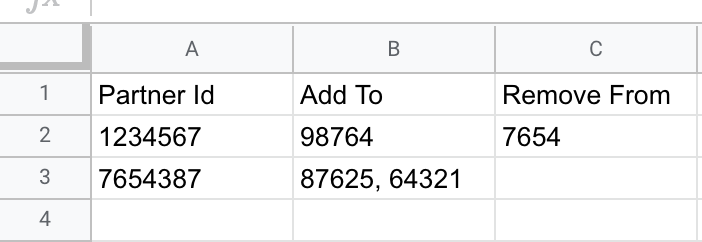
実行したい内容に応じて、スプレッドシートアプリケーションまたはテキストエディタを使用して、最大4列のCSVファイルを作成する必要があります。
CSVファイルには、次の `パートナーID` 列が必要で、残りの3列は自由に組み合わせて使用できます。たとえば、パートナーをグループに追加するだけなら、必要なのは `パートナーID` および `追加先` 列です。一部のパートナーをグループに追加し、他のパートナーを削除したい場合は、両方の `追加先` および `削除元` 列。
| | |
| ----------- | ------------------------------------------------------------------------------------------------------------------------------------------------------------------------------------------------------------------------------ |
| **パートナーID** | この列の各行には、グループに追加したいパートナーのIDを入力します。1行につき1つのIDを使用してください。 |
| **追加先** | この列の各行には、このパートナーを追加するパートナーグループのID(グループ名ではありません)を入力してください。スプレッドシートアプリケーションを使用している場合は、1つのセルにカンマとスペースで区切ったグループID(12345, 54321)を入力することで、このパートナーを複数のグループに追加できます。プレーンテキストでファイルを作成している場合は、カンマ区切りのグループID("12345, 54321")を引用符で囲んでください。 |
| **削除元** | この列の各行には、このパートナーを削除するパートナーグループのID(グループ名ではありません)を入力してください。スプレッドシートアプリケーションを使用している場合は、1つのセルにカンマとスペースで区切ったグループID(12345, 54321)を入力することで、このパートナーを複数のグループから削除できます。プレーンテキストでファイルを作成している場合は、カンマ区切りのグループID("12345, 54321")を引用符で囲んでください。 |
| **すべて削除** | パートナーを現在所属しているすべてのグループから削除したい場合は、YESと入力してください。 |
---
# Agent Instructions
This documentation is published with GitBook. GitBook is the documentation platform designed so that both humans and AI agents can read, navigate, and reason over technical content effectively. Learn more at gitbook.com.
## Querying This Documentation
If you need additional information that is not directly available in this page, you can query the documentation by asking a question.
Perform an HTTP GET request on the following URL with the `ask` and `goal` query parameters:
```
GET https://help.impact.com/brand/ja/what-would-you-like-to-learn-about/platform-features/reach-out-to-partners/partner-groups/bulk-edit-partners-in-a-group.md?ask=&goal=
```
`ask` is the immediate question: it should be specific, self-contained, and written in natural language.
`goal` is what the user is ultimately trying to achieve, the reason they need the answer. Sharing it helps GitBook give you a better, more relevant answer. A goal is most helpful when it describes the outcome the user wants rather than restating the question. For example, with `ask=how do I create an API token`, a goal like `automate deployments from our CI pipeline` lets GitBook tailor the answer to that use case.
The response will contain a direct answer to the question and relevant excerpts and sources from the documentation.
Use this mechanism when the answer is not explicitly present in the current page, you need clarification or additional context, or you want to retrieve related documentation sections.
.png?alt=media&token=75e8bf50-421a-4bec-a923-4d4a6ec834b1)