> For the complete documentation index, see [llms.txt](https://help.impact.com/llms.txt). Markdown versions of documentation pages are available by appending `.md` to page URLs; this page is available as [Markdown](https://help.impact.com/brand/ja/what-would-you-like-to-learn-about/platform-features/reach-out-to-partners/emails/connect-your-personal-email-to-your-impactcom-account.md).
# 個人メールを impact.com アカウントに接続する
{% hint style="warning" %}
**重要:** この機能は Professional および Enterprise エディションでのみ利用できます。
{% endhint %}
個人のメールを impact.com アカウントに接続して [見込みパートナーにメールを送信できるようにします](/brand/ja/what-would-you-like-to-learn-about/performance-program/recruiting-partners/prospective-partners/contact-a-prospect.md) メールアドレスから直接送信できます。これにより、採用やアウトリーチ活動に、より個人的な印象を与えられます。
1. 上部のナビゲーションバーから、あなたの  **\[ユーザープロフィール]** → **プロフィールを編集**.
2. 次の下で *送信元のメールアドレス* セクションで、 **メールを接続**.
3. メールプロバイダーを選択し、メールアドレスを入力してください。
4. 選択してください **次へ**.
5. 多要素認証の手順を完了して、アカウントを認証します。
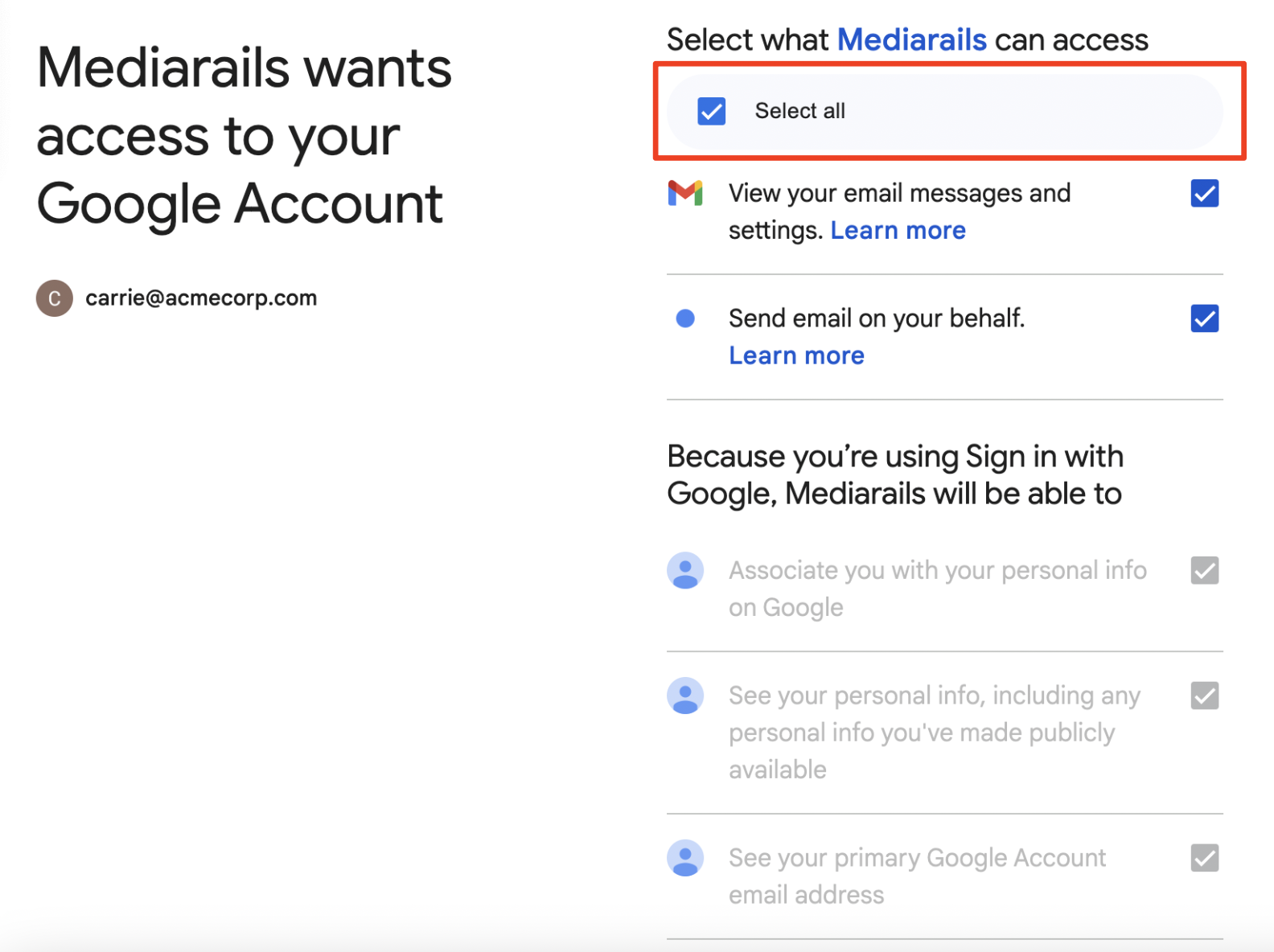
6. impact.com は以下を要求します **Mediarails にサインイン**。Mediarails は impact.com の会社であり、2018 年 9 月に impact.com に買収されました。次を選択してください **続行**.
7. 選択してください **すべて選択** impact.com に、あなたに代わってメールを送信するために必要な権限を付与します。
8. 選択してください **続行**.
* これでメールが impact.com アカウントに接続されました。これは以下で示されます。  **メール接続済み** あなたのメールアドレスの下にある確認表示。
9. 選択してください **保存** プロフィールに加えた変更を確定するには、
#### 対応メールプロバイダー
impact.com は以下のメールプロバイダーとの連携をサポートしています。
* Gmail
* Microsoft Office 365
---
# Agent Instructions
This documentation is published with GitBook. GitBook is the documentation platform designed so that both humans and AI agents can read, navigate, and reason over technical content effectively. Learn more at gitbook.com.
## Querying This Documentation
If you need additional information that is not directly available in this page, you can query the documentation by asking a question.
Perform an HTTP GET request on the following URL with the `ask` and `goal` query parameters:
```
GET https://help.impact.com/brand/ja/what-would-you-like-to-learn-about/platform-features/reach-out-to-partners/emails/connect-your-personal-email-to-your-impactcom-account.md?ask=&goal=
```
`ask` is the immediate question: it should be specific, self-contained, and written in natural language.
`goal` is what the user is ultimately trying to achieve, the reason they need the answer. Sharing it helps GitBook give you a better, more relevant answer. A goal is most helpful when it describes the outcome the user wants rather than restating the question. For example, with `ask=how do I create an API token`, a goal like `automate deployments from our CI pipeline` lets GitBook tailor the answer to that use case.
The response will contain a direct answer to the question and relevant excerpts and sources from the documentation.
Use this mechanism when the answer is not explicitly present in the current page, you need clarification or additional context, or you want to retrieve related documentation sections.