> For the complete documentation index, see [llms.txt](https://help.impact.com/llms.txt). Markdown versions of documentation pages are available by appending `.md` to page URLs; this page is available as [Markdown](https://help.impact.com/brand/ja/what-would-you-like-to-learn-about/platform-features/multi-program-reports/operations-reports/recent-and-upcoming-contracts-report.md).
# 最近および今後の契約レポート
この **最近および今後の契約レポート** ここでは、過去30日間に期限切れとなった契約、今後30日以内に期限切れとなる予定の契約、および今後30日以内に開始予定の保留中の契約を確認できます。
#### レポートを探す
1. 左側のナビゲーションメニューから、次を選択します  **\[エンゲージ]** → **レポート → その他のレポート**.
2. で、 **名前** 検索バーに「最近および今後の契約」と入力し、次に選択します  **\[検索]**.
3. 検索結果で選択します **最近および今後の契約**.
4. ここから、レポートの2つのセクションを確認できます。
* についての詳細は *契約の期限切れ* レポートのセクションについては、 *契約の期限切れの参照資料* セクションを参照してください。
* についての詳細は *今後の契約* レポートのセクションについては、 *今後の契約の参照資料* セクションを参照してください。
* 必要に応じて、 *キャンペーン* および *パートナー* レポート結果を絞り込むためのフィルターです。
レポートを [スケジュール設定](/brand/ja/what-would-you-like-to-learn-about/platform-features/multi-program-reports/report-management/manage-reports.md) および [保存](/brand/ja/what-would-you-like-to-learn-about/platform-features/multi-program-reports/report-management/manage-reports.md) レポートを表示しているときに、画面右上のボタンを使用してこのレポートを保存します。
契約の期限切れの参照資料
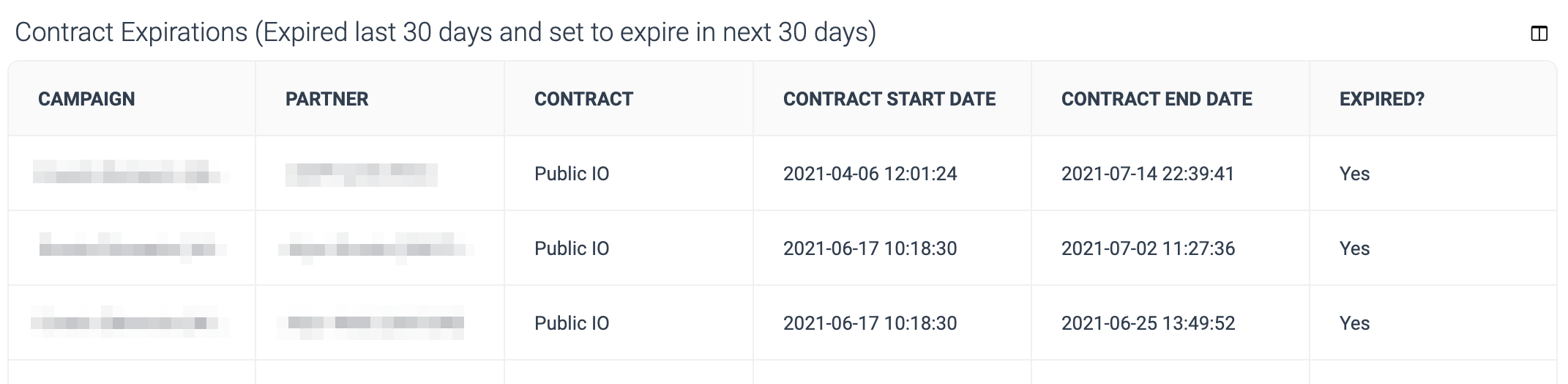
このレポートのこのセクションには、あなたとパートナーとの間で最近期限切れになった、またはまもなく期限切れになる契約に関する情報が含まれています。このセクションの各レポート列ヘッダーの詳細については、下の表をご覧ください。
ここに表示される契約は、必ずしもパートナーとのビジネス関係が終了することを意味するわけではありません。パートナーが署名した契約を変更している場合、新しい契約が始まる前に元の契約が終了し(ここに表示され)、新しい契約はレポートの次のセクションに表示されます。
| | |
| ------------ | ----------------------------------------------------------------------------------------------- |
| **テーブル列** | **説明** |
| **キャンペーン** | この契約がどのプログラム向けのものかを確認します(以前は *キャンペーン*)この契約が期限切れになりました。 |
| **パートナー** | すでに離脱した、または離脱予定のパートナーを確認します。 |
| **契約** | その行で、そのパートナーとの契約を規定していたテンプレート条件の名前を確認します。 |
| **契約開始日** | パートナーとのビジネス関係を規定していたその契約がいつ始まったかを確認します。 |
| **契約終了日** | パートナーとのビジネス関係を規定していた契約がいつ終了したか、またはいつ終了予定かを確認します。 |
| **期限切れですか?** | パートナーとのビジネス関係を規定していた契約がすでに終了しているかどうかを確認します。もし *いいえ* ここに表示される場合、次のものに変わります。 *はい* の日時に *契約終了日* 列。 |
今後の契約の参照資料
このレポートのこのセクションには、あなたとパートナーとの間でまもなく開始予定の契約に関する情報が含まれています。このセクションの各レポート列ヘッダーの詳細については、下の表をご覧ください。
| | |
| ---------- | ------------------------------------------------------------------- |
| **テーブル列** | **説明** |
| **キャンペーン** | この契約がどのプログラム向けのものかを確認します(以前は *キャンペーン*)この契約は存在します。 |
| **パートナー** | あなたのプログラムに参加予定のパートナーを確認します。 |
| **契約タイプ** | この契約が〜かどうかを確認します *New* または *更新済み*. |
| **契約** | その行で、そのパートナーとの契約を規定するテンプレート条件の名前を確認します。 |
| **契約開始日** | パートナーとのビジネス関係を規定する契約がいつ開始予定かを確認します。 |
| **契約終了日** | パートナーとのビジネス関係を規定する契約がいつ終了予定かを確認します。空欄の場合、この時点ではこの契約の有効期限は設定されていません。 |
---
# Agent Instructions
This documentation is published with GitBook. GitBook is the documentation platform designed so that both humans and AI agents can read, navigate, and reason over technical content effectively. Learn more at gitbook.com.
## Querying This Documentation
If you need additional information that is not directly available in this page, you can query the documentation by asking a question.
Perform an HTTP GET request on the following URL with the `ask` and `goal` query parameters:
```
GET https://help.impact.com/brand/ja/what-would-you-like-to-learn-about/platform-features/multi-program-reports/operations-reports/recent-and-upcoming-contracts-report.md?ask=&goal=
```
`ask` is the immediate question: it should be specific, self-contained, and written in natural language.
`goal` is what the user is ultimately trying to achieve, the reason they need the answer. Sharing it helps GitBook give you a better, more relevant answer. A goal is most helpful when it describes the outcome the user wants rather than restating the question. For example, with `ask=how do I create an API token`, a goal like `automate deployments from our CI pipeline` lets GitBook tailor the answer to that use case.
The response will contain a direct answer to the question and relevant excerpts and sources from the documentation.
Use this mechanism when the answer is not explicitly present in the current page, you need clarification or additional context, or you want to retrieve related documentation sections.