> For the complete documentation index, see [llms.txt](https://help.impact.com/llms.txt). Markdown versions of documentation pages are available by appending `.md` to page URLs; this page is available as [Markdown](https://help.impact.com/brand/ja/what-would-you-like-to-learn-about/platform-features/finance/your-subscription/view-your-impactcom-subscription-and-usage-details.md).
# impact.comのサブスクリプションと使用状況の詳細を表示
この *サブスクリプション* 画面には、impact.com のサブスクリプション、関連料金に関する情報が表示され、注文書を PDF としてダウンロードできます。サブスクリプションと利用は impact.com の [利用規約](https://impact.com/terms-of-use/).
#### サブスクリプションの概要を表示
1. 上部ナビゲーションバーで、 **残高** → **サブスクリプション**.
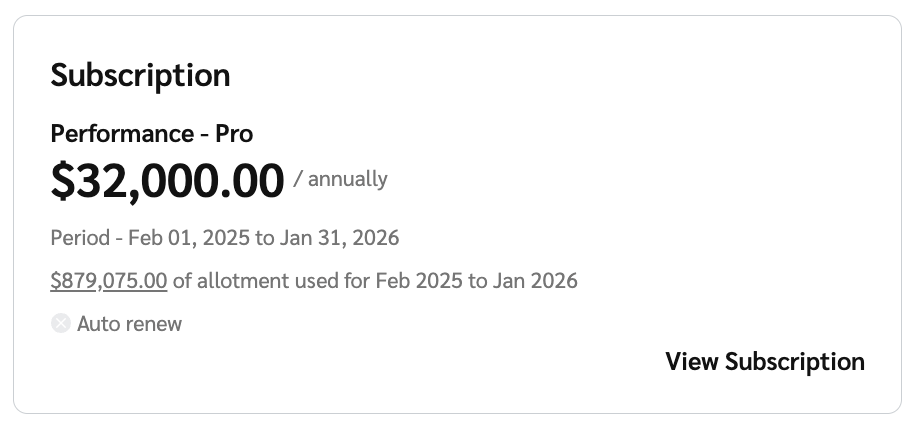
2. 以下の *概要* 画面で、サブスクリプションの概要を表示するサブスクリプションウィジェットを確認します。
* 毎月の impact.com サブスクリプション料金
* サブスクリプション期間
* サブスクリプション期間中に使用された総購入価格差異(PPV)割当量。以下の [利用の詳細セクション](#view-your-usage-details-0-1) 詳細はこちら。
3. 選択 **サブスクリプションを表示** さらに詳しいサブスクリプション情報を表示します。
* 〜をご覧ください *詳細* および *サブスクリプション料金* この画面の項目の詳細については、以下の参照セクションをご覧ください。
詳細参照
| | |
| ----------- | ---------------------------------------------------------------------------- |
| プロダクト | ご契約中の impact.com エディション名です。必要に応じて、 **注文書をダウンロード** impact.com の注文書をダウンロードします。 |
| サブスクリプション期間 | サブスクリプションの開始日と終了日。 |
| 更新期間 | サブスクリプションが自動更新される日付と、新しいサブスクリプション期間の開始日および終了日。 |
サブスクリプション料金の参照
| | |
| ------------- | ---------------------------------------------------------------------------------------------------------------- |
| impact.com手数料 | impact.com の料金の詳細です。 |
| 月額サブスクリプション料金 | サブスクリプション料金、関連する支払日、そしてどの程度の \*支払い処理量 がサブスクリプションに含まれます。
\*追加料金なしで、impact.com で毎月処理できる支払い額。
|
| 追加利用分に対する追加料金 | 利用量が合意された契約上限を超えた時点で発生する追加料金。 |
| 利用を表示 | 各申請者の横にある **利用を表示** Payment Volume の利用に関する詳細を表示するためのボタン。 |
4. 選択 **利用を表示** 毎月の包括量と追加または累積量、ならびに追加利用料金の詳細を示す利用の詳細を表示します。
* 〜をご覧ください *列の説明* この画面の列に関する詳細については、以下をご覧ください。
*\*上のスクリーンショットは、年間サブスクリプションアカウントの例です。*
列の説明
| | |
| ------------------------- | ------------------------------------------------------------------------------------------------------------------------------------------ |
| 月 | 月と年。 |
| 包括量 | 利用可能な利用量はサブスクリプションに基づいています。この数値は、期間中の後続の量の購入により増加します。年間利用量に適用されます。 |
| 月間の量(年間サブスクリプションアカウントの場合) | その月に使用された量の合計。 |
| 使用済み総量 | その月に使用された量の合計。 |
| 累積量(年間サブスクリプションアカウントの場合) | 1 年間で累積された量。 |
| 増分量 | 包括量を超えた量。 |
| 追加利用料金 | 超過利用に関連する料金。 |
| ステータス | いずれか 見積 現在の月のもの、または 最終 前月のもの。
というステータスは 見積 値がまだ変わる可能性があることを示し、 最終 は値が変更される見込みがないことを意味します。
|
---
# Agent Instructions
This documentation is published with GitBook. GitBook is the documentation platform designed so that both humans and AI agents can read, navigate, and reason over technical content effectively. Learn more at gitbook.com.
## Querying This Documentation
If you need additional information that is not directly available in this page, you can query the documentation by asking a question.
Perform an HTTP GET request on the following URL with the `ask` and `goal` query parameters:
```
GET https://help.impact.com/brand/ja/what-would-you-like-to-learn-about/platform-features/finance/your-subscription/view-your-impactcom-subscription-and-usage-details.md?ask=&goal=
```
`ask` is the immediate question: it should be specific, self-contained, and written in natural language.
`goal` is what the user is ultimately trying to achieve, the reason they need the answer. Sharing it helps GitBook give you a better, more relevant answer. A goal is most helpful when it describes the outcome the user wants rather than restating the question. For example, with `ask=how do I create an API token`, a goal like `automate deployments from our CI pipeline` lets GitBook tailor the answer to that use case.
The response will contain a direct answer to the question and relevant excerpts and sources from the documentation.
Use this mechanism when the answer is not explicitly present in the current page, you need clarification or additional context, or you want to retrieve related documentation sections.