> For the complete documentation index, see [llms.txt](https://help.impact.com/llms.txt). Markdown versions of documentation pages are available by appending `.md` to page URLs; this page is available as [Markdown](https://help.impact.com/brand/ja/what-would-you-like-to-learn-about/platform-features/finance/finance-settings/manage-general-finance-settings-as-a-brand.md).

# ブランドとして一般的な財務設定を管理する

<a href="https://pxa.impact.com/student/activity/1087833?sid=0c0e3e5c-54c9-4435-9bee-ebcdccb7f292&#x26;sid_i=0?utm_source=app.impact.com&#x26;utm_medium=owned-platform&#x26;utm_content=con-250&#x26;utm_campaign=help-center" class="button primary">PXAコースを受講する</a>

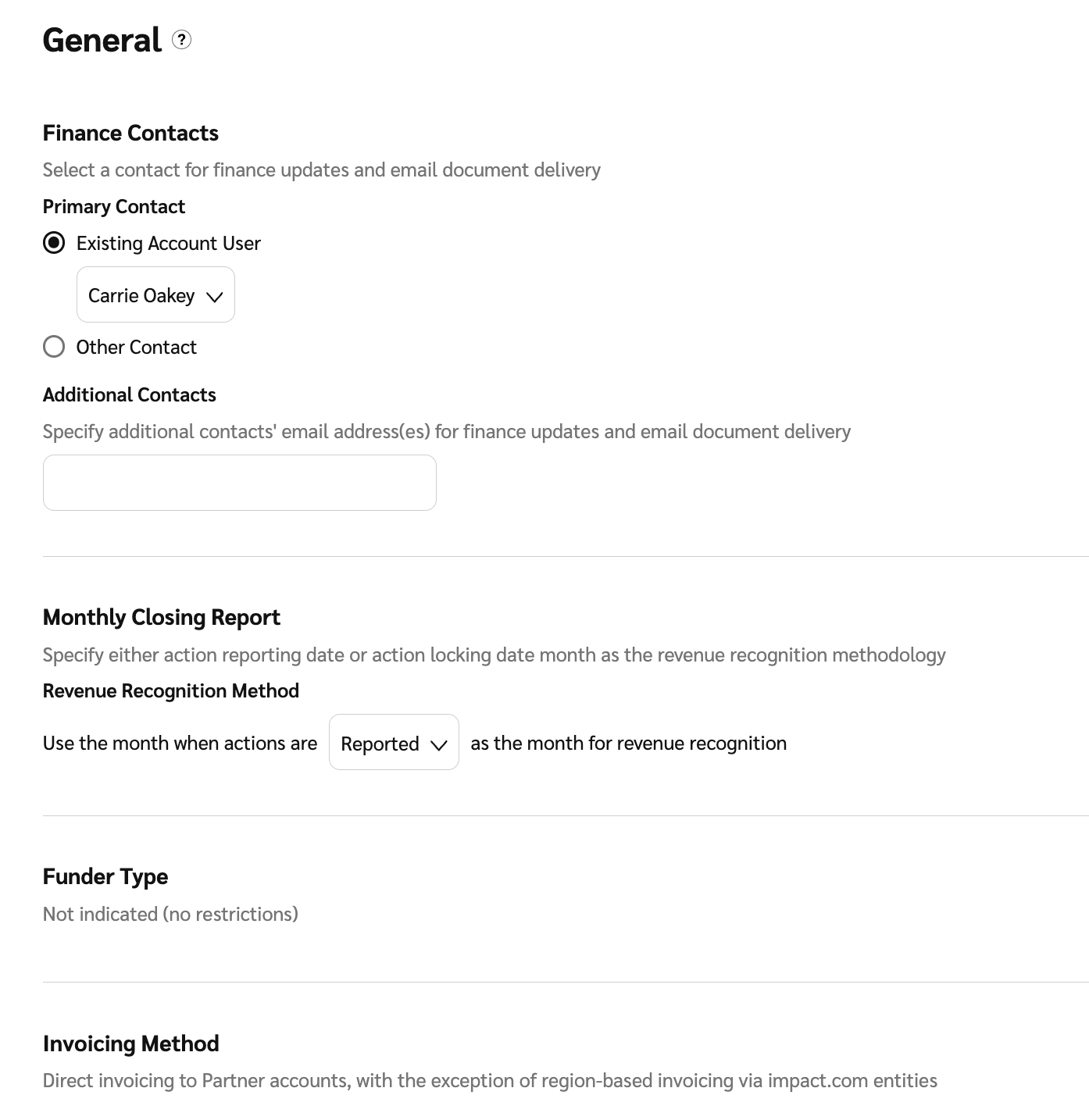
次を使用します： *一般財務設定* 以下を含む主要な設定を管理するために **主要財務連絡先**、あなたの **月次締めレポート** がどのように作成されるかを管理し、 **資金提供者タイプ** および **請求方法**.

1. 上部ナビゲーションバーから、 **残高** → **設定**.
2. 確認して変更を行ってください： *一般財務設定*.

   | ユーザー設定   | 説明                                                                                                                                                                                                                                                                                                                                                                  |
   | -------- | ------------------------------------------------------------------------------------------------------------------------------------------------------------------------------------------------------------------------------------------------------------------------------------------------------------------------------------------------------------------- |
   | 財務連絡先    | <p>追加または変更する <a href="/pages/4de178eaa44a52107c5bc23d8de481b272a043ef">主要財務連絡先</a> および、財務の更新やメールでの書類配信について通知したい追加の連絡先。これらの連絡先は、書類設定を構成する際の既定のオプションとして利用できます。</p><p>この設定は、アカウントを初めて設定する際に役立ちます。情報は財務書類の設定を構成する際に再利用できます。</p><p><strong>注：</strong> ここで連絡先詳細を更新しても、既存の書類設定は更新されません。各該当書類の設定ページでこれらの詳細を直接更新する必要があります。</p>                                              |
   | 月次締めレポート | <p>ニーズに最も適したレポートのバージョンを選択してください。</p><p>次の <img src="/files/6f8314de4650eb50296a22f0905ff81ab67391cc" alt=""> <strong>\[ドロップダウンメニュー]</strong> の下で <em>収益認識方法</em>、どちらかを選択します <strong>報告済み</strong> または <strong>確定済み</strong> を報告日として。</p><p>・アクション報告日：この方法では、アクションが発生した日付に対応する月にコストを計上します。</p><p>・アクション確定日：この方法では、コストが確定した日付に対応する月にコストを計上します。アクションの場合、これはロック日です。</p> |
   | 資金提供者タイプ | アカウントがどの資金提供者タイプで設定されているかを確認できます。一部の資金提供者タイプでは、この暗黙の資金提供方法に反するシステムの使用を防ぐため、機能が適切に調整されます。たとえば、アカウントの資金提供者タイプが「SOI Funder - Fund based on invoices」の場合、これらの請求書は毎月生成されるため、パートナーへの即時送金を行うことはできません。                                                                                                                                                                      |
   | 請求方法     | あなたの [請求方法](/other/ja/reference-documentation/discover-your-invoicing-method.md).                                                                                                                                                                                                                                                                                   |
3. 選択します **保存**.

   <div data-with-frame="true"><figure><img src="/files/32bbc2a3c71e9bcb6c9e239d3dde463be49ff918" alt="" width="563"><figcaption></figcaption></figure></div>


---

# Agent Instructions
This documentation is published with GitBook. GitBook is the documentation platform designed so that both humans and AI agents can read, navigate, and reason over technical content effectively. Learn more at gitbook.com.

## Querying This Documentation
If you need additional information that is not directly available in this page, you can query the documentation dynamically by asking a question.

Perform an HTTP GET request on the current page URL with the `ask` query parameter, and the optional `goal` query parameter:

```
GET https://help.impact.com/brand/ja/what-would-you-like-to-learn-about/platform-features/finance/finance-settings/manage-general-finance-settings-as-a-brand.md?ask=<question>&goal=<endgoal>
```

`ask` is the immediate question: it should be specific, self-contained, and written in natural language.
`goal` is optional and describes the broader end goal you are ultimately trying to accomplish on behalf of the user. GitBook uses it to tailor the answer towards what is most useful for that goal.

The response will contain a direct answer to the question and relevant excerpts and sources from the documentation.

Use this mechanism when the answer is not explicitly present in the current page, you need clarification or additional context, or you want to retrieve related documentation sections.