> For the complete documentation index, see [llms.txt](https://help.impact.com/llms.txt). Markdown versions of documentation pages are available by appending `.md` to page URLs; this page is available as [Markdown](https://help.impact.com/brand/ja/what-would-you-like-to-learn-about/platform-features/finance/finance-for-starter-edition-accounts/impactcom-starter-edition-billing-explained.md).

# impact.com Starter Edition の請求の説明

<a href="https://pxa.impact.com/student/activity/1087833?sid=0c0e3e5c-54c9-4435-9bee-ebcdccb7f292&#x26;sid_i=0?utm_source=app.impact.com&#x26;utm_medium=owned-platform&#x26;utm_content=con-250&#x26;utm_campaign=help-center" class="button primary">PXAコースを受講する</a>

この記事では Starter Edition の請求について説明します。もしあなたが *Starter Agency* 版をご利用の場合は、の記事を参照してください [Starter Agency Edition の請求](/agency/ja/what-would-you-like-to-learn-about/finance/impactcom-starter-agency-edition-billing-explained.md).

最初のパートナー報酬の支払いは、最初のパートナー起点のアクションが記録された時点で請求されます。また、最初の impact.com 手数料は、サインアップから1暦月が経過した後の2か月目の初日に請求されます。impact.com の手数料は、ロックされたパートナー費用の月間総収益の2.5%または30米ドル（またはアカウント通貨での同等額）のいずれか大きい方です。

Starter Edition にサインアップする際、クレジットカード情報の提供が必要になります。これにより、impact.com は資金アカウントに補充でき、すべての費用を確実にカバーして、支払い遅延を防ぐことができます。資金アカウント残高が impact.com の手数料またはパートナー費用をカバーするために必要な最小額を下回ると、システムが自動的にクレジットカードに請求します。

* **資金アカウントの残高が十分である場合、またはパートナーへの未払い額 + impact.com への未払い額の合計が請求の最小金額を下回る場合、impact.com はクレジットカードに請求しません。**

{% hint style="info" %}
**注意：** 現在、クレジットカード支払いには USD、GBP、AUD、EUR、HKD、DKK、NOK、SEK、JPY、SGD がサポートされています。
{% endhint %}

<div data-with-frame="true"><figure><img src="/files/e60f8e8e1c677407726caafb1bd46ca2f777171f" alt="" width="375"><figcaption></figcaption></figure></div>

#### 想定される動作

パートナーまたは impact.com の手数料が発生するたびに、システムはそれらの費用について資金アカウントを確認します。資金アカウントが impact.com の手数料またはパートナー費用をカバーするために必要な額を下回っている場合、システムは必要額で資金アカウントを補充するためにクレジットカードに請求します。

<details>

<summary>例のシナリオ</summary>

\**この例では通貨として USD を使用します。*

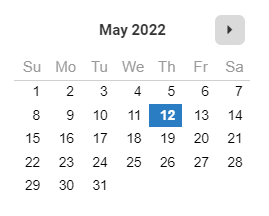
**5月12日 — サインアップ:**

<div data-with-frame="true"><figure><img src="/files/a98630220840c90a3988f377fb4e8d7182f1d24d" alt=""><figcaption></figcaption></figure></div>

5月12日に impact.com Starter Edition にサインアップし、請求情報を入力します。まだパートナー費用や impact.com 手数料は発生していません。

* 資金アカウント残高: $0
* 支払総額: $0
* 資金アカウントからの控除: $0
* クレジットカードの自動請求: $0

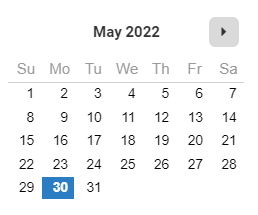
**5月30日 — 最初のコンバージョンが記録される:**

<div data-with-frame="true"><figure><img src="/files/96c4eb7c2973bebb268a16205151f8d54cb7a64e" alt=""><figcaption></figcaption></figure></div>

5月30日までに、コンバージョンにつながるトラフィックを発生させたパートナーと契約を結ぶことができました。パートナーとの契約で合意したとおり、75ドルのコミッションを支払う必要があります。この75ドルは、アクションがすでに記録されているため、5月30日の *支払総額* に含まれますが、 *控除される* のは、アクションが [ロックされてから](/brand/ja/what-would-you-like-to-learn-about/platform-features/actions-and-payouts/understand-the-action-life-cycle-and-finance.md).

* 資金アカウント残高: $0
* 支払総額: パートナー費用 $75
* 資金アカウントからの控除: $0
* クレジットカードの自動請求: $75

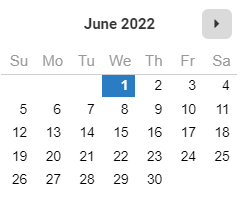
**6月1日 — 最初の1暦月が始まる:**

<div data-with-frame="true"><figure><img src="/files/03ae31e9b17daee5a2933b941f0a34bb82b3632e" alt=""><figcaption></figcaption></figure></div>

6月1日に、impact.com での最初の1暦月が始まります。サインアップから1暦月が経過した後の2か月目の初日に最初の手数料が請求されるため、まだ impact.com の手数料は発生していません。

* 資金アカウント残高: $75
* 支払総額: $0
* 資金アカウントからの控除: $0（コンバージョンはまだロックされていないため、控除はありません。）
* クレジットカードの自動請求: $0（現在の資金アカウント残高でパートナー費用をカバーできます。）

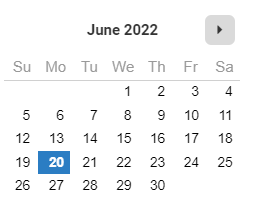
**6月20日 — 最初のコンバージョンがロックされる:**

<div data-with-frame="true"><figure><img src="/files/446ab57d29a849d4e4543cb397ef64bd1e1f6233" alt=""><figcaption></figcaption></figure></div>

パートナーとの契約で合意したとおり、5月30日に記録されたアクションは6月20日にロックされます。これでパートナー費用は資金アカウントから差し引かれます。

* 資金アカウント残高: $75
* 支払総額: $0（新しいコンバージョンは記録されませんでした。）
* 資金アカウントからの控除: パートナー費用 $75
* クレジットカードの自動請求: $0（すべての費用はカバーされているため、自動請求は発生しません。）

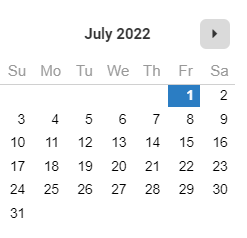
**7月1日 — 最初の impact.com 手数料が請求される:**

<div data-with-frame="true"><figure><img src="/files/f96adf4a0e5332550df1e671aed26dcf2d5dedf0" alt=""><figcaption></figcaption></figure></div>

7月1日は、サインアップから1暦月が経過した後の2か月目の初日です。最初の impact.com の月額利用料は本日請求されますが、7月2日に清算されます。以後は、前月の利用分に対する月額利用料が毎月1日に請求されます。

* 資金アカウント残高: $0
* 支払総額: impact.com 手数料 $30
* 資金アカウントからの控除: $0
* クレジットカードの自動請求: $30（資金アカウント残高では impact.com の手数料をカバーできません）

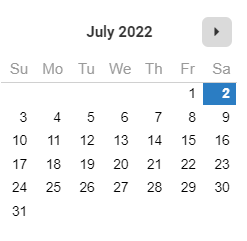
**7月2日 — 最初の impact.com 手数料が清算される:**

<div data-with-frame="true"><figure><img src="/files/7d5ef66b8c64f91104d1ae611b8fc97e94fdd648" alt=""><figcaption></figcaption></figure></div>

* 資金アカウント残高: $30
* 支払総額: $0
* 資金アカウントからの控除: impact.com 手数料 $30
* クレジットカードの自動請求: $0

</details>


---

# Agent Instructions
This documentation is published with GitBook. GitBook is the documentation platform designed so that both humans and AI agents can read, navigate, and reason over technical content effectively. Learn more at gitbook.com.

## Querying This Documentation
If you need additional information that is not directly available in this page, you can query the documentation dynamically by asking a question.

Perform an HTTP GET request on the current page URL with the `ask` query parameter, and the optional `goal` query parameter:

```
GET https://help.impact.com/brand/ja/what-would-you-like-to-learn-about/platform-features/finance/finance-for-starter-edition-accounts/impactcom-starter-edition-billing-explained.md?ask=<question>&goal=<endgoal>
```

`ask` is the immediate question: it should be specific, self-contained, and written in natural language.
`goal` is optional and describes the broader end goal you are ultimately trying to accomplish on behalf of the user. GitBook uses it to tailor the answer towards what is most useful for that goal.

The response will contain a direct answer to the question and relevant excerpts and sources from the documentation.

Use this mechanism when the answer is not explicitly present in the current page, you need clarification or additional context, or you want to retrieve related documentation sections.