> For the complete documentation index, see [llms.txt](https://help.impact.com/llms.txt). Markdown versions of documentation pages are available by appending `.md` to page URLs; this page is available as [Markdown](https://help.impact.com/brand/ja/what-would-you-like-to-learn-about/platform-features/finance/add-funds-to-your-funding-account/your-funding-account-overview-explained.md).

# 資金アカウントの概要の説明

impact.com上のブランドとして、あなたはパートナーと連携し、そこで発生する費用を支払う必要があります。また、impact.comプラットフォームの利用料金も負担する責任があります。これらの支払いを円滑に行うために、impact.comは1つ以上の資金口座（デジタルウォレットとも呼ばれます）を提供します。ここでは、これらの口座に資金を入金することで、支払期日が到来した際に金銭的義務が自動的に履行されるようにできます。十分な残高を維持することは、アカウントを良好な状態に保ち、プログラムをマーケットプレイス内でアクティブな状態に維持するために不可欠です。

## ファイナンス概要画面の説明

1. 上部のナビゲーションバーから次を選択します **残高** → [**概要**](https://app.impact.com/secure/advertiser/finance/fr/finance-overview.ihtml).
2. この *概要* 画面で、必要資金と取引概要を確認します。

   <div data-gb-custom-block data-tag="hint" data-style="success" class="hint hint-success"><p><strong>注:</strong> 資金口座が複数ある場合は、それぞれが個別のウィジェットとして表示されます。</p></div>

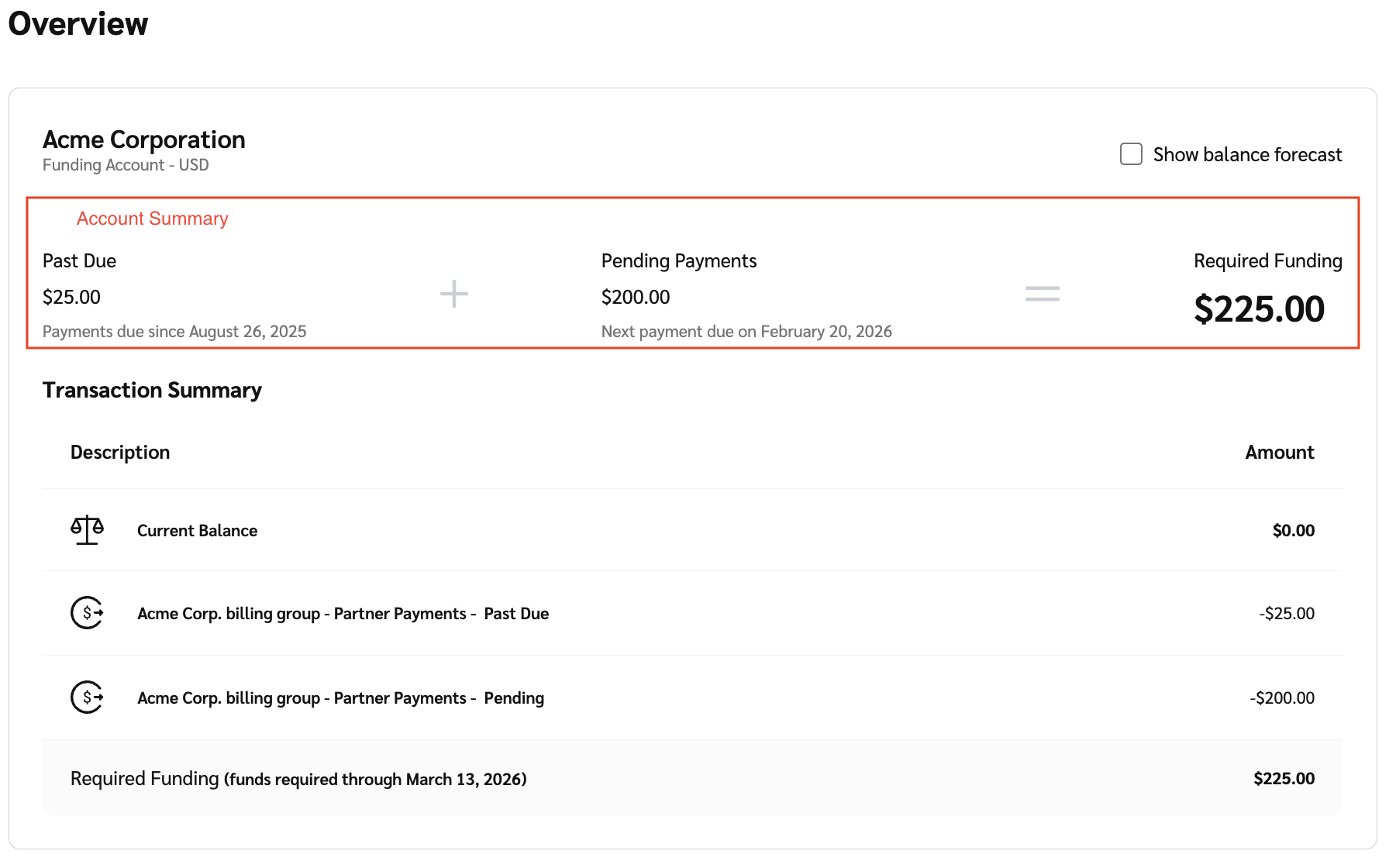
   この *ファイナンス概要* 画面には、次の内訳とともに資金口座が表示されます:

   * **アカウント概要:** アカウントに必要な資金総額の内訳です。必要資金は次の項目に分けられます: *延滞分*, *保留中の支払い* および *必要資金。* 次を参照してください: *アカウント概要の参照* および *必要資金のシナリオ* 詳細については以下を参照してください。
   * **取引概要:** 資金口座の残高と、システム内の現在の取引に基づいて45日間の期間内に適切な資金状態を維持するために支払う必要がある金額です。次を参照してください: *取引概要の参照* 詳細については以下を参照してください。
   * **サブスクリプション:** これは別個のウィジェットとして表示され、あなたの [サブスクリプションの詳細](/brand/ja/what-would-you-like-to-learn-about/platform-features/finance/your-subscription/view-your-impactcom-subscription-and-usage-details.md) およびアカウントに含まれるアドオンを表示します。

     <div data-with-frame="true"><figure><img src="/files/ac6f4598e7767b235a9e0e77b4b7c02be2e0e00f" alt=""><figcaption></figcaption></figure></div>

<details>

<summary>取引概要の参照</summary>

| 説明                                                     | 説明                                                                                                                                                                                          |
| ------------------------------------------------------ | ------------------------------------------------------------------------------------------------------------------------------------------------------------------------------------------- |
| 現在残高                                                   | 現在の資金口座残高です。                                                                                                                                                                                |
| 保留中の入金                                                 | <p>未決済のAutomated Clearing House（ACH）支払いの合計額です。</p><p><strong>注:</strong> これらの支払いは、入金を開始してから処理されるまでに3～5営業日かかります。</p>                                                                         |
| impact.com手数料 - <mark style="color:$danger;">延滞</mark> | <p>未払いの合計額 <a href="/pages/71ae84453ae719298f45978f81d4058e329e83ad">impact.com手数料</a>.</p><p>選択します <strong>impact.com手数料</strong> を選択すると、請求書詳細のドリルダウンを表示できます。ステータスは <em>期限超過</em> です。</p>  |
| パートナー支払い - <mark style="color:$danger;">延滞</mark>      | <p>ロック済み契約費用および、予定された決済日に達したものの、資金口座の残高不足により決済できなかった処理済みのパートナー資金移転を含む、パートナー支払いです。</p><p>選択します <strong>パートナー支払い</strong> を選択すると、次の請求書詳細のドリルダウンを表示できます: <em>期限超過のパートナー支払い</em> 請求書の詳細。</p>    |
| 保留中のimpact.com手数料                                      | <p>今後発生する合計額 <a href="/pages/71ae84453ae719298f45978f81d4058e329e83ad">impact.com手数料</a>.</p><p>選択します <strong>impact.com手数料</strong> を選択すると、請求書詳細のドリルダウンを表示できます。ステータスは <em>未到来</em> です。</p> |
| 保留中のパートナー支払い                                           | <p>今後予定されているパートナー支払いの合計額です。これらの支払いには、ロックされているかどうかにかかわらず、今後45日以内に決済予定の費用が含まれます。</p><p>選択します <strong>パートナー支払い</strong> を選択すると、次の請求書詳細のドリルダウンを表示できます: <em>今後のパートナー支払い</em> 請求書の詳細。</p>         |
| 必要資金                                                   | 保留中および期限超過のすべての支払いをカバーするために必要な資金総額です。                                                                                                                                                       |

</details>

<details>

<summary>アカウント概要の参照</summary>

| 項目      | 説明                                                                          |
| ------- | --------------------------------------------------------------------------- |
| 延滞      | 支払期日までに支払われていない支払いの総額を表示します。                                                |
| 保留中の支払い | 予定されているが、まだ支払期日が到来していない支払いを表示します。これには、将来の支払期日が設定された今後の手数料またはパートナー支払いが含まれます。 |
| 必要資金    | 期限超過分と保留中の支払いの両方をカバーするために、資金口座に追加される資金の総額です。                                |

</details>

<details>

<summary>必要資金のシナリオ</summary>

|               |                                                                                                                                                                                       |
| ------------- | ------------------------------------------------------------------------------------------------------------------------------------------------------------------------------------- |
| **シナリオ**      | **説明**                                                                                                                                                                                |
| 期限超過の支払いがあります | 期限超過の支払いがある場合、残高には必要な [入金](/brand/ja/what-would-you-like-to-learn-about/platform-features/finance/add-funds-to-your-funding-account/deposit-funds-into-your-account.md) 金額と期限が表示されます。 |
| 支払いは最新の状態です   | 支払いが最新の状態である場合、現在残高と、必要日までに必要な最低入金額の両方が表示されます。                                                                                                                                        |

</details>

3. 必要に応じて、次を選択します ![](/files/fd83586f9930f6bcc6498179e6d7ed9571e7b572) **\[未チェックのボックス]** **残高予測を表示** を表示するには *残高予測*。特定の日付を表示するには、グラフの上にカーソルを合わせます。

   * あなたの *残高予測* は、現在の日から始まり45日先まで続く45日間の時系列グラフです。このグラフは、現在残高と今後の取引に基づいて、資金口座の資金がいつ不足する可能性があるかを視覚的に示します。

   <div data-with-frame="true"><figure><img src="/files/3b69f5a69de9c3eae17521d5a92c34d77dce5c37" alt=""><figcaption></figcaption></figure></div>


---

# Agent Instructions
This documentation is published with GitBook. GitBook is the documentation platform designed so that both humans and AI agents can read, navigate, and reason over technical content effectively. Learn more at gitbook.com.

## Querying This Documentation
If you need additional information that is not directly available in this page, you can query the documentation dynamically by asking a question.

Perform an HTTP GET request on the current page URL with the `ask` query parameter, and the optional `goal` query parameter:

```
GET https://help.impact.com/brand/ja/what-would-you-like-to-learn-about/platform-features/finance/add-funds-to-your-funding-account/your-funding-account-overview-explained.md?ask=<question>&goal=<endgoal>
```

`ask` is the immediate question: it should be specific, self-contained, and written in natural language.
`goal` is optional and describes the broader end goal you are ultimately trying to accomplish on behalf of the user. GitBook uses it to tailor the answer towards what is most useful for that goal.

The response will contain a direct answer to the question and relevant excerpts and sources from the documentation.

Use this mechanism when the answer is not explicitly present in the current page, you need clarification or additional context, or you want to retrieve related documentation sections.
