> For the complete documentation index, see [llms.txt](https://help.impact.com/llms.txt). Markdown versions of documentation pages are available by appending `.md` to page URLs; this page is available as [Markdown](https://help.impact.com/brand/ja/what-would-you-like-to-learn-about/platform-features/dashboard/impactcom-ui-tour-for-brands.md).

# ブランド向け impact.com UIツアー

<a href="https://pxa.impact.com/student/activity/1099652?sid=0c0e3e5c-54c9-4435-9bee-ebcdccb7f292&#x26;sid_i=0?utm_source=app.impact.com&#x26;utm_medium=owned-platform&#x26;utm_content=fund-lp-150&#x26;utm_campaign=help-center" class="button primary">PXAコースを受講する</a>

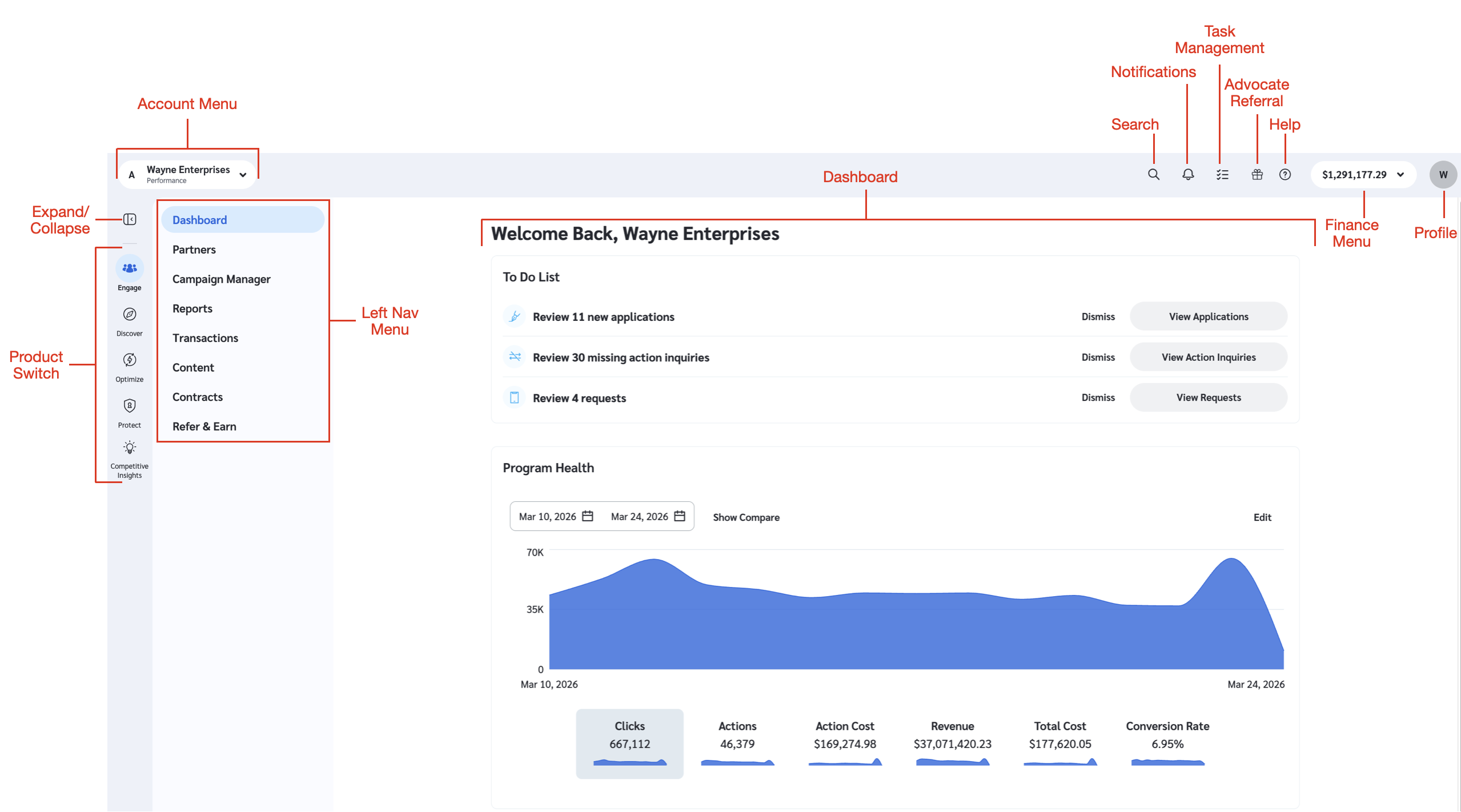
impact.comへようこそ！ブランド用のユーザーインターフェースを見て回り、各機能がどこにあるかを詳しく確認しましょう。

<div data-with-frame="true"><figure><img src="/files/03c29de17d4b4e2f40608f8aeeed4c3e45814a58" alt="" width="563"><figcaption></figcaption></figure></div>

#### Performanceを操作する

左ナビゲーションメニューを使用して画面間を移動し、ダッシュボードを使って impact.com の [ダッシュボードのウィジェット](/brand/ja/what-would-you-like-to-learn-about/platform-features/dashboard/brand-dashboard-widgets.md).

|              |                                                                                                                                                                                                                                                                                                                                                                                                                                                                                                                                                                                                                                                                                                                                                      |
| ------------ | ---------------------------------------------------------------------------------------------------------------------------------------------------------------------------------------------------------------------------------------------------------------------------------------------------------------------------------------------------------------------------------------------------------------------------------------------------------------------------------------------------------------------------------------------------------------------------------------------------------------------------------------------------------------------------------------------------------------------------------------------------- |
| **UI要素**     | **説明**                                                                                                                                                                                                                                                                                                                                                                                                                                                                                                                                                                                                                                                                                                                                               |
| アカウントメニュー    | 次を使用します： ![](/files/6f8314de4650eb50296a22f0905ff81ab67391cc) **\[ドロップダウンメニュー]** アカウントとプログラムを切り替えるために。                                                                                                                                                                                                                                                                                                                                                                                                                                                                                                                                                                                                                                               |
| 製品切り替え       | <p>操作したいPerformance製品を選択してください。これらのアイコンで表される製品を上から順に示すと、次のとおりです。</p><p><img src="/files/7ddd72d8e69e7055d9408cf4847c5c54abf9f71d" alt=""> <strong>エンゲージ</strong></p><p><img src="/files/fc2aa178f1291b29bb479c0ce0c2b42c3895dc48" alt=""> <strong>Discover</strong></p><p><img src="/files/f4e17f011f01b566efa9f421519575c83c1771cd" alt=""> <strong>最適化</strong></p><p><img src="/files/a04507c15cd543fd3055919f33acaddabf53606f" alt=""> <strong>保護</strong></p><p><img src="/files/fd7b4ed7992e56a4c5a6db3dd66410ba73965fa4" alt=""><strong>Altitude</strong></p><p><img src="/files/8bebcbe9882cbe4ee7e7c0274c440f15879586a1" alt=""> <strong>Competitive Insights</strong></p><p>すべてのアイコンが表示されるとは限りません。利用できるアイコンは、特定の製品パッケージによって異なる場合があります。</p> |
| 左ナビゲーションメニュー | このメニューを使用して、プラットフォーム内のさまざまな画面を移動します。製品アイコンを選択すると、その製品固有の機能のメニューが開きます。                                                                                                                                                                                                                                                                                                                                                                                                                                                                                                                                                                                                                                                                                |
| ダッシュボード      | あなたの *To Do List*, *Program Health*、および *おすすめパートナー* （おすすめが利用可能な場合）メイン画面上のウィジェットです。これらのウィジェットは、パフォーマンスや優先タスクの追跡に役立ち、指標の監視や成長機会への対応を可能にします。                                                                                                                                                                                                                                                                                                                                                                                                                                                                                                                                                                                                            |
| 検索           | impact.comのグローバル検索ツールを使用して、特定の画面やパートナーを検索します。                                                                                                                                                                                                                                                                                                                                                                                                                                                                                                                                                                                                                                                                                                        |
| 通知           | アカウントで発生しているイベントを把握するには、次の項目にアクセスしてください： [通知](/brand/ja/what-would-you-like-to-learn-about/account-administration/account-settings/notifications/manage-your-brand-notification-settings.md).                                                                                                                                                                                                                                                                                                                                                                                                                                                                                                                                                        |
| タスク管理        | <p>次の項目から、他のブランドアカウントユーザーやパートナーにタスクを作成・割り当てしたり、自分に割り当てられたタスクを確認したりできます。 <a href="/pages/e36a2988fc9a87ff96cf998e0cf7d2bcc6486c12">タスク管理</a> メニュー。</p><p>このオプションは、アカウントのレベルや種類によって表示されない場合があります。</p>                                                                                                                                                                                                                                                                                                                                                                                                                                                                                                                                                  |
| アドボケイト紹介     | あなたのネットワークをimpact.comに紹介して、報酬を受け取りましょう！                                                                                                                                                                                                                                                                                                                                                                                                                                                                                                                                                                                                                                                                                                              |
| ヘルプが必要ですか？   | ヘルプとサポートにすぐアクセスできます。詳細は次を参照してください [ヘルプとサポートを利用する](/other/ja/reference-documentation/get-help-and-support.md).                                                                                                                                                                                                                                                                                                                                                                                                                                                                                                                                                                                                                                        |
| ファイナンスメニュー   | 次を ![](/files/6f8314de4650eb50296a22f0905ff81ab67391cc) **\[ドロップダウンメニュー]** 次をご覧いただくには、 [*ファイナンス概要*](/brand/ja/what-would-you-like-to-learn-about/platform-features/finance/finance-explained-for-brands.md) そしてファイナンスメニューにアクセスします。                                                                                                                                                                                                                                                                                                                                                                                                                                                                                                                   |
| プロフィール       | ここでプロフィールの詳細、アカウントとプログラムの設定を表示・編集し、impact.comからサインアウトできます。                                                                                                                                                                                                                                                                                                                                                                                                                                                                                                                                                                                                                                                                                           |


---

# Agent Instructions
This documentation is published with GitBook. GitBook is the documentation platform designed so that both humans and AI agents can read, navigate, and reason over technical content effectively. Learn more at gitbook.com.

## Querying This Documentation
If you need additional information that is not directly available in this page, you can query the documentation dynamically by asking a question.

Perform an HTTP GET request on the current page URL with the `ask` query parameter, and the optional `goal` query parameter:

```
GET https://help.impact.com/brand/ja/what-would-you-like-to-learn-about/platform-features/dashboard/impactcom-ui-tour-for-brands.md?ask=<question>&goal=<endgoal>
```

`ask` is the immediate question: it should be specific, self-contained, and written in natural language.
`goal` is optional and describes the broader end goal you are ultimately trying to accomplish on behalf of the user. GitBook uses it to tailor the answer towards what is most useful for that goal.

The response will contain a direct answer to the question and relevant excerpts and sources from the documentation.

Use this mechanism when the answer is not explicitly present in the current page, you need clarification or additional context, or you want to retrieve related documentation sections.