> For the complete documentation index, see [llms.txt](https://help.impact.com/llms.txt). Markdown versions of documentation pages are available by appending `.md` to page URLs; this page is available as [Markdown](https://help.impact.com/brand/ja/what-would-you-like-to-learn-about/platform-features/cross-channel-performance-insights/set-up-rules-to-identify-channel-traffic.md).

# チャネルのトラフィックを識別するルールを設定

*識別ルール* あなたの *最適化チャネル* そのチャネルへのトラフィックの割り当て方法を決定します。各ルールは、次のいずれかから少なくとも1つの要素を使用します: *参照元 URL* または *ランディングページ URL* トラフィックソースを特定するためにリファラルで取得されたもの。

*識別ルール* …したときに設定されます [Optimize Channelを作成する](/brand/ja/what-would-you-like-to-learn-about/platform-features/cross-channel-performance-insights/optimize-channels/create-an-optimize-channel.md) また、いつでも次の方法で更新できます: [チャネルを編集することで](/brand/ja/what-would-you-like-to-learn-about/platform-features/cross-channel-performance-insights/optimize-channels/edit-an-optimize-channel.md).

#### 識別ルールの構成要素

{% hint style="info" %}
この機能は Optimize アドオンでのみ利用できます。 [ここをクリック](https://app.impact.com/secure/advertiser/fr/upgrade.ihtml?u=/secure/advertiser/optimize/landing-page.html) アドオンを入手するにはこちら！
{% endhint %}

～を作成するとき *識別ルール*、入力が必要なフィールドは3～4個あります。各フィールドの詳細は以下のタブを参照してください。

{% tabs %}
{% tab title="ルール対象" %}
ルールが検索する“場所” *ルール値*。これは、～を作成するときの1つ目のドロップダウンメニューで選択します: *識別ルール*.

以下の1つ目の表を参照してください: *識別ルールの更新* セクションで、利用可能なすべての *ルール対象* オプションを表示します。

{% hint style="info" %}
**例**: ランディングページURL
{% endhint %}
{% endtab %}

{% tab title="ルールロジック" %}
“どのように” *ルール* がトラフィックの識別を試みます。これは、～を作成するときの2つ目のドロップダウンメニューで選択します: *識別ルール*.

以下の2つ目の表を参照してください: *識別ルールの更新* セクションで、利用可能なすべての *ルールロジック* オプションを表示します。

{% hint style="info" %}
**例**: 完全一致
{% endhint %}
{% endtab %}

{% tab title="ルール値1" %}
どのパラメーターキーを *ルールロジック* がトラフィックの識別を試みるために使用します。これは次の間に入力します: *ルール対象* と *ルールロジック*.

これは次の場合には不要です: *ルール対象* は **ランディングページパラメータ** または **参照元パラメーター**.

{% hint style="info" %}
**例**: utm\_medium
{% endhint %}
{% endtab %}

{% tab title="ルール値2" %}
どの値を *ルールロジック* がトラフィックの識別を試みるために使用します。この値は～によって異なる場合がありますが、 *識別ルール*、ルールがトラフィックを識別するために探す“何”と考えるのが最も適切です。

これは次の場合には不要です: *ルールロジック* は **存在する** または **存在しない**.

{% hint style="info" %}
**例**: ppc
{% endhint %}
{% endtab %}
{% endtabs %}

#### 識別ルールを設定する

その *識別ルール* （RTI）はある *AND/OR* システム:

選択すると ![](/files/31ed8bce4d22f3780f0bf5494c25049b3181e0a9) **\[追加]** **および** ルールに条件を追加します。一方、次を選択すると ![](/files/31ed8bce4d22f3780f0bf5494c25049b3181e0a9) **\[追加]** **または** “別個の”ルールを追加します。ORを選択すると、ORで結ばれた条件のいずれかがチャネルのリファラルを識別します。ANDを選択すると、ANDで結ばれたすべての条件がチャネルのリファラルを識別するために必要です。

～を作成または更新するとき **識別ルール**、impact.comではロジックをできるだけシンプルで読みやすく保つことを推奨しています。これにより、ルールの継続的なサポートがより効果的かつ効率的になります。

以下は、 *ルール対象* で使用できる説明です *識別ルール*. 必ず次を選択してください **保存** 変更後。次を参照してください [Optimizeセットアップシナリオ](/brand/ja/what-would-you-like-to-learn-about/platform-features/cross-channel-performance-insights/optimize-channels/optimize-channel-setup-scenario-examples.md) の記事で、次の例を確認できます *識別ルール*.

{% hint style="info" %}
**注**: 次は設定できません *識別ルール* の *ダイレクト* （参照元がない場合）および *オーガニックリファラル* （参照元がある場合）のチャネル。これは次の名称でも知られています: *デフォルトチャネル*。これらのチャネルは、トラフィックが適用対象となるいずれの識別ルールの条件も満たさない場合に使用します。
{% endhint %}

**ルール対象**

|                  |                                                                  |                                                                       |
| ---------------- | ---------------------------------------------------------------- | --------------------------------------------------------------------- |
| **ルール対象**        | **説明**                                                           | **例**                                                                 |
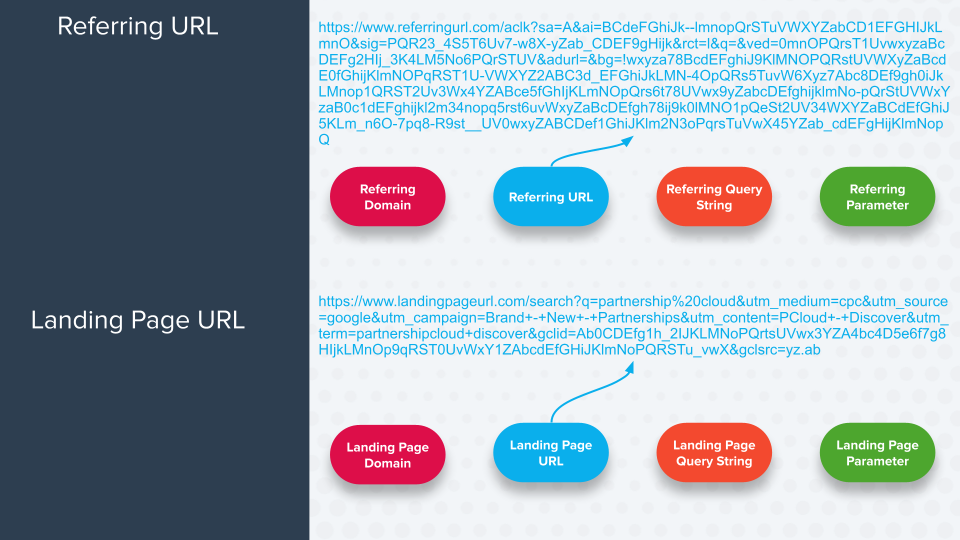
| ランディングページ URL    | 参照トラフィックが到達する完全なURL。                                             | `https://www.landingpage.com?key=valueparameter&key=parametervalue`   |
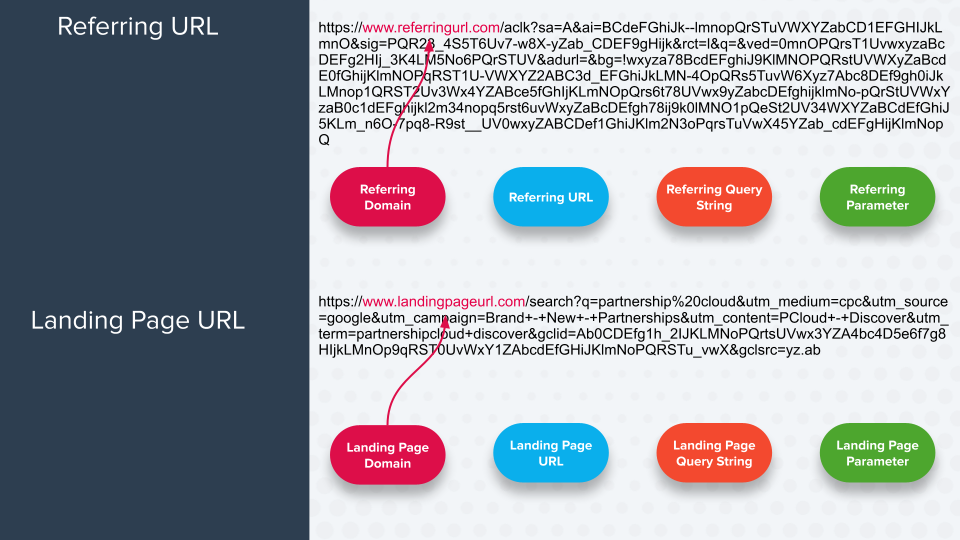
| ランディングページドメイン    | URLのうち、プロトコルの後に続き、サブディレクトリ/パス（パスがある場合）またはクエリ文字列（パスがない場合）の前にある部分。 | `www.landingpage.com`                                                 |
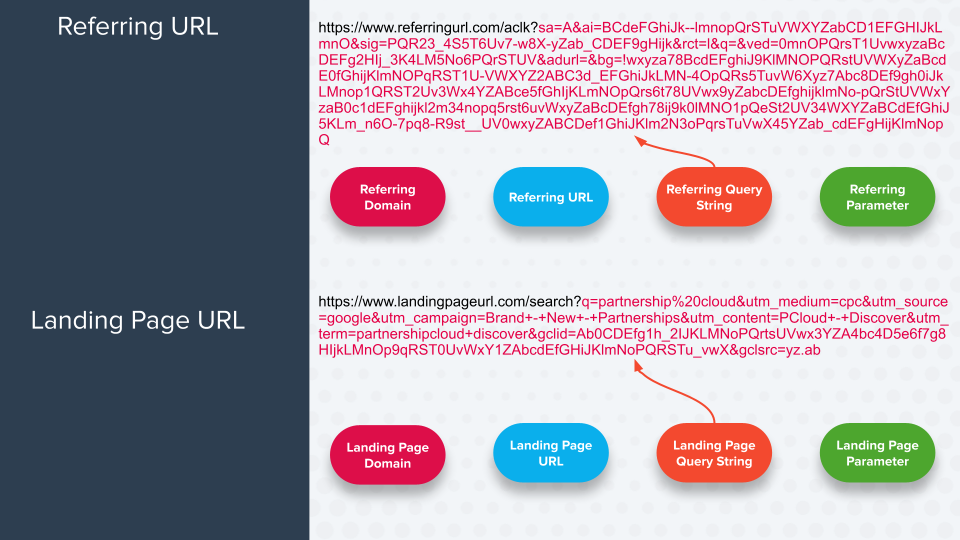
| ランディングページのクエリ文字列 | 疑問符（**?**）の後に続くすべてのパラメーターキーと値のペア。これはクエリ文字列の開始を示します。              | `key=value&parameterkey=parametervalue`                               |
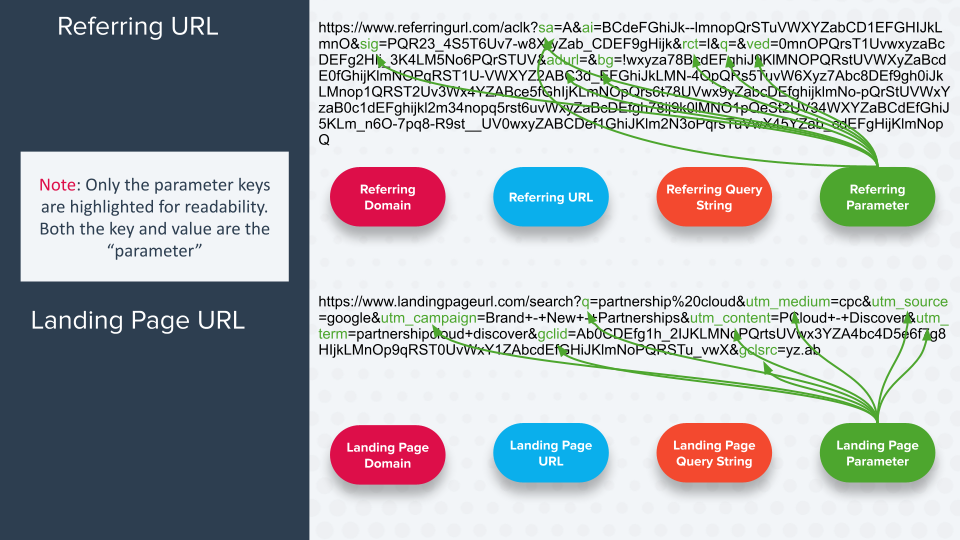
| ランディングページパラメータ   | クエリ文字列に含まれる特定のキーと値のペア。                                           | `parameterkey=parametervalue`                                         |
| 参照元 URL          | トラフィックの流入元となる完全なURL。                                             | `https://www.referringpage.com?key=value&parameterkey=parametervalue` |
| 参照元ドメイン          | URLのうち、プロトコルの後に続き、サブディレクトリ/パス（パスがある場合）またはクエリ文字列（パスがない場合）の前にある部分。 | `www.referringpage.com`                                               |
| 参照元のクエリ文字列       | URLのパス（存在する場合）の後、またはトップレベルドメイン（パスがない場合）の後にあるすべての部分。              | `key=value&parameterkey=parametervalue`                               |
| 参照元パラメーター        | クエリ文字列に含まれる特定のキーと値のペア。                                           | `parameterkey=parametervalue`                                         |

<details>

<summary>各ルール対象が何を探すかを確認する</summary>

<div data-with-frame="true"><figure><img src="/files/e81c49d33c032cc81dcbcbe003e3fc4236edab6c" alt=""><figcaption></figcaption></figure></div>

<div data-with-frame="true"><figure><img src="/files/bf2be996a80509cb8fc94b58b8f12821ac78488c" alt=""><figcaption></figcaption></figure></div>

<div data-with-frame="true"><figure><img src="/files/9277e68f2f30e006c7d8e6b6fe0adba7d9c9999a" alt=""><figcaption></figcaption></figure></div>

<div data-with-frame="true"><figure><img src="/files/c4e77fca26bff8eca80f283bc97df4e5393a2a31" alt=""><figcaption></figcaption></figure></div>

</details>

**ルールロジックのオプション**

また、次をどのように *ルール対象* （上の表にある）が **ルール値2** （次の最終フィールドに入力する内容） *識別ルール*を選択することで適用方法を指定できます **ルールロジック**。詳細は以下の表を参照してください *ルールロジック* オプションを表示します。

<details>

<summary>オプション</summary>

|                   |                                                                                                                                                                                                                                                                        |                                                                                                                                                                                                                                                                                         |
| ----------------- | ---------------------------------------------------------------------------------------------------------------------------------------------------------------------------------------------------------------------------------------------------------------------- | --------------------------------------------------------------------------------------------------------------------------------------------------------------------------------------------------------------------------------------------------------------------------------------- |
| **ルールロジックのオプション** | **説明**                                                                                                                                                                                                                                                                 | **例**                                                                                                                                                                                                                                                                                   |
| 完全一致              | 完全に *ルール値2* 設定した内容が次に見つかる必要があります *ルール対象*。前後に余分な文字があってはなりません。                                                                                                                                                                                                           | <p><strong>ルール:</strong></p><p>ランディングページパラメータ <code>utm\_medium</code> 完全一致 <code>search</code></p><p><strong>含まれるURLの例:</strong></p><p><code><https://www.impact.com?utm_medium=search></code></p>                                                                                     |
| 含む                | その *ルール値2* が次に含まれている必要があります *ルール対象*.                                                                                                                                                                                                                                   | <p><strong>ルール:</strong></p><p>ランディングページパラメータ <code>utm\_medium</code> 含む <code>search</code></p><p><strong>含まれるURLの例:</strong></p><p><code><https://www.impact.com?utm_medium=somesearchentry></code></p>                                                                              |
| で始まる              | その *ルール値2* 設定した内容が次の先頭に含まれている必要があります *ルール対象*.                                                                                                                                                                                                                          | <p><strong>ルール:</strong></p><p>ランディングページパラメータ <code>utm\_medium</code> で始まる <code>search</code></p><p><strong>含まれるURLの例:</strong></p><p><code><https://www.impact.com?utm_medium=searchentry></code></p>                                                                                |
| で終わる              | その *ルール値2* 設定した内容が次の末尾に含まれている必要があります *ルール対象*.                                                                                                                                                                                                                          | <p><strong>ルール:</strong></p><p>ランディングページパラメータ <code>utm\_medium</code> で終わる <code>search</code></p><p><strong>含まれるURLの例:</strong></p><p><code><https://www.impact.com?utm_medium=someentry></code></p>                                                                                  |
| 正規表現に一致           | その *ルール対象の* 値は次の [正規表現](/brand/ja/what-would-you-like-to-learn-about/platform-features/promo-codes/regular-expression/regex-explained.md) に一致する必要があります *ルール値2*。について詳しく見る [正規表現](https://en.wikipedia.org/wiki/Regular_expression) 、 [正規表現をテストする](https://regexr.com/). | CSM（または [サポートチケットを作成](https://app.impact.com/support/portal.ihtml?createTicket=true)）このルールロジックオプションのヘルプを確認してください。                                                                                                                                                                       |
| 完全一致しない           | 完全に *ルール値2* 設定した内容は **一致してはなりません** 次に含まれている必要があります *ルール対象*.                                                                                                                                                                                                            | <p><strong>ルール:</strong></p><p>ランディングページパラメータ <code>utm\_medium</code> 完全一致しない <code>search</code></p><p><strong>除外されるURLの例:</strong></p><p><code><https://www.impact.com?utm_medium=search></code></p>                                                                                 |
| 含まない              | その *ルール値2* 設定した内容は **一致してはなりません** 次に含まれている必要があります *ルール対象*.                                                                                                                                                                                                             | <p><strong>ルール:</strong></p><p>ランディングページパラメータ <code>utm\_medium</code> 含まない <code>search</code></p><p><strong>除外されるURLの例:</strong></p><p><code><https://www.impact.com?utm_medium=search></code></p>                                                                                    |
| 正規表現に一致しない        | その *ルール対象の* 値は次と正規表現一致してはなりません *ルール値2*。について詳しく見る [正規表現](https://en.wikipedia.org/wiki/Regular_expression). [正規表現をテストする](https://regexr.com/).                                                                                                                          | CSM（または [サポートチケットを作成](https://app.impact.com/support/portal.ihtml?createTicket=true)）このルールロジックオプションのヘルプを確認してください。                                                                                                                                                                       |
| いずれかに一致           | その *ルール値2* は、カンマ区切りの *完全一致* 値の列です（ *完全一致* 行を参照）。各項目の間にスペースを入れないでください。                                                                                                                                                                                                  | <p><strong>ルール:</strong></p><p>ランディングページパラメータ <code>utm\_medium</code> いずれかに一致 <code>search,ppc</code></p><p><strong>含まれるURLの例:</strong></p><p><code><https://impact.com?utm_medium=search></code></p><p><code><https://impact.com?utm_medium=ppc></code></p>                           |
| いずれかを含む           | その *ルール値2* は、カンマ区切りの *含む* 値の列です（ *含む* 行を参照）。項目の間にスペースを入れないでください。                                                                                                                                                                                                       | <p><strong>ルール:</strong></p><p>ランディングページパラメータ <code>utm\_medium</code> いずれかを含む <code>search,ppc</code></p><p><strong>含まれるURLの例:</strong></p><p><code><https://www.impact.com?utm_medium=somesearchentry></code></p><p><code><https://www.impact.com?utm_medium=someppcentry></code></p> |
| 存在する              | 指定されたランディングページパラメーター値はURLに含まれている必要があります。次の場合にのみ利用可能です: `ルール対象=ランディングページパラメーター`.                                                                                                                                                                                        | <p><strong>ルール:</strong></p><p>ランディングページパラメータ <code>utm\_medium</code> 存在する</p><p><strong>含まれるURLの例:</strong></p><p><code><https://www.impact.com?utm_medium_ppc></code></p>                                                                                                            |
| 存在しない             | 指定されたランディングページパラメーター値は **一致してはなりません** URLに含まれている必要があります。次の場合にのみ利用可能です: `ルール対象=ランディングページパラメーター`.                                                                                                                                                                        | <p><strong>ルール:</strong></p><p>ランディングページパラメータ <code>utm\_medium</code> 存在しない</p><p><strong>除外されるURLの例:</strong></p><p><code><https://www.impact.com?utm_medium_ppc></code></p>                                                                                                          |

</details>


---

# Agent Instructions
This documentation is published with GitBook. GitBook is the documentation platform designed so that both humans and AI agents can read, navigate, and reason over technical content effectively. Learn more at gitbook.com.

## Querying This Documentation
If you need additional information that is not directly available in this page, you can query the documentation dynamically by asking a question.

Perform an HTTP GET request on the current page URL with the `ask` query parameter, and the optional `goal` query parameter:

```
GET https://help.impact.com/brand/ja/what-would-you-like-to-learn-about/platform-features/cross-channel-performance-insights/set-up-rules-to-identify-channel-traffic.md?ask=<question>&goal=<endgoal>
```

`ask` is the immediate question: it should be specific, self-contained, and written in natural language.
`goal` is optional and describes the broader end goal you are ultimately trying to accomplish on behalf of the user. GitBook uses it to tailor the answer towards what is most useful for that goal.

The response will contain a direct answer to the question and relevant excerpts and sources from the documentation.

Use this mechanism when the answer is not explicitly present in the current page, you need clarification or additional context, or you want to retrieve related documentation sections.