> For the complete documentation index, see [llms.txt](https://help.impact.com/llms.txt). Markdown versions of documentation pages are available by appending `.md` to page URLs; this page is available as [Markdown](https://help.impact.com/brand/ja/what-would-you-like-to-learn-about/platform-features/cross-channel-performance-insights/optimize-reports/new-customer-value-report.md).

# 新規顧客価値レポート

<a href="https://pxa.impact.com/student/activity/2860074-micro-top-5-optimize-reports-for-brands?utm_source=app.impact.com&#x26;utm_medium=owned-platform&#x26;utm_content=opt-351-1&#x26;utm_campaign=help-center" class="button primary">PXAコースを受講する</a>

その *新規顧客価値* このレポートでは、新規顧客がプログラムにもたらす合計価値と、その購買行動に関する指標を確認できます。これらの指標はパートナーレベルで集計され、指定した期間にわたって表示できます。

このレポートを使用して、特定のプロモーションがもたらした価値を評価できます。たとえば、次を設定できます。 *期間* フィルターをブラックフライデーの週末に設定し、次に *評価期間* フィルターを180日に設定して、その週末に獲得した新規顧客のうち、次の180日以内に再度購入した人数を確認できます。詳細はこちら： [Optimize Essentials & Pro](/brand/ja/what-would-you-like-to-learn-about/platform-features/cross-channel-performance-insights/compare-optimize-essentials-and-pro-tiers.md).

#### 新規顧客価値レポートにアクセスする

{% hint style="warning" %}
This feature is only available with specific impact.com editions or add-ons. If you see the ![](https://1651675991-files.gitbook.io/~/files/v0/b/gitbook-x-prod.appspot.com/o/spaces%2FpVKEIcehMut8QKRmaUZu%2Fuploads%2F5ikfGgRSMOFn089EEFxy%2Foptimize.svg%20\(1\).svg?alt=media\&token=91ff61f9-8618-4503-b0df-791e0353d124) **Optimize** icon, your account is eligible for the upgrade. Select the icon and get the Optimize add-on directly in the platform!
{% endhint %}

1. 左側のナビゲーションバーから、 ![](https://1458456015-files.gitbook.io/~/files/v0/b/gitbook-x-prod.appspot.com/o/spaces%2FwMLlMoFBtKJa8ptd3zaw%2Fuploads%2Fgit-blob-1e02b2659c94fa0756772cc6c1880977fc9aba73%2F6ad16bf9b7edb0a28ab3574d313014f32392aa7f9508686b63bfacfafc7a9735.svg?alt=media) **\[Optimize]** → **Audience → 顧客価値**.

   <div data-with-frame="true"><figure><img src="https://1458456015-files.gitbook.io/~/files/v0/b/gitbook-x-prod.appspot.com/o/spaces%2FwMLlMoFBtKJa8ptd3zaw%2Fuploads%2FpewuAbICrpiLQpQHjTDl%2FUntitled%20design%20(68).png?alt=media&amp;token=74e23223-e1ff-4ea2-baf0-e37d93a0e26a" alt="" width="563"><figcaption></figcaption></figure></div>
2. 次を使用します **フィルター** 上部でレポートをカスタマイズします。
   * 以下の *フィルターリファレンス* セクションを参照して、これらのフィルターの詳細をご確認ください。
3. 選択 ![](https://1458456015-files.gitbook.io/~/files/v0/b/gitbook-x-prod.appspot.com/o/spaces%2FwMLlMoFBtKJa8ptd3zaw%2Fuploads%2Fgit-blob-26956d35e17c61868ca8dba76097721fd6066ab4%2F69945c787eb2db89761c82e0cd32fb31d2fc690bfb8592d9a08b7e7983b7445b.svg?alt=media) **\[Search]** してレポートを実行します。
   * 以下の *レポートデータリファレンス* セクションを以下で参照すると、レポートに含まれるデータをよりよく理解できます。

{% hint style="warning" %}
**重要：** 変換に *新規顧客価値* Customer Status `と` および `Customer ID` パラメータを渡さない限り、impact.com ではレポートを表示する前にこれら2つのフィールドの値が必要なため、レポートにはデータが表示されません。これらのパラメータを渡したい場合は、 [サポート](https://app.impact.com/support/portal.ihtml) にお問い合わせください。
{% endhint %}

<details>

<summary>フィルターリファレンス</summary>

| フィルター       | 説明                                                                                                                                                                                                                                                                                                                                                                                                                                                                                                                                                                                                                                                                                                                                                                               |
| ----------- | -------------------------------------------------------------------------------------------------------------------------------------------------------------------------------------------------------------------------------------------------------------------------------------------------------------------------------------------------------------------------------------------------------------------------------------------------------------------------------------------------------------------------------------------------------------------------------------------------------------------------------------------------------------------------------------------------------------------------------------------------------------------------------- |
| 期間          | <p>作成日時に基づいてデータをフィルタリングします。一度に最大366日分のデータを取得できますが、2つの期間を相互に比較することもできます。</p><p>前年比レポートを行うには、 <img src="https://1458456015-files.gitbook.io/~/files/v0/b/gitbook-x-prod.appspot.com/o/spaces%2FwMLlMoFBtKJa8ptd3zaw%2Fuploads%2FwXho9QKP3e4iU4ZKUSJ5%2F167ebb8cc30303.svg?alt=media&amp;token=a046e9f0-63aa-46f6-8a35-f73973fd326c" alt=""> <strong>\[Checked box]</strong> <strong>を比較対象に設定し、</strong> → <img src="https://1458456015-files.gitbook.io/~/files/v0/b/gitbook-x-prod.appspot.com/o/spaces%2FwMLlMoFBtKJa8ptd3zaw%2Fuploads%2Fgit-blob-c2cb550b55c51ea1eeff0acbd6f437a03b621a2c%2F60d033ae8a04c14498d5229c3c0160ac05feea7f605dbd770741793c900469f0.svg?alt=media" alt=""> <strong>\[Drop-down menu] → \[Tick] 前年</strong>.</p><p>2年以上前のデータは、定期的にアーカイブされる場合があります。</p> |
| インサイトレベル    | <p>これは、新規顧客データを表示するレベルを設定します：</p><p>• <em>パートナー</em> — impact.com 上のすべてのパートナーにわたる新規顧客データを比較するには、このオプションを選択します。これはこのレポートの既定オプションです。</p><p>• <em>グループ</em> — すべての <a href="/brand/ja/what-would-you-like-to-learn-about/platform-features/reach-out-to-partners/partner-groups/create-and-manage-partner-groups.md">パートナーグループ</a>.</p><p>• <em>チャネル</em> — すべての <a href="/brand/ja/what-would-you-like-to-learn-about/platform-features/cross-channel-performance-insights/optimize-channels/edit-an-optimize-channel.md">パートナーチャネル</a>.</p>                                                                                                                                                                                                                                       |
| イベントタイプ     | データを表示したいイベントタイプを選択するか、 **すべて** を選択して、すべてのイベントタイプのデータを表示します。                                                                                                                                                                                                                                                                                                                                                                                                                                                                                                                                                                                                                                                                                                                     |
| インタラクションタイプ | <p>これは、行動データを表示するインタラクションの種類を設定します：</p><p>• <em>クローザー</em> — アクションを完了させた（つまり、最後のクリックだった）インサイトレベルの新規顧客データを表示するには、このオプションを選択します。</p><p>• <em>紹介者</em> — ユーザーに広告を紹介した（つまり、最初のクリックだった）選択したインサイトレベルの新規顧客データを表示するには、このオプションを選択します。</p><p>• <em>参加者</em> — パートナーがアクションライフサイクルに参加していた（つまり、紹介も終了もしていない）場合の、選択したインサイトレベルの新規顧客データを表示するには、このオプションを選択します。</p><p>• <em>単独</em> — パートナーが完全なアクションライフサイクルにおける唯一の要因だった場合の、選択したインサイトレベルの新規顧客データを表示するには、このオプションを選択します。</p>                                                                                                                                                                                                                                                                                                                           |
| マージン上書き率 %  | このフィルターを使用して、レポートの *顧客あたりのマージン* 列を上書きするマージンを生成します。                                                                                                                                                                                                                                                                                                                                                                                                                                                                                                                                                                                                                                                                                                                               |
| 評価対象期間      | 顧客の最初のコンバージョン後、顧客価値の分析にレポートで考慮したい日数です。                                                                                                                                                                                                                                                                                                                                                                                                                                                                                                                                                                                                                                                                                                                                           |
| 参加済み        | 次を使用します ![](https://1458456015-files.gitbook.io/~/files/v0/b/gitbook-x-prod.appspot.com/o/spaces%2FwMLlMoFBtKJa8ptd3zaw%2Fuploads%2Fgit-blob-c2cb550b55c51ea1eeff0acbd6f437a03b621a2c%2F60d033ae8a04c14498d5229c3c0160ac05feea7f605dbd770741793c900469f0.svg?alt=media) **\[Drop-down menu]** を使用して特定のパートナーを絞り込み、選択したインサイトレベルとインタラクションタイプに基づいてアクションライフサイクルに参加していたかどうかを確認します。                                                                                                                                                                                                                                                                                                                                                                                                     |
| 表示          | <p>必要に応じて、レポートに含めるこれらのデータポイントのいずれかを選択します。</p><p>• <em>売上</em> — 選択した期間における、各パートナーの新規獲得顧客によって生成された売上を表示するには、このオプションを選択します。</p><p>• <em>利益</em> — 選択した期間における、各パートナーの新規獲得顧客によって生成された利益を表示するには、このオプションを選択します。</p>                                                                                                                                                                                                                                                                                                                                                                                                                                                                                                                                                                    |

</details>

<details>

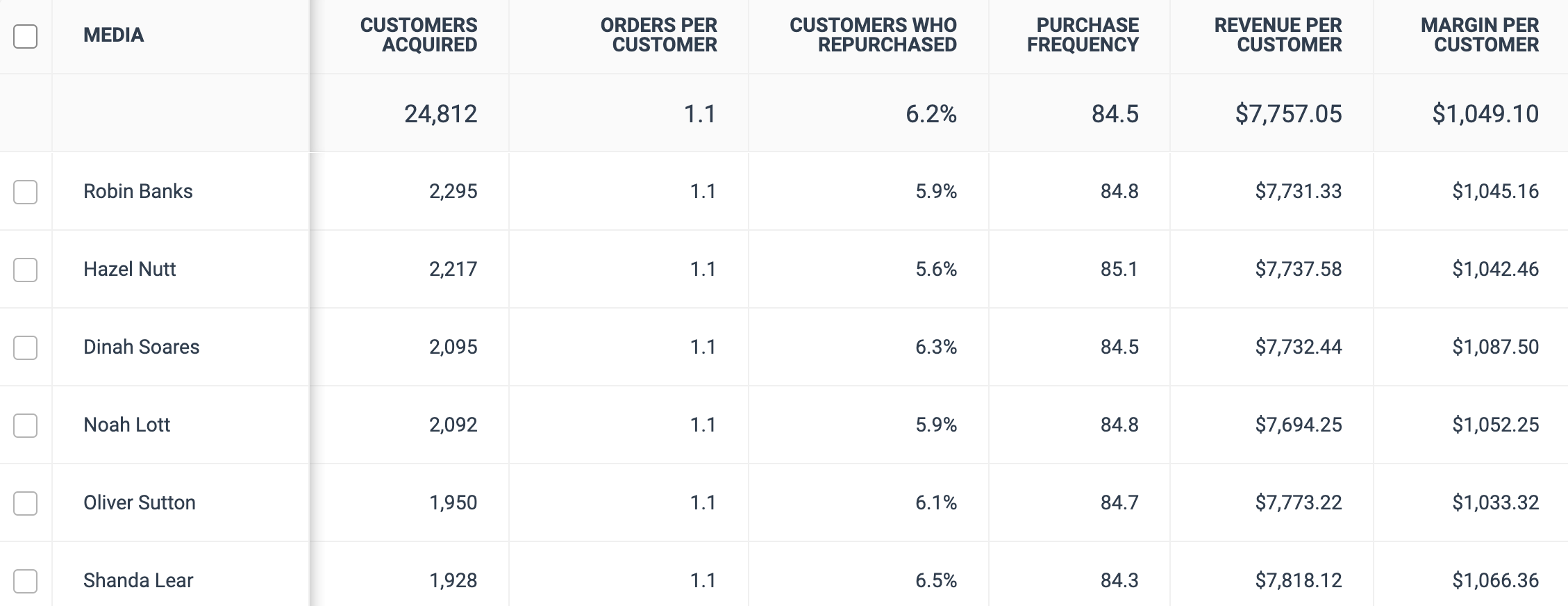
<summary>レポートデータリファレンス</summary>

| 列                     | 説明                                                                                                                                                             |
| --------------------- | -------------------------------------------------------------------------------------------------------------------------------------------------------------- |
| メディア                  | 顧客を獲得したパートナーの名前。                                                                                                                                               |
| 獲得した顧客数               | 選択した日付範囲内で、コンバージョンに至る過程のどこかでパートナーと接触した新規顧客の数。                                                                                                                  |
| 顧客あたりの注文数             | 評価対象期間中に新規獲得顧客が行った注文数の平均。                                                                                                                                      |
| 再購入した顧客               | 評価対象期間中に少なくとも2回注文した新規獲得顧客の割合。                                                                                                                                  |
| 購入頻度                  | <p>以下を返す指標です：</p><p>(<em>評価対象期間</em> \* <em>獲得した顧客数</em>）/ アクション</p><p>言い換えると、購入頻度が次の期間の日数に近いほど <em>評価対象期間</em> （またはそれ以上）であればあるほど、そのパートナーの顧客転換能力をよりよく表します。</p> |
| 顧客あたりの売上              | 評価対象期間中に、各パートナーの新規獲得顧客1人あたりに生成された平均売上。                                                                                                                         |
| 顧客あたりのマージン            | 評価対象期間中に、各パートナーの新規獲得顧客1人あたりに生成された平均マージン。                                                                                                                       |
| 売上                    | 評価対象期間中に、各パートナーの新規獲得顧客によって生成された売上。                                                                                                                             |
| 利益                    | 評価対象期間中に、各パートナーの新規獲得顧客によって生成されたマージン。                                                                                                                           |
| 新規顧客売上（初回購入）          | 評価対象期間中に、パートナーが初回顧客を通じて生成した売上。これにより、どのパートナーが新規顧客を獲得し、どのパートナーがリピート購入者を獲得しているかを把握できます。                                                                           |
| 新規顧客あたりのAOV（初回購入）     | 評価対象期間中に、パートナーが初回顧客を通じて生成した平均注文額。これにより、どのパートナーが新規顧客を獲得し、どのパートナーがリピート購入者を獲得しているかを把握できます。                                                                        |
| 新規顧客売上（2回目以降の購入）      | 評価対象期間中に、パートナーが初回以外の顧客を通じて生成した売上。これにより、初回購入後に支出を増やす顧客を獲得しているパートナーと、初回の支出を維持する顧客を獲得しているパートナーを把握できます。                                                            |
| 新規顧客あたりのAOV（2回目以降の購入） | 評価対象期間中に、パートナーが初回以外の顧客を通じて生成した平均注文額。これにより、初回購入後に支出を増やす顧客を獲得しているパートナーと、初回の支出を維持する顧客を獲得しているパートナーを把握できます。                                                         |
<div data-with-frame="true"><figure><img src="https://1458456015-files.gitbook.io/~/files/v0/b/gitbook-x-prod.appspot.com/o/spaces%2FwMLlMoFBtKJa8ptd3zaw%2Fuploads%2Fgit-blob-bfb0d355660ada73c098f6b1a0f1ad99c0cac4c3%2Fc2045c1724bd198aa1f4e7e8352950f92677a05a27ea8ffaaab6025d30d0b9cd.png?alt=media" alt="" width="563"><figcaption></figcaption></figure></div>

{% hint style="success" %}
**注：** の合計 *獲得した顧客数*, *売上*、および *顧客あたりのマージン* 列の合計は、プログラムの実際の合計値を上回る場合があります。これは、同じ顧客、売上、およびマージンが、その顧客と関与した複数のパートナーに適用される可能性があるためです。
{% endhint %}

</details>


---

# Agent Instructions
This documentation is published with GitBook. GitBook is the documentation platform designed so that both humans and AI agents can read, navigate, and reason over technical content effectively. Learn more at gitbook.com.

## Querying This Documentation
If you need additional information that is not directly available in this page, you can query the documentation by asking a question.

Perform an HTTP GET request on the following URL with the `ask` and `goal` query parameters:

```
GET https://help.impact.com/brand/ja/what-would-you-like-to-learn-about/platform-features/cross-channel-performance-insights/optimize-reports/new-customer-value-report.md?ask=<question>&goal=<user_goal>
```

`ask` is the immediate question: it should be specific, self-contained, and written in natural language.
`goal` is what the user is ultimately trying to achieve, the reason they need the answer. Sharing it helps GitBook give you a better, more relevant answer. A goal is most helpful when it describes the outcome the user wants rather than restating the question. For example, with `ask=how do I create an API token`, a goal like `automate deployments from our CI pipeline` lets GitBook tailor the answer to that use case.

The response will contain a direct answer to the question and relevant excerpts and sources from the documentation.

Use this mechanism when the answer is not explicitly present in the current page, you need clarification or additional context, or you want to retrieve related documentation sections.
