> For the complete documentation index, see [llms.txt](https://help.impact.com/llms.txt). Markdown versions of documentation pages are available by appending `.md` to page URLs; this page is available as [Markdown](https://help.impact.com/brand/ja/what-would-you-like-to-learn-about/platform-features/cross-channel-performance-insights/optimize-reports/incrementality-dashboard-explained.md).

# 増分効果ダッシュボードの解説

インクリメンタリティ・ダッシュボードには、3つの独自レポートが用意されており、各パートナーがプログラムにもたらす増分価値の大きさ、パートナーを削除した場合に増分売上へどのような影響があるか、そして高価値なパートナーシップを改善する機会がどこにあるかを確認できます。この記事では、3つのレポートを分かりやすく解説し、プログラム成長を促進するためにどのように活用できるかをより深く理解していただけるようにします。詳細はこちら [Optimize Essentials & Pro](/brand/ja/what-would-you-like-to-learn-about/platform-features/cross-channel-performance-insights/compare-optimize-essentials-and-pro-tiers.md).

#### 増分を測定することが重要なのはなぜですか？

各顧客の購買プロセスで最後のクリックだけを見るだけでは十分ではありません。最終購入に各関係者がどのように貢献したのかを知る必要があります。各販売における最後の接点だけを分析すると、真実が歪められ、コンバージョンの過程で大きな影響を与えたパートナーの評価を誤る可能性があります。パートナーとチャネルの増分を測定することで、パートナーが正しくアトリビューションされ、パフォーマンスが最適化されます。詳細は [インクリメンタリティFAQ](/brand/ja/what-would-you-like-to-learn-about/platform-features/cross-channel-performance-insights/optimize-reports/incrementality-faq.md).

#### インクリメンタリティ・ダッシュボードにアクセス

{% hint style="warning" %}
この機能は、特定の impact.com エディションまたはアドオンでのみ利用できます。次の ![](/files/f4e17f011f01b566efa9f421519575c83c1771cd) **Optimize** アイコンが表示されている場合、お使いのアカウントはアップグレードの対象です。アイコンを選択して、プラットフォーム上で直接 Optimize アドオンを入手してください！
{% endhint %}

1. 左側のナビゲーションバーから ![](/files/80820a684046e77348a87fa4aae033fc6f04adf0) **\[Optimize]** → **参加価値** → [インクリメンタリティ](https://app.impact.com/secure/advertiser/optimize/Adv_Attribution_Report/r2119/report/viewReport.report?handle=insights_incrementality).
2. 必要に応じてフィルターを調整し、次を選択してください ![](/files/34c3dbe05c1110f13e076d5a5abd0fec57cb1797) **\[検索]**.

   * 次を参照してください *フィルターリファレンス* フィルターの詳細は以下のセクションをご覧ください。

   <div data-with-frame="true"><figure><img src="/files/e23bd1d7ef034db5594be2ec9acb99d987c0191a" alt="" width="563"><figcaption></figcaption></figure></div>

<details>

<summary>フィルターリファレンス</summary>

| フィルター   | 説明                                                                                                                                                                                               |
| ------- | ------------------------------------------------------------------------------------------------------------------------------------------------------------------------------------------------ |
| 日付範囲    | <p>特定の日付範囲のデータでフィルターします。</p><p>• 統計的に有意なインサイトを得るには、少なくとも30日を選択してください。</p>                                                                                                                        |
| 指標      | 次に関連する数値を表示するかどうかを選択してください **収益** または **アクション** パートナーによって促進されたもの。                                                                                                                                |
| グループ    | 次で結果をフィルター [パートナーグループ](/brand/ja/what-would-you-like-to-learn-about/platform-features/reach-out-to-partners/partner-groups/create-and-manage-partner-groups.md).                                 |
| 顧客ステータス | 次で結果をフィルター [顧客タイプ](/brand/ja/what-would-you-like-to-learn-about/platform-features/tracking/set-up-tracking/configure-customer-status-mapping.md)。表示する対象を選択できます **すべて**, **新規**、または **リピーター** 顧客。 |
| 最小参加数   | 発生したアクション数のしきい値で結果をフィルターします。                                                                                                                                                                     |
| イベントタイプ | 次を選択してください [イベントタイプ](/brand/ja/what-would-you-like-to-learn-about/platform-features/event-types/event-types-explained.md) について、パートナーの貢献データを表示します。                                                |

</details>

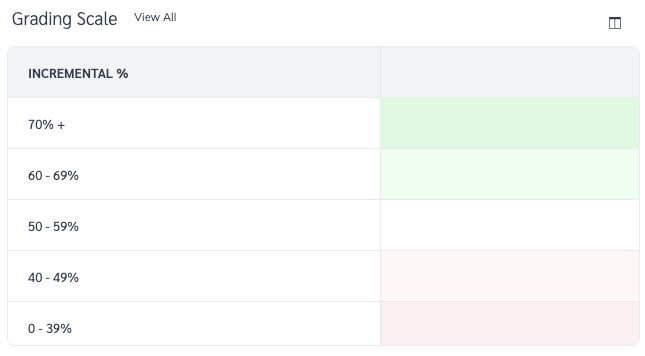
#### 評価スケール

評価スケールでは、パートナーのインクリメンタリティを低（0%）から優秀（100%）までの割合で示し、各割合に色を割り当てて、以下の3つのレポートの *インクリメンタリティ・ダッシュボード* 画面上の条件付き書式が決定されます。

<div data-with-frame="true"><figure><img src="/files/1727964958e7f249284541027ffc12b0e4f72ff5" alt="" width="484"><figcaption></figcaption></figure></div>

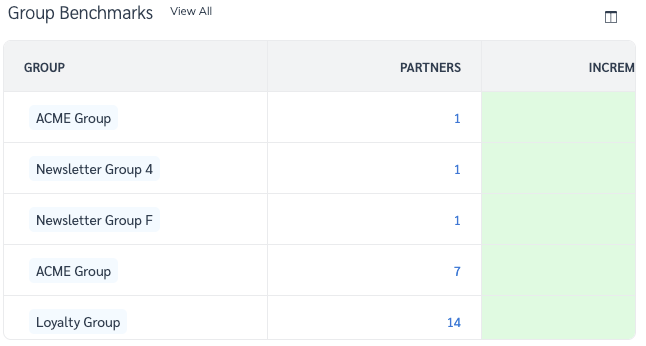
#### グループベンチマークレポート

グループベンチマークレポートを使用すると、あなたの [パートナーグループ](/brand/ja/what-would-you-like-to-learn-about/platform-features/reach-out-to-partners/partner-groups/create-and-manage-partner-groups.md) また、パートナーの増分価値を同業他社と比較できます。

選択 **すべて表示** レポート名の横にある [パートナー別インクリメンタリティレポート](/brand/ja/what-would-you-like-to-learn-about/platform-features/cross-channel-performance-insights/optimize-reports/incrementality-by-partner-report.md).

<div data-with-frame="true"><figure><img src="/files/5c4d2ac67b854e574e303e62c7926996b1f8f2e6" alt="" width="485"><figcaption></figcaption></figure></div>

#### 高インクリメンタリティ/低インクリメンタリティのパートナーレポート

{% tabs %}
{% tab title="高" %}
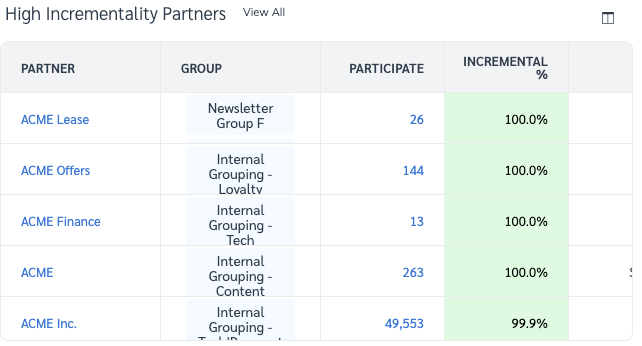
これは、あなたのプログラムに最も多くの増分価値をもたらす上位10件のパートナーです。高い *単独*, *導入する*、または *閉じる* 割合を持つパートナーは、増分価値が高くなります。

選択 **すべて表示** レポート名の横にある [パートナー別インクリメンタリティレポート](/brand/ja/what-would-you-like-to-learn-about/platform-features/cross-channel-performance-insights/optimize-reports/incrementality-by-partner-report.md).

* 次を参照してください *レポート列の説明* この表に表示されているデータの詳細は、以下のセクションをご覧ください。

<div data-with-frame="true"><figure><img src="/files/87e971f404e0fd4dd5472baf835a9d7c78b44a81" alt="" width="482"><figcaption></figcaption></figure></div>
{% endtab %}

{% tab title="低" %}
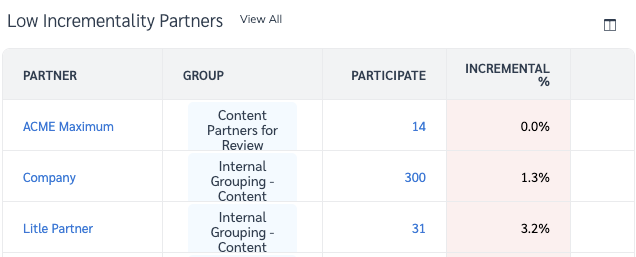
これは、あなたのプログラムに最も少ない増分価値をもたらす下位10件のパートナーです。低い *単独*, *導入する*、または *閉じる* 割合を持つパートナーは、増分価値が低くなります。

選択 **すべて表示** にアクセスするには [パートナー別インクリメンタリティレポート](/brand/ja/what-would-you-like-to-learn-about/platform-features/cross-channel-performance-insights/optimize-reports/incrementality-by-partner-report.md).

* 次を参照してください *レポート列の説明* この表に表示されているデータの詳細は、以下のセクションをご覧ください。

<div data-with-frame="true"><figure><img src="/files/a00c6f201de2fa419b5a61935a7e8a0f217d5f92" alt="" width="477"><figcaption></figcaption></figure></div>
{% endtab %}
{% endtabs %}


---

# Agent Instructions
This documentation is published with GitBook. GitBook is the documentation platform designed so that both humans and AI agents can read, navigate, and reason over technical content effectively. Learn more at gitbook.com.

## Querying This Documentation
If you need additional information that is not directly available in this page, you can query the documentation dynamically by asking a question.

Perform an HTTP GET request on the current page URL with the `ask` query parameter, and the optional `goal` query parameter:

```
GET https://help.impact.com/brand/ja/what-would-you-like-to-learn-about/platform-features/cross-channel-performance-insights/optimize-reports/incrementality-dashboard-explained.md?ask=<question>&goal=<endgoal>
```

`ask` is the immediate question: it should be specific, self-contained, and written in natural language.
`goal` is optional and describes the broader end goal you are ultimately trying to accomplish on behalf of the user. GitBook uses it to tailor the answer towards what is most useful for that goal.

The response will contain a direct answer to the question and relevant excerpts and sources from the documentation.

Use this mechanism when the answer is not explicitly present in the current page, you need clarification or additional context, or you want to retrieve related documentation sections.