> For the complete documentation index, see [llms.txt](https://help.impact.com/llms.txt). Markdown versions of documentation pages are available by appending `.md` to page URLs; this page is available as [Markdown](https://help.impact.com/brand/ja/what-would-you-like-to-learn-about/platform-features/cross-channel-performance-insights/opt-in-to-the-impactcom-consortium.md).
# impact.comコンソーシアムに参加
impact.com Consortium は、クロスデバイスマッチングの最上位レベルです。impact.com のアイデンティティ コンソーシアムを利用することを選択すると、コンバージョンパスを進む中で、消費者がデバイス間をどのように移動しているかについて、より深い洞察を得ることができます。
すべてのデータは匿名化されており、impact.com がクロスチャネルのインサイトを連携するために使用する識別子がユーザーと共有されることはありません。impact.com が他のブランドと識別可能なデータを共有することは一切ありません。
{% hint style="warning" %}
**重要:** impact.com Consortium に参加すると、追跡されたトラフィックの匿名化されたタッチポイントを他のブランドと共有し、受け取ることに同意することになります。データの所有権を失うことはありません。
{% endhint %}
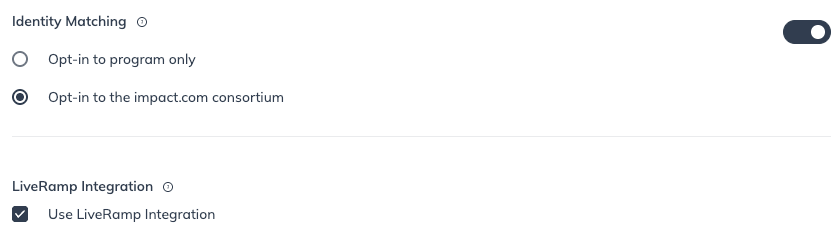
#### impact.com Consortium に参加する
1. 上部ナビゲーションバーで、  **\[ユーザープロフィール] → 設定**.
2. 右側の *トラッキング*で、 **一般**.
3.  オンに切り替える **アイデンティティマッチング**.
4. 選択 **Impact コンソーシアムに参加する**.
5. 選択 **保存**.
---
# Agent Instructions
This documentation is published with GitBook. GitBook is the documentation platform designed so that both humans and AI agents can read, navigate, and reason over technical content effectively. Learn more at gitbook.com.
## Querying This Documentation
If you need additional information that is not directly available in this page, you can query the documentation by asking a question.
Perform an HTTP GET request on the following URL with the `ask` and `goal` query parameters:
```
GET https://help.impact.com/brand/ja/what-would-you-like-to-learn-about/platform-features/cross-channel-performance-insights/opt-in-to-the-impactcom-consortium.md?ask=&goal=
```
`ask` is the immediate question: it should be specific, self-contained, and written in natural language.
`goal` is what the user is ultimately trying to achieve, the reason they need the answer. Sharing it helps GitBook give you a better, more relevant answer. A goal is most helpful when it describes the outcome the user wants rather than restating the question. For example, with `ask=how do I create an API token`, a goal like `automate deployments from our CI pipeline` lets GitBook tailor the answer to that use case.
The response will contain a direct answer to the question and relevant excerpts and sources from the documentation.
Use this mechanism when the answer is not explicitly present in the current page, you need clarification or additional context, or you want to retrieve related documentation sections.