> For the complete documentation index, see [llms.txt](https://help.impact.com/llms.txt). Markdown versions of documentation pages are available by appending `.md` to page URLs; this page is available as [Markdown](https://help.impact.com/brand/ja/what-would-you-like-to-learn-about/platform-features/contracts-and-template-terms/template-terms/payout-adjustments/set-payout-limits.md).
# 支払い上限を設定
テンプレート条件で *上限*、指定した期間内または支払対象アクション数に基づいて、パートナーへの支払いを制限できます。これらの上限は、契約全体、顧客ごと、注文ごと、またはクリックごとに適用できます。
1. 左側のナビゲーションバーで、選択します  **\[Engage] → 契約 →** [テンプレート条項](https://app.impact.com/secure/advertiser/engage/contracts/library/view-manage-ios-flow.ihtml).
2. 支払い上限を追加するテンプレート条件を見つけ、行にカーソルを合わせて、選択します  **\[その他]** → **条件を変更**.
3. の横の *上限*,  **\[オンに切り替える]** **支払対象項目の上限を指定する**.
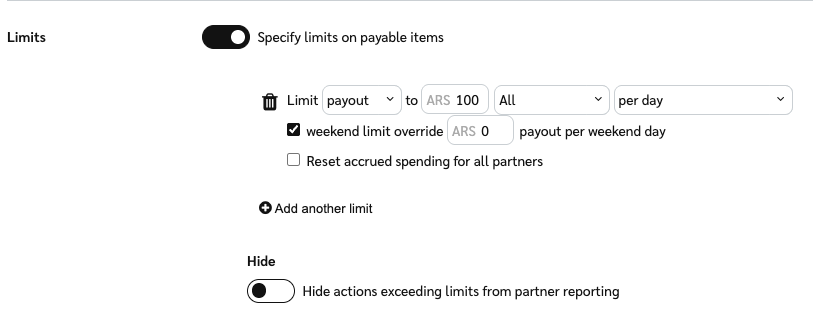
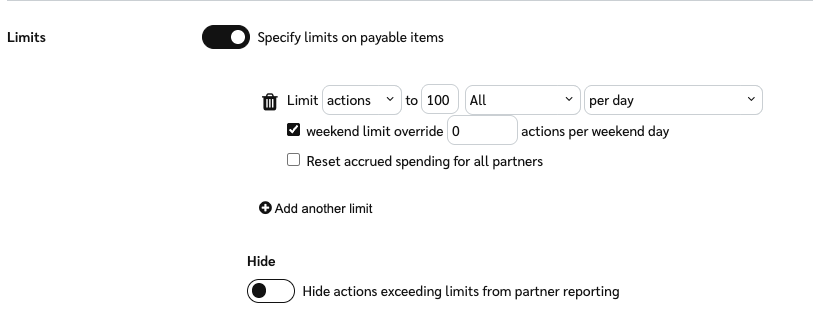
4. ドロップダウンリストから次を選択してください **支払い** または **アクション**、次に上限を設定します。
{% tabs %}
{% tab title="支払い" %}
1. 次の  **\[ドロップダウンメニュー]**で、 **支払い**.
2. パートナーが受け取れる最大額を設定します。
3. 次のオプションから上限の種類を選択してください: *すべて* (あなたとパートナー間の契約全体に適用されます)、 *注文ごと*, *顧客ごと*、または *クリックごと*.
4. 支払い上限を *すべて* または *顧客ごと*に設定した場合、 *リセットのタイミング* その上限にカウントされる支払い
* **1日ごと**
* **週ごと** — デフォルトでは次の月曜日に開始します。
* **月ごと** — すぐに開始します。この上限がすでに設定されていて更新している場合は、月初からの支払いが考慮されます。
* **四半期ごと** — すぐに開始します。この上限がすでに設定されていて更新している場合は、 [会計四半期](https://www.investopedia.com/terms/q/quarter.asp) の開始時点からの支払いが考慮されます。
* **契約期間中**
{% endtab %}
{% tab title="アクション" %}
1. 次の  **\[ドロップダウンメニュー]**で、 **アクション**.
2. パートナーに支払い可能なアクションの最大数を選択してください。
3. 上限の種類を選択してください: *すべて* (あなたとパートナー間の契約全体に適用されます)、 *クリックごと*、または *顧客ごと*.
4. 支払い上限を *すべて* または *顧客ごと*、設定できます *リセットのタイミング* その上限にカウントされるアクション。リセットオプションは次のとおりです:
* **1日ごと**
* **週ごと** — デフォルトでは次の月曜日に開始します。
* **月ごと** — すぐに開始します。この上限がすでに設定されていて更新している場合は、月初からのアクションが考慮されます。
* **四半期ごと** — すぐに開始します。この上限がすでに設定されていて更新している場合は、 [会計四半期](https://www.investopedia.com/terms/q/quarter.asp) の開始時点からの支払いが考慮されます。
* **契約期間中**
{% endtab %}
{% endtabs %}
5. 支払いを制限することを選択した場合 *1日ごと*、カスタムの週末上限を設定する場合は選択し、週末上限の値を入力してください。
* ここで選択した数値が、設定した通常の上限に優先します。
* 支払いを制限することを選択した場合 *週ごと*, *か月*, *四半期*、または *契約期間*、週末は常に全体の上限に含まれ、個別の上限を設定することはできません。
6. 変更開始日から新しい支払い上限を適用するには、  **\[未チェックのボックス]** **すべてのパートナーの累積支出をリセット**。このオプションを無効のままにすると、新しい支払い上限は元の契約開始日から適用されます。
* を参照してください [支払いグループを使用して支払いルールを設定する](/brand/ja/what-would-you-like-to-learn-about/platform-features/contracts-and-template-terms/template-terms/payout-adjustments/set-payout-rules-using-payout-groups.md) または [サポートにお問い合わせください](https://app.impact.com/secure/advertiser/support/customer-support-portal-flow.ihtml) 支払い上限のカスタマイズの詳細について。
7. 選択 **次へ** および変更内容を確認します。
8. 変更開始日を確認し、次を選択します **保存**.
---
# Agent Instructions
This documentation is published with GitBook. GitBook is the documentation platform designed so that both humans and AI agents can read, navigate, and reason over technical content effectively. Learn more at gitbook.com.
## Querying This Documentation
If you need additional information that is not directly available in this page, you can query the documentation by asking a question.
Perform an HTTP GET request on the following URL with the `ask` and `goal` query parameters:
```
GET https://help.impact.com/brand/ja/what-would-you-like-to-learn-about/platform-features/contracts-and-template-terms/template-terms/payout-adjustments/set-payout-limits.md?ask=&goal=
```
`ask` is the immediate question: it should be specific, self-contained, and written in natural language.
`goal` is what the user is ultimately trying to achieve, the reason they need the answer. Sharing it helps GitBook give you a better, more relevant answer. A goal is most helpful when it describes the outcome the user wants rather than restating the question. For example, with `ask=how do I create an API token`, a goal like `automate deployments from our CI pipeline` lets GitBook tailor the answer to that use case.
The response will contain a direct answer to the question and relevant excerpts and sources from the documentation.
Use this mechanism when the answer is not explicitly present in the current page, you need clarification or additional context, or you want to retrieve related documentation sections.