> For the complete documentation index, see [llms.txt](https://help.impact.com/llms.txt). Markdown versions of documentation pages are available by appending `.md` to page URLs; this page is available as [Markdown](https://help.impact.com/brand/ja/what-would-you-like-to-learn-about/platform-features/contracts-and-template-terms/template-terms/configure-public-facing-template-term-visibility.md).
# 公開向けテンプレート条件の表示設定を構成
PXAコースを受講する
複数の公開テンプレート条件を用意すると、特定の公開向け報酬オファーを同時に調整できます。1つのデフォルトを設定できますが、 *包括的な* 一般向けの申請に対する報酬率として使える一方で、どのパートナーセグメントにどの特定のオファーをマーケットプレイスで表示するかを制御するルールを使って、戦略的なパートナータイプに対して、より的を絞った魅力的なレートを訴求できます。その後、パートナーは自身の属性に基づいて関連する条件を表示します。
## 主な違い
* **新しいデフォルトの公開条件を設定する:** これにより、既存のデフォルトの公開条件が置き換えられます。選択した条件が、他のルールが適用されない限り、マーケットプレイス上でパートナーに表示される唯一の一般公開オファーになります。古いデフォルトの公開条件は、もはやデフォルトの公開オファーではなくなります。条件自体(およびそれに登録されているパートナー)はそのままです。
* **対象を絞った公開向け条件を追加する:** これにより、デフォルトの公開条件に加えて、追加の公開向け条件を定義できます。パートナーのペルソナやビジネスモデルなどの特定のルールを設定して、マーケットプレイス上の対象パートナーがデフォルトのテンプレート条件ではなく、より有利なこれらの条件を表示できるようにします。
## 新しいデフォルトの公開条件を設定する
{% hint style="success" %}
**注:** このオプションは現在の公開条件では利用できません。
{% endhint %}
1. 左側のナビゲーションメニューで、 ![\[Engage\] v2](https://paligoapp-cdn-eu1.s3.eu-west-1.amazonaws.com/impact/attachments/f01cdffa431a4d75ff09c130b66974d4-aa671735ec2b65af79961eaf59ab60af.svg) **\[エンゲージ]** → **契約** → [**テンプレート条件**](https://app.impact.com/secure/advertiser/engage/contracts/library/view-manage-ios-flow.ihtml).
2. 一覧で、デフォルトの公開条件として設定したい条件を見つけ、その行にカーソルを合わせて、 ![\[More\] vNext](https://paligoapp-cdn-eu1.s3.eu-west-1.amazonaws.com/impact/attachments/f01cdffa431a4d75ff09c130b66974d4-73f43076a692f2dcc8960037fabdca9c.svg) **\[その他]** → **公開設定を変更**.
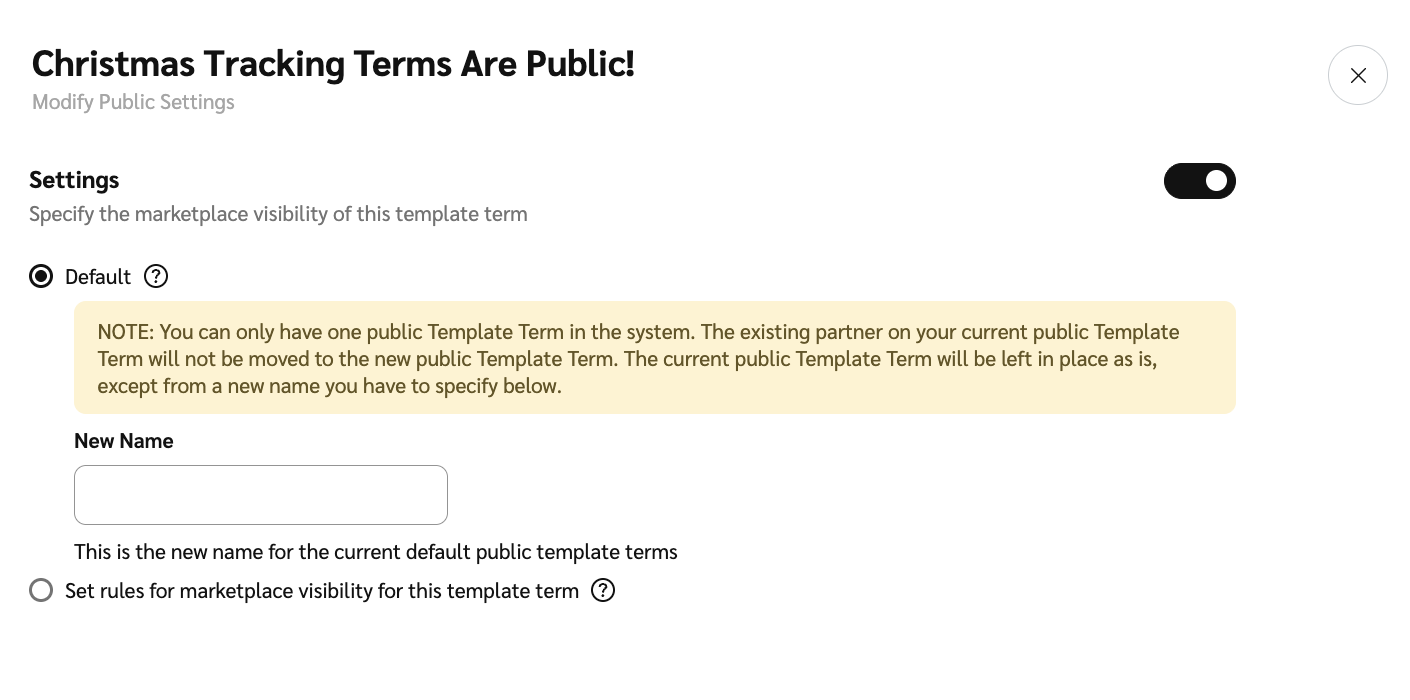
3. ![\[Toggle on\]](https://paligoapp-cdn-eu1.s3.eu-west-1.amazonaws.com/impact/attachments/f01cdffa431a4d75ff09c130b66974d4-84d1224fd3bb6ba94b899febe2021eaa.svg) **\[オンに切り替え]** **設定** → 次を選択 ![\[Radio button\]](https://paligoapp-cdn-eu1.s3.eu-west-1.amazonaws.com/impact/attachments/f01cdffa431a4d75ff09c130b66974d4-b7d91d1c012267bd96951fe6c2b643a4.svg) **\[ラジオボタン]** **デフォルト**.
4. 入力してください **新しい名前** 古いデフォルトの公開条件に対して、次を選択します **保存**.
* このテンプレート条件が、既存のデフォルトの公開テンプレート条件に代わって、新しいデフォルトになります。
## 対象を絞った公開向け条件を追加する
さまざまな公開向けテンプレート条件の表示ルールを設定する際は、主に2つのカテゴリから基準を定義できます: *パートナーペルソナ* および *ビジネスモデル*。条件が重複する場合、該当するパートナーには最新のものが表示されます。たとえば、アフィリエイトパートナーのみに関連付けられたテンプレート条件を作成し、その後アフィリエイトまたはクリエイターパートナーに関連付けられた新しい条件を作成した場合、両方の条件に関連付けられているアフィリエイトパートナーには最新の条件が先に表示されます。
### **テンプレート条件の設定**
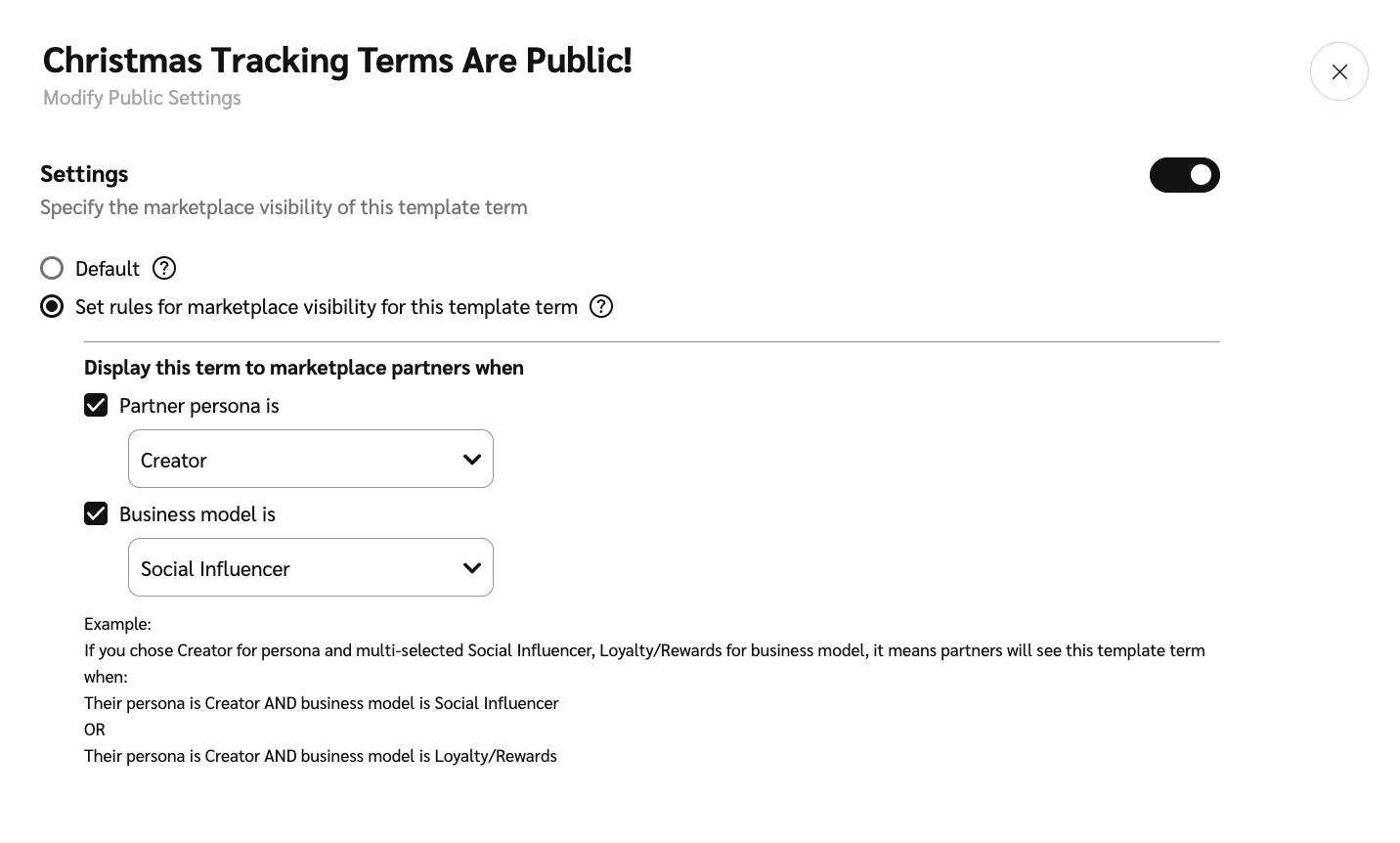
* **この `および` ルール(タイプ間)**:パートナーがテンプレートを表示するには、 *パートナーペルソナ* `および` *ビジネスモデル* タイプ。
* **例:** 特定のペルソナと特定のビジネスモデルの要件を設定した場合、パートナーはその両方に一致しないとテンプレート条件を表示できません。
* **この `または` ルール(各タイプ内):** 1つのタイプ(たとえばビジネスモデル)の中では、パートナーは1つに一致する必要があります `または` 選択した他のオプションのいずれか。
* **例:** を選択した場合 *ソーシャルインフルエンサー* および *ロイヤルティ/リワード* 受け入れ可能なビジネスモデルとして、ソーシャルインフルエンサー `または` またはロイヤルティ/リワードパートナーであるパートナーは、そのルール部分を満たします。
1. 左側のナビゲーションメニューで、 ![\[Engage\] v2](https://paligoapp-cdn-eu1.s3.eu-west-1.amazonaws.com/impact/attachments/f01cdffa431a4d75ff09c130b66974d4-aa671735ec2b65af79961eaf59ab60af.svg) **\[エンゲージ]** → **契約** → [**テンプレート条件**](https://app.impact.com/secure/advertiser/engage/contracts/library/view-manage-ios-flow.ihtml).
2. 一覧で、公開表示ルールを設定したい条件を見つけ、その行にカーソルを合わせて、 ![\[More\] vNext](https://paligoapp-cdn-eu1.s3.eu-west-1.amazonaws.com/impact/attachments/f01cdffa431a4d75ff09c130b66974d4-73f43076a692f2dcc8960037fabdca9c.svg) **\[その他]** → **公開設定を変更**.
3. ![\[Toggle on\]](https://paligoapp-cdn-eu1.s3.eu-west-1.amazonaws.com/impact/attachments/f01cdffa431a4d75ff09c130b66974d4-84d1224fd3bb6ba94b899febe2021eaa.svg) **\[オンに切り替え]** **設定** → 次を選択 ![\[Radio button\]](https://paligoapp-cdn-eu1.s3.eu-west-1.amazonaws.com/impact/attachments/f01cdffa431a4d75ff09c130b66974d4-b7d91d1c012267bd96951fe6c2b643a4.svg) **\[ラジオボタン]** **このテンプレート条件のマーケットプレイスでの表示ルールを設定する**.
4. 以下で *この条件をマーケットプレイスのパートナーに表示するのは*、マーケットプレイス表示ルールを設定してください。次を参照してください: [テンプレート条件の設定](/brand/ja/what-would-you-like-to-learn-about/platform-features/contracts-and-template-terms/template-terms/configure-public-facing-template-term-visibility.md) ルール設定の仕組みを確認できます。
* 選択してください ![\[Checked box\]](https://paligoapp-cdn-eu1.s3.eu-west-1.amazonaws.com/impact/attachments/f01cdffa431a4d75ff09c130b66974d4-aee23966cd91ec2a9f9985361c43ab1a.svg) **\[チェックボックス]** **パートナーペルソナが** これらの条件を適用するパートナータイプを選択します。
* 選択してください ![\[Checked box\]](https://paligoapp-cdn-eu1.s3.eu-west-1.amazonaws.com/impact/attachments/f01cdffa431a4d75ff09c130b66974d4-aee23966cd91ec2a9f9985361c43ab1a.svg) **\[チェックボックス]** **ビジネスモデルが** これらの条件を適用するビジネスモデルを選択します。
5. 選択してください **保存**.
{% hint style="success" %}
**注:** テンプレート条件の表示設定を編集した後、パートナーが更新された条件を確認できるようになるまで最大60分かかる場合があります。
{% endhint %}
---
# Agent Instructions
This documentation is published with GitBook. GitBook is the documentation platform designed so that both humans and AI agents can read, navigate, and reason over technical content effectively. Learn more at gitbook.com.
## Querying This Documentation
If you need additional information that is not directly available in this page, you can query the documentation by asking a question.
Perform an HTTP GET request on the following URL with the `ask` and `goal` query parameters:
```
GET https://help.impact.com/brand/ja/what-would-you-like-to-learn-about/platform-features/contracts-and-template-terms/template-terms/configure-public-facing-template-term-visibility.md?ask=&goal=
```
`ask` is the immediate question: it should be specific, self-contained, and written in natural language.
`goal` is what the user is ultimately trying to achieve, the reason they need the answer. Sharing it helps GitBook give you a better, more relevant answer. A goal is most helpful when it describes the outcome the user wants rather than restating the question. For example, with `ask=how do I create an API token`, a goal like `automate deployments from our CI pipeline` lets GitBook tailor the answer to that use case.
The response will contain a direct answer to the question and relevant excerpts and sources from the documentation.
Use this mechanism when the answer is not explicitly present in the current page, you need clarification or additional context, or you want to retrieve related documentation sections.