> For the complete documentation index, see [llms.txt](https://help.impact.com/llms.txt). Markdown versions of documentation pages are available by appending `.md` to page URLs; this page is available as [Markdown](https://help.impact.com/brand/ja/what-would-you-like-to-learn-about/platform-features/contracts-and-template-terms/contracts/send-a-counter-proposal-to-applicants.md).
# 応募者に対してカウンター提案を送信する
パートナーが公開条件に基づいてあなたのプログラムに申し込んでいる場合は、別の契約を提案することもできます(たとえば、パートナーのビジネスモデルにより適した別の条件セットなど)。
方法を見る [見込み先に提案を送信する](/brand/ja/what-would-you-like-to-learn-about/performance-program/recruiting-partners/prospective-partners/send-a-proposal-to-a-prospect.md).
1. 左側のナビゲーションメニューから、  **\[エンゲージ]** → **パートナー** → **申請数**.
2. 提案を送りたいパートナーにカーソルを合わせ、次に  **\[その他]** → **対案**.
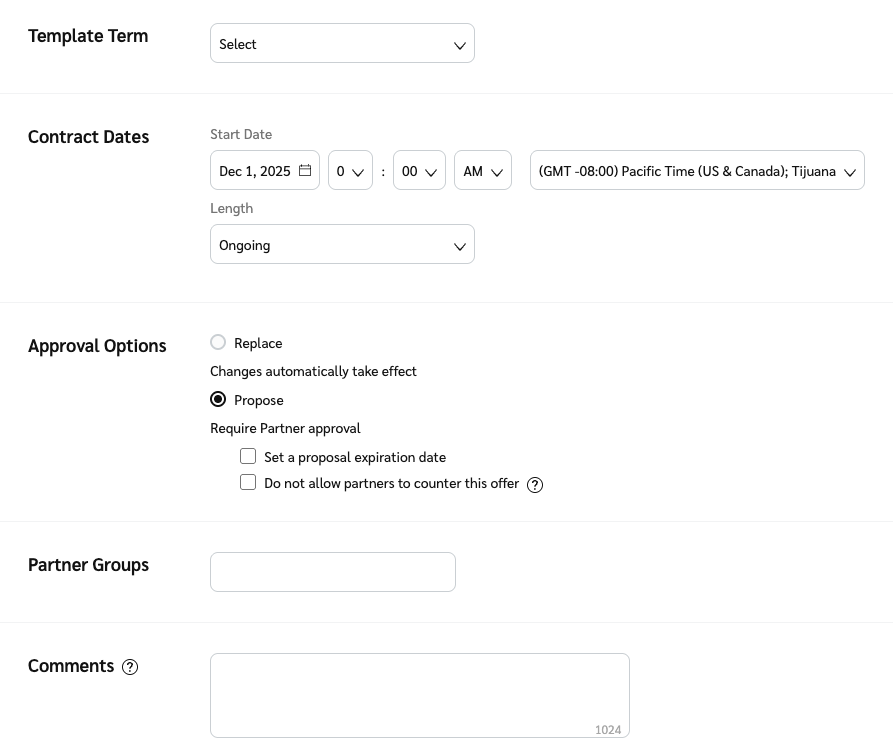
3. 上の *提案* 画面で、次を使用します  **\[ドロップダウンメニュー]** を選択して **テンプレート条件**.
4. 次の値を設定します: **契約日** を選び、契約が *期間* であるべきか **継続中** または **一時的**.
* を選択すると **一時的**、次を指定します **終了日を** 日付にし、必要に応じて契約を **現在のテンプレート条件にフォールバックする** または **別のテンプレート条件** 契約終了時に適用します。
5. の横の *承認オプション*、次を選択します  **[ラジオボタン]** **提案する**。次を使用して  **\[未チェックのボックス]** この提案に〜があるかどうかを判断します **有効期限** また、彼らが〜できるかどうかを **対案を提示する** あなたの提案に対して。
6. 必要に応じて、 **コメント** 提案を説明するために記入します。
7. 画面下部で、次を選択してください **保存**.
* 対案は次へ移動します **送信済みの提案** タブ。
{% hint style="success" %}
**注**:提案ステータスは `対案あり` のいずれかの当事者が条件を再提案したときに変更されます。これは、条件の詳細が変更されていなくても発生します。再提案すると署名日が更新され、システムはこれを新しい対案として解釈するためです。
{% endhint %}
---
# Agent Instructions
This documentation is published with GitBook. GitBook is the documentation platform designed so that both humans and AI agents can read, navigate, and reason over technical content effectively. Learn more at gitbook.com.
## Querying This Documentation
If you need additional information that is not directly available in this page, you can query the documentation dynamically by asking a question.
Perform an HTTP GET request on the current page URL with the `ask` query parameter, and the optional `goal` query parameter:
```
GET https://help.impact.com/brand/ja/what-would-you-like-to-learn-about/platform-features/contracts-and-template-terms/contracts/send-a-counter-proposal-to-applicants.md?ask=&goal=
```
`ask` is the immediate question: it should be specific, self-contained, and written in natural language.
`goal` is optional and describes the broader end goal you are ultimately trying to accomplish on behalf of the user. GitBook uses it to tailor the answer towards what is most useful for that goal.
The response will contain a direct answer to the question and relevant excerpts and sources from the documentation.
Use this mechanism when the answer is not explicitly present in the current page, you need clarification or additional context, or you want to retrieve related documentation sections.