> For the complete documentation index, see [llms.txt](https://help.impact.com/llms.txt). Markdown versions of documentation pages are available by appending `.md` to page URLs; this page is available as [Markdown](https://help.impact.com/brand/ja/what-would-you-like-to-learn-about/performance-program/performance-program-reports/competitive-insights/industry-insights-report.md).
# 業界インサイトレポート
PXAコースを受講する
この *業界インサイト* このレポートは、業界レベルのインサイトを提供し、対象セクターの平均プログラム指標を確認できます。これらのインサイトは、概要、主要なプログラム指標、対象セクターの上位パートナーに分けて表示されます。
{% hint style="info" %}
**注:** この *業界インサイト* このレポートは現在、北米、ヨーロッパ、オセアニアに所在する、リテールベース(芸術・エンターテインメントを除く)、旅行ベース、教育ベースのプログラムでのみ利用できます。
{% endhint %}
#### レポートにアクセスする
1. 左側のナビゲーションメニューで、  **\[競合インサイト]** → **業界インサイト**.
2. 以下で *業界インサイト*、表示したいデータを絞り込みます。
* 次の方法をご利用いただけます:  **\[共有]** および  **\[ダウンロード]** 右上のアイコンを選択してレポートを操作します。
* 次の *フィルター参照* 表をご覧ください。
フィルター参照
| フィルター | 説明 |
| ----- | -------------------------------- |
| 業種 | 業界インサイトデータを表示したい市場セグメントで絞り込みます。 |
| 地域 | 業界インサイトデータを表示したい地域で絞り込みます。 |
| 四半期 | 業界インサイトデータを表示したい特定の3か月期間で絞り込みます。 |
3. 業種インサイトの内訳を、次の3つの主要セクションで表示します:
{% tabs %}
{% tab title="業種の概要" %}
*業種の概要* では、次の内容を確認できます:
* **パートナー総数:** 選択した業種セグメントのプログラムに参加しているパートナーの総数。
* **アクティブなパートナー:** 四半期中に少なくとも1回のクリックまたはアクションを発生させたパートナー数。
* **成果を上げたパートナー:** 四半期中に少なくとも1件のアクションを発生させたパートナーの数。
{% endtab %}
{% tab title="業種別プログラムの平均指標" %}
*業種別プログラムの平均指標* は次のセクションに分かれています:
{% endtab %}
{% tab title="業種別上位パートナー" %}
対象業種の上位パートナーを表示します。以下を参照してください。 *業種別上位パートナーの参考資料* 表を参照してください。
{% endtab %}
{% endtabs %}
業種別上位パートナーの参考資料
| 列 | 説明 |
| ------------- | --------------------------------------------------------------------------------------------------- |
| 業種順位 | 対象業種市場で生み出した収益に基づくパートナーの順位。
例: 順位が3の場合、対象業種市場でこのパートナーより多くの収益を生み出しているパートナーが2社あることを示します。
|
| パートナー名 | パートナー名。 |
| パートナーID | パートナーのシステム生成ID。 |
| パートナーのビジネスモデル | このパートナーがブランドを宣伝する主な方法です。パートナーが主なプロモーション手法を指定していない場合、ビジネスモデルは *未分類*. |
| メール | パートナーのメールアドレス。 |
プログラム効率
プログラム効率では、対象業種におけるパートナー数、非アクティブ数、成果あり数、アクティブだが成果なし数、アクティブかつ成果あり数、および特定業種のパートナーのアクティブ率と成果率を比較表示します。
* **非アクティブ:** 選択した四半期中にクリックもアクションも1件も発生させていないパートナー。
* **アクティブだが成果なし:** 選択した四半期中に少なくとも1回のクリックを発生させたが、アクションは0件のパートナー。
* **アクティブかつ成果あり:** 選択した四半期中に少なくとも1件のアクションを発生させたパートナー。
* **アクティブ率:** アクティブなパートナー数(アクティブだが成果なしのパートナーと成果ありのパートナーを含む)をパートナー総数で割った割合をパーセントで表示したもの。
* **成果率:** 成果ありのパートナー数をアクティブなパートナー数で割った割合をパーセントで表示したもの。
主要プログラムKPI
* **# 提携プログラム数:** 対象業種の提携プログラム数。
* **平均注文額:** 対象業種のオーディエンスから生み出された平均注文額。この値は、発生収益をコンバージョン数(アクション数とも呼ばれます)で割って算出されます。 *収益* を件数で割ったもの *アクション*.
* **コンバージョン率:** コンバージョン率は、発生したリンククリックのうちコンバージョン(アクションとも呼ばれます)につながった割合を示します。この率は、発生したコンバージョン数をユニーククリック数で割って算出されます。件数 *アクション* を件数で割ったもの *クリック数*.
* **ROAS(広告費用対効果):** これは、勝者クレジットモデルによって帰属された収益を総アクションコストで割って算出されます。
* **アクション単価:** 合計 **アクションのコスト** をアクション数で割ったもの。
* **クリック単価:** 総コストを総クリック数で割ったもの。
* **コミッション率:** コミッション率は、アクションコストを収益で割ったものです。
* **定額コミッション率:** 定額コミッション率は、定額手数料を収益で割ったものです。
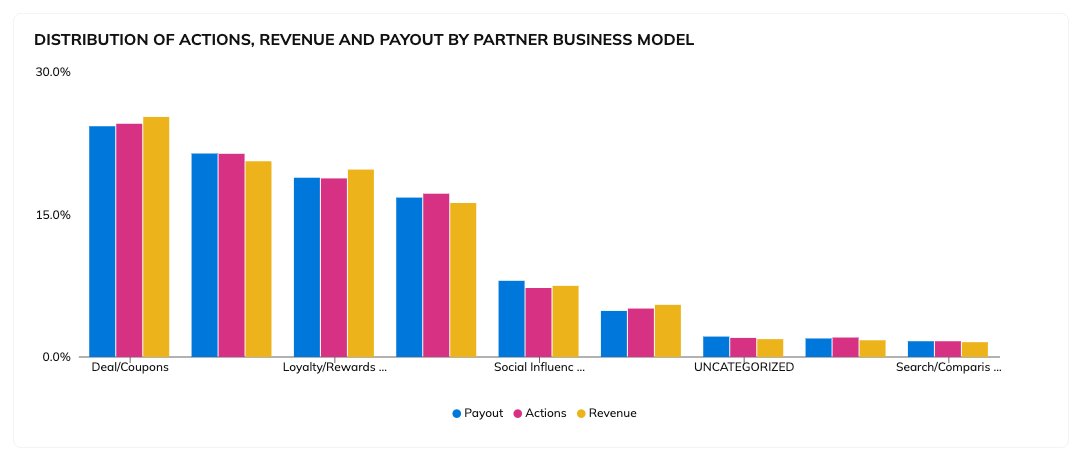
パートナータイプ別の主要指標分布
ビジネスモデルごとのアクション、収益、支払い分配率を表示します。
プログラム集中度
このセクションでは、対象業種のプログラムにおいて上位パフォーマンスのパートナーがどの程度の収益を生み出しているかの割合を示します。このレポートを使うことで、あなたのプログラムの上位パートナーが対象業種市場の上位パフォーマンスのパートナーと比べてどうかを判断するのに役立ちます。
---
# Agent Instructions
This documentation is published with GitBook. GitBook is the documentation platform designed so that both humans and AI agents can read, navigate, and reason over technical content effectively. Learn more at gitbook.com.
## Querying This Documentation
If you need additional information that is not directly available in this page, you can query the documentation by asking a question.
Perform an HTTP GET request on the following URL with the `ask` and `goal` query parameters:
```
GET https://help.impact.com/brand/ja/what-would-you-like-to-learn-about/performance-program/performance-program-reports/competitive-insights/industry-insights-report.md?ask=&goal=
```
`ask` is the immediate question: it should be specific, self-contained, and written in natural language.
`goal` is what the user is ultimately trying to achieve, the reason they need the answer. Sharing it helps GitBook give you a better, more relevant answer. A goal is most helpful when it describes the outcome the user wants rather than restating the question. For example, with `ask=how do I create an API token`, a goal like `automate deployments from our CI pipeline` lets GitBook tailor the answer to that use case.
The response will contain a direct answer to the question and relevant excerpts and sources from the documentation.
Use this mechanism when the answer is not explicitly present in the current page, you need clarification or additional context, or you want to retrieve related documentation sections.