> For the complete documentation index, see [llms.txt](https://help.impact.com/llms.txt). Markdown versions of documentation pages are available by appending `.md` to page URLs; this page is available as [Markdown](https://help.impact.com/brand/ja/what-would-you-like-to-learn-about/performance-program/performance-program-reports/competitive-insights/finance-benchmark-report/finance-benchmark-overview.md).

# 金融ベンチマークの概要

この *金融ベンチマークの概要* これは、あなたのパートナープログラムと、競合セグメントにおけるパートナープログラムの平均的なパフォーマンスとの主要指標の比較分析です。この記事では、ダッシュボードの各セクションを使って、あなたのプログラムが競合他社と比べてどうなのかをよりよく理解する方法を学びます。

#### レポートにアクセスする

1. 左側のナビゲーションメニューで、 ![](https://1458456015-files.gitbook.io/~/files/v0/b/gitbook-x-prod.appspot.com/o/spaces%2FwMLlMoFBtKJa8ptd3zaw%2Fuploads%2Fgit-blob-81365ab1e9414f66498604921f52870f117b8cc7%2Fd33a611679a65f191574b81820ac09c98c5cc774faa6ff5a8a739a9cc7a87234.svg?alt=media) **\[競合インサイト]** → **金融ベンチマーク → 概要**.
2. ページ上部の、以下の項目の下に *金融ベンチマークの概要*、表示したいデータを絞り込みます。

<details>

<summary>フィルター参照</summary>

| フィルター  | 説明                                                                                                                                                                                                                                                                                                           |
| ------ | ------------------------------------------------------------------------------------------------------------------------------------------------------------------------------------------------------------------------------------------------------------------------------------------------------------ |
| 四半期    | ベンチマークデータを表示する特定の3か月期間でフィルタします。                                                                                                                                                                                                                                                                              |
| プログラム  | ベンチマークデータを表示するプログラムでフィルタします。                                                                                                                                                                                                                                                                                 |
| 地域     | ベンチマークデータを表示する地域でフィルタします。                                                                                                                                                                                                                                                                                    |
| 業種     | ベンチマークデータを表示する市場セグメントでフィルタします。                                                                                                                                                                                                                                                                               |
| ファネル段階 | <p>ファネルの上部または下部のどちらを表示するかを選択します。</p><p>• <strong>初回アクション</strong> データを、見込み顧客をコンバージョンへの流れに導くパートナーに限定します。この時点では通常、金銭のやり取りは発生しておらず、パートナーに支払われる報酬も比較的小額です。</p><p>• <strong>最終アクション</strong> データを、望ましい最終目標を達成しているパートナーに限定します。これには金銭のやり取りが伴い、たとえば口座への入金や、ローンやクレジットカードの発行などが含まれます。パートナーへの報酬は一般的により高額になると見込まれます。</p> |

</details>

<details>

<summary>初回アクションと最終アクションの例</summary>

| 金融商品     | 初回アクションの例 | 最終アクションの例           |
| -------- | --------- | ------------------- |
| 保険       | リード、見積もり  | 購入                  |
| ローン      | 申込送信、申込承認 | 融資実行済みローン           |
| 銀行業務     | 口座開設、申込承認 | 口座入金済み、条件達成（例：最低残高） |
| クレジットカード | 申込送信、申込承認 | カード発行               |
| 信用サービス   | リード、口座開設  | 契約、条件達成（例：連携済み銀行口座） |
| 投資       | 口座開設、申込承認 | 口座入金済み、条件達成（例：最低残高） |
| 暗号資産     | 口座開設      | 口座入金済み、条件達成（例：最低残高） |

{% hint style="info" %}
**注：** アプリのダウンロードは、銀行業務や信用サービスなどのカテゴリでよく追跡されます。アプリのダウンロードは支払対象のイベントになり得ますが、初回アクションから最終アクションへの主要なコンバージョンファネルとは別個のものと見なされます。
{% endhint %}

</details>

3. 業種別インサイトの内訳を表示:

<details>

<summary>プログラム効率</summary>

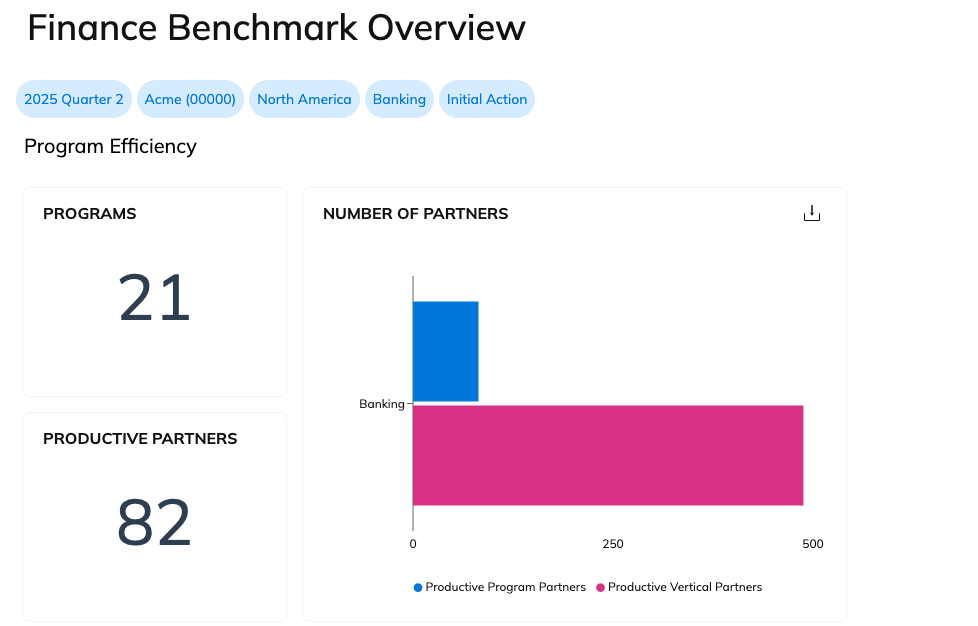
プログラム効率では、あなたの業種におけるプログラム数と成果を上げているパートナー数を表示します。また、あなたのプログラムにおける成果を上げているパートナー数を、業種全体の成果を上げているパートナー数と比較することもできます。

ある **成果を上げている** パートナーとは、選択した四半期中に少なくとも1件のアクションを発生させた者です。

<div data-with-frame="true"><figure><img src="https://1458456015-files.gitbook.io/~/files/v0/b/gitbook-x-prod.appspot.com/o/spaces%2FwMLlMoFBtKJa8ptd3zaw%2Fuploads%2Fgit-blob-27f02cd9a93c38bad2db3aea06b99b0ee682bc2c%2F8d8262435aef0a0198e0ccbb0267e199dd246bad735a2dbcd101ab0c732ae36b.png?alt=media" alt=""><figcaption></figcaption></figure></div>

</details>

<details>

<summary>KPI比較</summary>

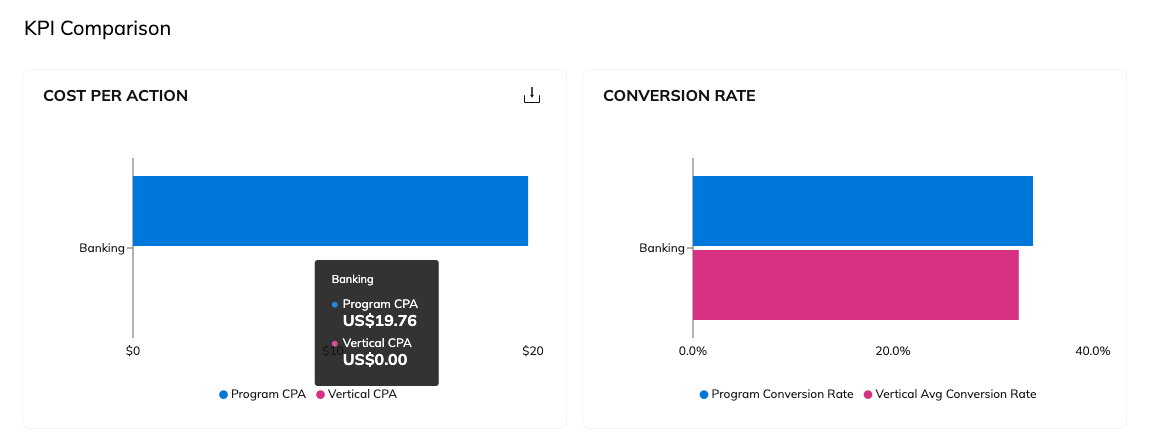
選択した業種における他のプログラムと、アクション単価およびコンバージョン率を比較します。

具体的な数値を確認するには、グラフ上にカーソルを合わせてください。

<div data-with-frame="true"><figure><img src="https://1458456015-files.gitbook.io/~/files/v0/b/gitbook-x-prod.appspot.com/o/spaces%2FwMLlMoFBtKJa8ptd3zaw%2Fuploads%2Fgit-blob-2248c164bd70a8a007f303dc3a8822564a626a74%2F510586323ec8f044a0f3517d09f15aa003705e7b09584d63081eb76e614ca9a2.png?alt=media" alt=""><figcaption></figcaption></figure></div>

</details>

<details>

<summary>プログラムの多様性</summary>

この *プログラムの多様性* このセクションには2つのグラフがあります： *ビジネスモデル別アクション* および *アクション指数のビジネスモデル*.

{% hint style="info" %}
**注：** パートナーのいずれかが主要なプロモーション手法を指定していない場合、そのパートナーが生み出した収益は未分類になります。
{% endhint %}

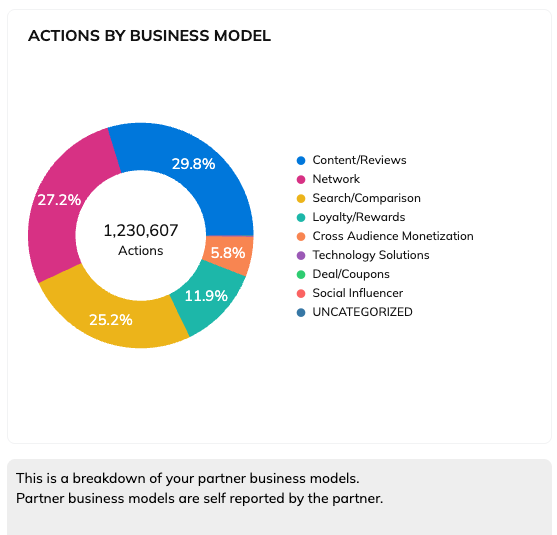
の *ビジネスモデル別アクション* このグラフでは、さまざまなビジネスモデルのパートナーによって行われたアクション数を確認できます。

<div data-with-frame="true"><figure><img src="https://1458456015-files.gitbook.io/~/files/v0/b/gitbook-x-prod.appspot.com/o/spaces%2FwMLlMoFBtKJa8ptd3zaw%2Fuploads%2Fgit-blob-352851d1a9f06b2f4ab50b97db33825ce7dafeac%2Fe3ef1c044b9aa2dd70bb70eef4c04f0bd0b836cf75dc3f72bf9b9fe2f67a6618.png?alt=media" alt=""><figcaption></figcaption></figure></div>

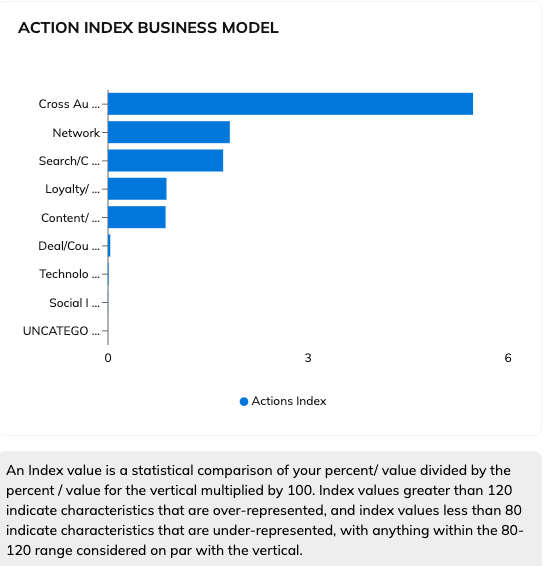
次の *アクション指数のビジネスモデル* このグラフで、ビジネスモデル内でのあなたのパフォーマンスが、同じ業種の他と比べてどうなのかを比較できます。

<div data-with-frame="true"><figure><img src="https://1458456015-files.gitbook.io/~/files/v0/b/gitbook-x-prod.appspot.com/o/spaces%2FwMLlMoFBtKJa8ptd3zaw%2Fuploads%2Fgit-blob-05fea0f2b1f1525af2250db9e937dcbae0e9af19%2Fbd359556488058f0af8f3ab864486a69c2bfad7340815699c3ce2f7bcdfdbc0b.png?alt=media" alt=""><figcaption></figcaption></figure></div>

</details>

<details>

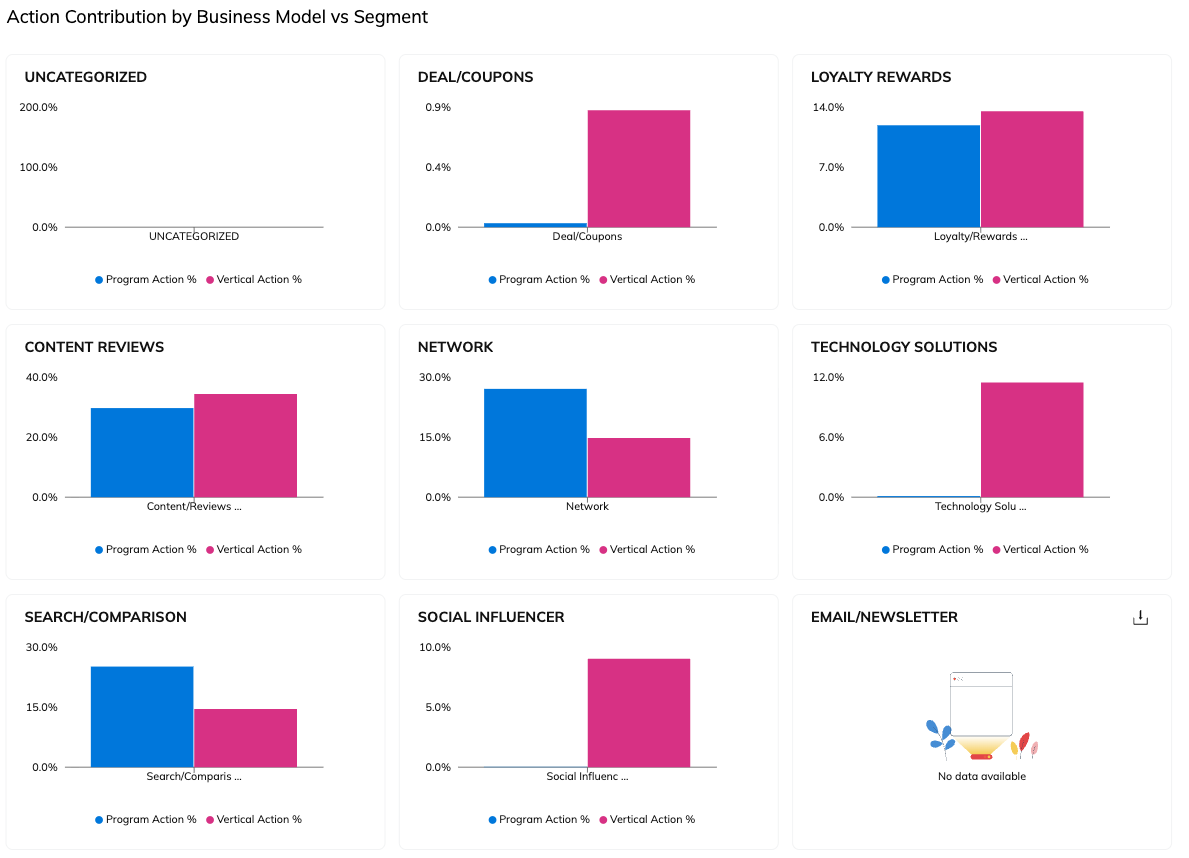
<summary>ビジネスモデル別 vs セグメント別のアクション貢献度</summary>

この *ビジネスモデル別 vs セグメント別のアクション貢献度* このセクションでは、さまざまなビジネスモデルがあなたのプログラムのアクション創出にどのように貢献しているかを、同じ業種の他のプログラムと比較できます。これは、以下の円グラフと同じ情報を提供します *プログラムの多様性* 上記のセクションですが、業界セグメントとの比較をしやすいように棒グラフ形式になっています。

<div data-with-frame="true"><figure><img src="https://1458456015-files.gitbook.io/~/files/v0/b/gitbook-x-prod.appspot.com/o/spaces%2FwMLlMoFBtKJa8ptd3zaw%2Fuploads%2Fgit-blob-389bf0f7f747071eaf7c7f98f19665ff0cb02c74%2Fb4be535100c33d7db35891c95e16a9b41f7a1312fec86d471095a633ca7f6e0c.png?alt=media" alt=""><figcaption></figcaption></figure></div>

</details>

<details>

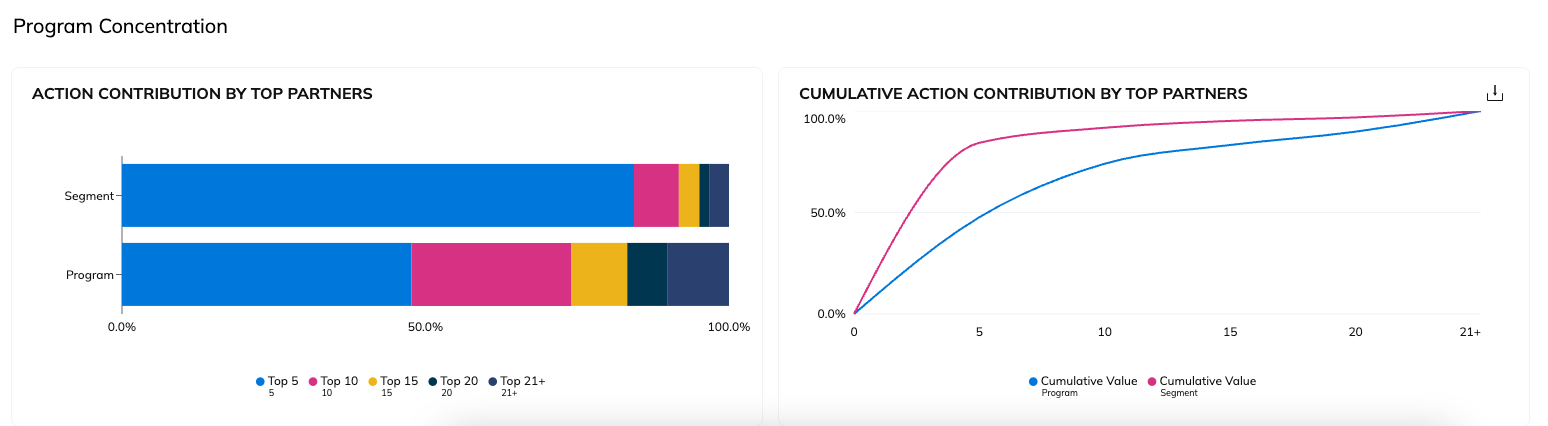
<summary>プログラム集中度</summary>

この *プログラム集中度* このセクションでは、業界セグメントと比較したときに、あなたのプログラムで上位パフォーマンスのパートナーがどの程度の割合のアクションを生み出しているかを示します。このレポートを使うことで、業界セグメントと比較しながら、あなたのプログラムが上位パフォーマンスのパートナーに依存しすぎていないかを判断するのに役立てられます。

<div data-with-frame="true"><figure><img src="https://1458456015-files.gitbook.io/~/files/v0/b/gitbook-x-prod.appspot.com/o/spaces%2FwMLlMoFBtKJa8ptd3zaw%2Fuploads%2Fgit-blob-0caaf648fa9bc91b5230cb34789e631a1b0ac8e8%2F16de03541ece5960c2b3f1699d3ff62e2e2c6cef5ca7a5c4ed759d8e62f3c907.png?alt=media" alt=""><figcaption></figcaption></figure></div>

</details>

2. 必要に応じて、 ![](https://1458456015-files.gitbook.io/~/files/v0/b/gitbook-x-prod.appspot.com/o/spaces%2FwMLlMoFBtKJa8ptd3zaw%2Fuploads%2Fgit-blob-5e962e68a3cf6c87d7ade712b204bae70f02fe42%2F07666ee42fc00c5eb99a6545e1f573505a3888c370d4751169eab2b06d01158c.svg?alt=media) **\[共有]** または ![](https://1458456015-files.gitbook.io/~/files/v0/b/gitbook-x-prod.appspot.com/o/spaces%2FwMLlMoFBtKJa8ptd3zaw%2Fuploads%2Fgit-blob-1c990ed7d1179d6bc54ec8a2f98688d63ffdf977%2F1ca7fd10d94ed494c076e86be8f0d3f371693b11c47f1b26ec0435a27e0e48c5.svg?alt=media) **\[ダウンロード]** レポート右上のボタンを使って概要を表示します。


---

# Agent Instructions
This documentation is published with GitBook. GitBook is the documentation platform designed so that both humans and AI agents can read, navigate, and reason over technical content effectively. Learn more at gitbook.com.

## Querying This Documentation
If you need additional information that is not directly available in this page, you can query the documentation by asking a question.

Perform an HTTP GET request on the following URL with the `ask` and `goal` query parameters:

```
GET https://help.impact.com/brand/ja/what-would-you-like-to-learn-about/performance-program/performance-program-reports/competitive-insights/finance-benchmark-report/finance-benchmark-overview.md?ask=<question>&goal=<user_goal>
```

`ask` is the immediate question: it should be specific, self-contained, and written in natural language.
`goal` is what the user is ultimately trying to achieve, the reason they need the answer. Sharing it helps GitBook give you a better, more relevant answer. A goal is most helpful when it describes the outcome the user wants rather than restating the question. For example, with `ask=how do I create an API token`, a goal like `automate deployments from our CI pipeline` lets GitBook tailor the answer to that use case.

The response will contain a direct answer to the question and relevant excerpts and sources from the documentation.

Use this mechanism when the answer is not explicitly present in the current page, you need clarification or additional context, or you want to retrieve related documentation sections.