> For the complete documentation index, see [llms.txt](https://help.impact.com/llms.txt). Markdown versions of documentation pages are available by appending `.md` to page URLs; this page is available as [Markdown](https://help.impact.com/brand/ja/what-would-you-like-to-learn-about/performance-program/performance-program-reports/competitive-insights/benchmarking/brand-benchmarking-overview.md).

# ブランドベンチマークの概要

ブランドベンチマーキングは、あなたのパートナープログラムと、競合セグメント内のパートナープログラムの平均的なパフォーマンスとの主要指標を比較分析するものです。この記事では、ダッシュボードのさまざまなセクションを使って、あなたのプログラムが競合他社とどのように比較されるかをより深く理解する方法を学べます。

{% hint style="warning" %}
**あなたの情報は安全に保護されます：** ベンチマークのインサイトは、集計指標と競合セグメントへの匿名参加に基づいています。ブランドのプログラムに関する識別可能な情報はすべて削除され、他の匿名データと統合されたうえで共有されます。impact.comは、ブランドの特定や顧客データにつながるデータを開示しません。セグメント参加者は匿名です。
{% endhint %}

#### ベンチマーク概要を表示

1. 左側のナビゲーションバーから ![](https://1458456015-files.gitbook.io/~/files/v0/b/gitbook-x-prod.appspot.com/o/spaces%2FwMLlMoFBtKJa8ptd3zaw%2Fuploads%2Fgit-blob-81365ab1e9414f66498604921f52870f117b8cc7%2Fd33a611679a65f191574b81820ac09c98c5cc774faa6ff5a8a739a9cc7a87234.svg?alt=media) **\[競合インサイト]** → **ベンチマーク → 概要**.
2. 画面上部付近のフィルターバーから *ベンチマーク概要* 画面で確認できます：
   * 次の **四半期** ベンチマークデータを表示したい
   * 次の **地域** ベンチマークデータを表示したい

     <div data-gb-custom-block data-tag="hint" data-style="success" class="hint hint-success"><p><strong>注：</strong> ブランドベンチマーキングは現在、 <em>北米</em>, <em>ヨーロッパ</em>、および <em>オセアニア</em>.</p></div>
   * 業界を選択 **カテゴリ** ベンチマークデータを表示したい

     <div data-gb-custom-block data-tag="hint" data-style="success" class="hint hint-success"><p><strong>注：</strong> ブランドベンチマーキングは現在、 <em>小売</em>, <em>旅行</em>、および <em>教育</em>関連プログラム。</p></div>
   * 表示されるフィルターオプションは、あなたのプログラムに関連するものです。
3. 必要に応じて、レポート右上のボタンを使って、この概要をメール送信、スケジュール設定、またはダウンロードできます。

#### 業界ベンチマークセグメントの規模

このセクションでは、プログラム内のパートナー総数と、そのうち何社が *アクティブな* または *成果を上げている* パートナーかを確認できます。

| ステータス          | 説明                                                 |
| -------------- | -------------------------------------------------- |
| 総パートナー数        | 選択した業界セグメントで、あなたのプログラムに参加しているパートナーの総数。             |
| アクティブなパートナー数   | 四半期中に少なくとも1回クリックを発生させたパートナーの数。                     |
| 成果を上げているパートナー数 | 四半期中に少なくとも1件のアクションを発生させたパートナーの数。                   |
| 参加を推奨するパートナー数  | 選択した業界セグメントで、impact.comがあなたのプログラムへの参加を推奨するパートナーの数。 |

#### パートナー概要

この *パートナー概要* このセクションでは、プログラム内のパートナー数、非アクティブ、成果あり、アクティブだが成果なしの数、および業界セグメントと比較したパートナーのアクティブ率と成果率を確認できます。このレポートを使って、プログラムの規模を業界平均と比較してください。

* 以下を参照してください *パートナーのステータス* このセクションで利用できるデータの詳細は、下の表をご覧ください。

| パートナーのステータス | 説明                                                                                                  |
| ----------- | --------------------------------------------------------------------------------------------------- |
| 非アクティブ      | *非アクティブ* これらのパートナーは契約済みですが、選択した四半期にクリックもアクションも1件も発生させていません。                                         |
| アクティブだが成果なし | *アクティブだが成果なし* これらのパートナーは、選択した四半期に少なくとも1件のクリックを発生させましたが、アクションはありません。                                 |
| 成果あり        | *成果あり* これらのパートナーは、選択した四半期に少なくとも1件のアクションを発生させました。                                                    |
| アクティブ率      | この *アクティブ率* は、 *アクティブなパートナー数* （これには *アクティブだが成果なし* および *成果あり* パートナーを含む）を総パートナー数で割った割合をパーセントで示したものです。 |
| 成果率         | この *成果率* は、 *成果あり* パートナー数を *アクティブ*の数で割った割合を、パーセントで示したものです。                                          |

<div data-with-frame="true"><figure><img src="https://1458456015-files.gitbook.io/~/files/v0/b/gitbook-x-prod.appspot.com/o/spaces%2FwMLlMoFBtKJa8ptd3zaw%2Fuploads%2FWaZ4e5csA3OgAE3tibLj%2Fimage%20(27).png?alt=media&amp;token=60bcbb27-d25a-4aca-9793-1bc4cdf26d43" alt=""><figcaption></figcaption></figure></div>

#### プログラム効率

この *プログラム効率* このセクションでは、プログラムの効率に関する指標（AOV、アクション単価、コンバージョン率、ROAS、実効CPC、コミッション率、固定コミッション指標など）を業界セグメントと比較します。正確な値を表示するには、グラフ上にカーソルを合わせてください。

<div data-with-frame="true"><figure><img src="https://1458456015-files.gitbook.io/~/files/v0/b/gitbook-x-prod.appspot.com/o/spaces%2FwMLlMoFBtKJa8ptd3zaw%2Fuploads%2FfQvLfqTVGoCQVtiId1TN%2Fimage%20(28).png?alt=media&amp;token=a74d7925-a032-4d2a-86e7-234eba4a0d9d" alt=""><figcaption></figcaption></figure></div>

#### パートナータイプの分布

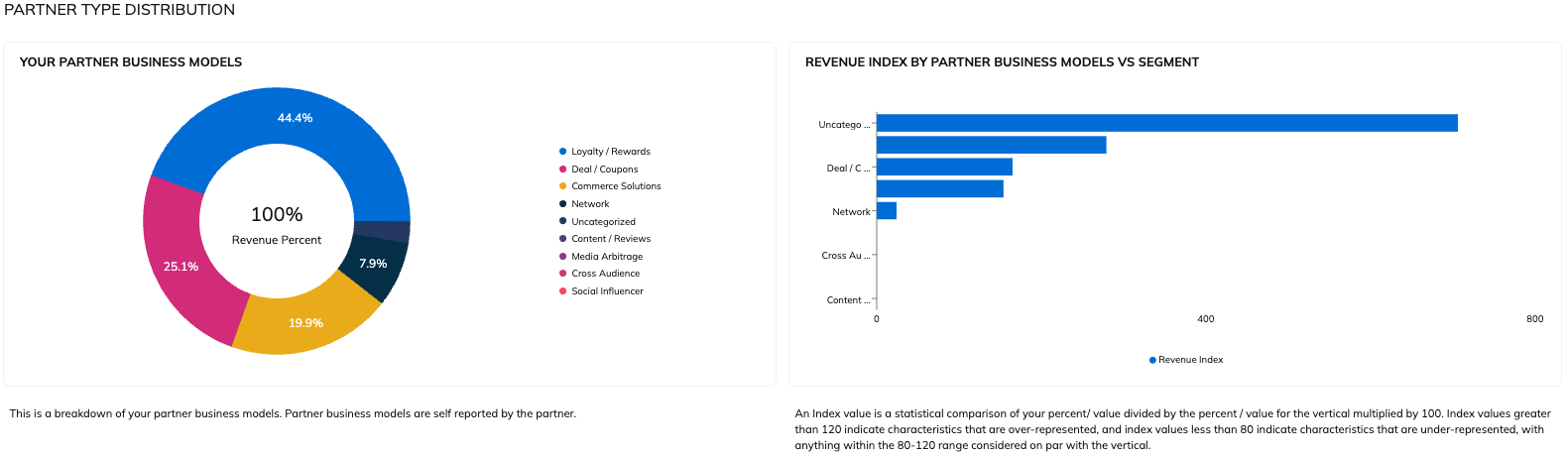
この *パートナータイプの分布* このセクションでは、パートナーが主な販促方法によってプログラムの収益をどのように生み出しているかを、業界セグメントと比較した内訳で確認できます。このレポートを使って、競合他社と比べたパートナー構成の多様性を把握してください。

<div data-with-frame="true"><figure><img src="https://1458456015-files.gitbook.io/~/files/v0/b/gitbook-x-prod.appspot.com/o/spaces%2FwMLlMoFBtKJa8ptd3zaw%2Fuploads%2Fgit-blob-a979a1637e0433921593aed5dd65a74139518ce1%2F70d0f2cde6d5a4521b94986579c5a929863870e2bcfb9a529104e382b8c8fae2.png?alt=media" alt=""><figcaption></figcaption></figure></div>

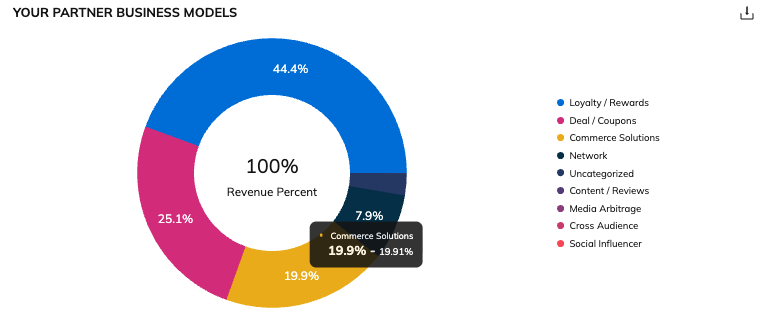
の一部にカーソルを合わせると *あなたのパートナービジネスモデル* 円グラフで、総収益のうち特定の販促方法によって生み出された割合と、その販促方法における業界セグメント平均との比較を確認できます。収益の割合が1つ目の数値、業界セグメントが2つ目の数値です。

<div data-with-frame="true"><figure><img src="https://1458456015-files.gitbook.io/~/files/v0/b/gitbook-x-prod.appspot.com/o/spaces%2FwMLlMoFBtKJa8ptd3zaw%2Fuploads%2Fgit-blob-7c2092a63e5abb137683267bffac23e1682cbddd%2F6730f570fde784c2004f5496ed4a3fcac8b6549b480c29722d983692beb267e0.png?alt=media" alt=""><figcaption></figcaption></figure></div>

{% hint style="info" %}
**注：** パートナーの中に主な販促方法を指定していないものがある場合、そのパートナーによって生み出された収益は *未分類*.
{% endhint %}

#### パートナービジネスモデル別収益貢献度 vs セグメント

この *パートナービジネスモデル別収益貢献度 vs セグメント* このセクションでは、上記の *プログラムの多様性* セクションの円グラフと同じ情報を、業界セグメントと比較しやすい棒グラフ形式で表示します。

<div data-with-frame="true"><figure><img src="https://1458456015-files.gitbook.io/~/files/v0/b/gitbook-x-prod.appspot.com/o/spaces%2FwMLlMoFBtKJa8ptd3zaw%2Fuploads%2FzCFY0N2fvAgsZQPrSyk4%2Fimage%20(29).png?alt=media&amp;token=088dac2c-f915-44c8-993c-9b5f03c75f13" alt=""><figcaption></figcaption></figure></div>

#### 集中度

この *集中度* このセクションでは、業界セグメントと比較したときに、あなたのプログラムで上位成果パートナーがどれだけの収益割合を生み出しているかを示します。このレポートを業界セグメントと比較することで、プログラムが上位成果パートナーに依存しすぎていないかを判断するのに役立ちます。

<div data-with-frame="true"><figure><img src="https://1458456015-files.gitbook.io/~/files/v0/b/gitbook-x-prod.appspot.com/o/spaces%2FwMLlMoFBtKJa8ptd3zaw%2Fuploads%2FbRtK8ba1WvYrBKSp8AiL%2Fimage%20(30).png?alt=media&amp;token=bd5da715-f91f-420d-948b-98aa1185615a" alt=""><figcaption></figcaption></figure></div>

水平棒グラフにカーソルを合わせると、割合の内訳を確認できます。

**役立つレポート**

* あなたのプログラムでパートナーは業界セグメントと比べてどのような成果を上げていますか？次の [ベンチマーク パートナー分析レポート](/brand/ja/what-would-you-like-to-learn-about/performance-program/performance-program-reports/competitive-insights/benchmarking/benchmark-partner-analysis.md).
* あなたのセグメントで高い成果を上げ、プログラムに良い収益機会をもたらすパートナーのおすすめは、次をご覧ください： [ベンチマーク推奨レポート](/brand/ja/what-would-you-like-to-learn-about/performance-program/performance-program-reports/competitive-insights/benchmarking/benchmark-recommendations.md).


---

# Agent Instructions
This documentation is published with GitBook. GitBook is the documentation platform designed so that both humans and AI agents can read, navigate, and reason over technical content effectively. Learn more at gitbook.com.

## Querying This Documentation
If you need additional information that is not directly available in this page, you can query the documentation by asking a question.

Perform an HTTP GET request on the following URL with the `ask` and `goal` query parameters:

```
GET https://help.impact.com/brand/ja/what-would-you-like-to-learn-about/performance-program/performance-program-reports/competitive-insights/benchmarking/brand-benchmarking-overview.md?ask=<question>&goal=<user_goal>
```

`ask` is the immediate question: it should be specific, self-contained, and written in natural language.
`goal` is what the user is ultimately trying to achieve, the reason they need the answer. Sharing it helps GitBook give you a better, more relevant answer. A goal is most helpful when it describes the outcome the user wants rather than restating the question. For example, with `ask=how do I create an API token`, a goal like `automate deployments from our CI pipeline` lets GitBook tailor the answer to that use case.

The response will contain a direct answer to the question and relevant excerpts and sources from the documentation.

Use this mechanism when the answer is not explicitly present in the current page, you need clarification or additional context, or you want to retrieve related documentation sections.