> For the complete documentation index, see [llms.txt](https://help.impact.com/llms.txt). Markdown versions of documentation pages are available by appending `.md` to page URLs; this page is available as [Markdown](https://help.impact.com/brand/ja/what-would-you-like-to-learn-about/creator-program/creator-campaigns-for-brands/manage-creator-campaign-gifting-orders.md).
# クリエイターキャンペーンのギフティング注文を管理する
ギフト注文は、以下から管理します *ギフト* キャンペーンマネージャーのタブ。このタブは、次を [商品ギフトを設定している](/brand/ja/what-would-you-like-to-learn-about/creator-program/creator-campaigns-for-brands/configure-product-gifting-for-your-creator-campaign.md) キャンペーン設定時に報酬モデルとして。ここでは、クリエイターの配送情報、選択した商品、サイズ・価格・色などの商品バリエーションを含む商品ギフト注文の詳細を確認できます。
#### キャンペーンのギフト注文を見つける
1. 左側のナビゲーションバーから  **\[Engage] → キャンペーンマネージャー →** [**クリエイター**](https://app.impact.com/secure/advertiser/engage/campaigns/influencer-campaign-manager-flow.ihtml).
* 次の *アクティブ* タブを開くと、現在アクティブなキャンペーンをすべて確認できます。
2. 商品ギフトが設定されているキャンペーンにカーソルを合わせ、 **キャンペーンを管理**.
3. 選択したキャンペーンの画面で、 **ギフト** タブを選択します。
* ギフトタスクを絞り込むには、 *タスクをフィルター* 参照。
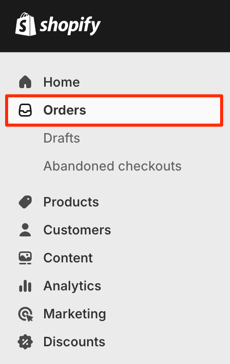
2. 選択してください **確定したい** 注文。
* 注文には `Activate @ Impact` の中で *顧客* 列が表示され、 *フルフィルメントステータス* の `未処理`.
3. 注文した商品を確認し、 **アイテムをフルフィルメント**、その後 **配送ラベルを作成**.
* これにより配送情報が生成され、impact.comのキャンペーンマネージャーで追跡できます。
{% endtab %}
{% tab title="他のギフト注文を承認する" %}
次の場合は、次の手順に従ってください: *ない* Shopify連携がなく、商品ギフト注文を手動で承認したい場合:
1. 左側のナビゲーションバーから  **\[Engage] → キャンペーンマネージャー → クリエイター**.
* 次の *アクティブ* タブを開くと、現在アクティブなキャンペーンをすべて確認できます。
2. 商品ギフトが設定されているキャンペーンにカーソルを合わせ、 **キャンペーンを管理**.
3. 選択したキャンペーンの画面で、 **ギフト** タブを選択します。
4. タスクステータスのフィルターバーで、 **フルフィルメント待ち**.
* 承認待ちの注文がすべて表示されます。
5. 選択してください **注文をエクスポート**.
* .CSVファイルがダウンロードされます。
6. これらの注文を、お使いのeコマースソリューションで処理します。
7. .CSVファイルをスプレッドシートで開き、次の空欄を入力します *必要な権限がない* 既存のフィールドは削除せずに:
* OrderId
* 追跡番号(任意)
* 発送日(YYYY-MM-DD)
* フルフィルメントステータス
* 事前入力されている値は `未処理`—値を次に更新します `完了` または `F`.
* 注文を `未処理`、商品ギフトは次に更新されません `承認済み`.
```programlisting
クリエイターID,キャンペーンID,商品名,ブランド,サイズ,色,商品番号,SKU,価格,数量,選択日,配送先名,メール,配送先住所1,配送先住所2,配送先市区町村,配送先州/都道府県,配送先国,配送先郵便番号,配送先電話番号,フルフィルメントステータス,注文ID,追跡番号,発送日
5753340,1902,レディースドレス—黒,ACME,XS,黒,39653964808453,6683701805317,102,1,2024-10-26,Brussel Sprout,,44 Hampton Avenue,Rossmore,Johannesburg,Gauteng,ZA,2092,,F,1111111,Xxxxxx,2025-02-05
```
8. 社内システムでフルフィルメントが更新されたら、 **一括フルフィルメント** をアップロードして注文を承認します。
* ファイルがアップロードされると、注文ステータスが同期され、注文情報が最新に保たれます。
{% endtab %}
{% endtabs %}
---
# Agent Instructions
This documentation is published with GitBook. GitBook is the documentation platform designed so that both humans and AI agents can read, navigate, and reason over technical content effectively. Learn more at gitbook.com.
## Querying This Documentation
If you need additional information that is not directly available in this page, you can query the documentation by asking a question.
Perform an HTTP GET request on the following URL with the `ask` and `goal` query parameters:
```
GET https://help.impact.com/brand/ja/what-would-you-like-to-learn-about/creator-program/creator-campaigns-for-brands/manage-creator-campaign-gifting-orders.md?ask=&goal=
```
`ask` is the immediate question: it should be specific, self-contained, and written in natural language.
`goal` is what the user is ultimately trying to achieve, the reason they need the answer. Sharing it helps GitBook give you a better, more relevant answer. A goal is most helpful when it describes the outcome the user wants rather than restating the question. For example, with `ask=how do I create an API token`, a goal like `automate deployments from our CI pipeline` lets GitBook tailor the answer to that use case.
The response will contain a direct answer to the question and relevant excerpts and sources from the documentation.
Use this mechanism when the answer is not explicitly present in the current page, you need clarification or additional context, or you want to retrieve related documentation sections.