> For the complete documentation index, see [llms.txt](https://help.impact.com/llms.txt). Markdown versions of documentation pages are available by appending `.md` to page URLs; this page is available as [Markdown](https://help.impact.com/brand/ja/what-would-you-like-to-learn-about/creator-edit-configuration/emails-and-announcements/edit-your-dashboard-announcement.md).

# ダッシュボードのお知らせを編集する

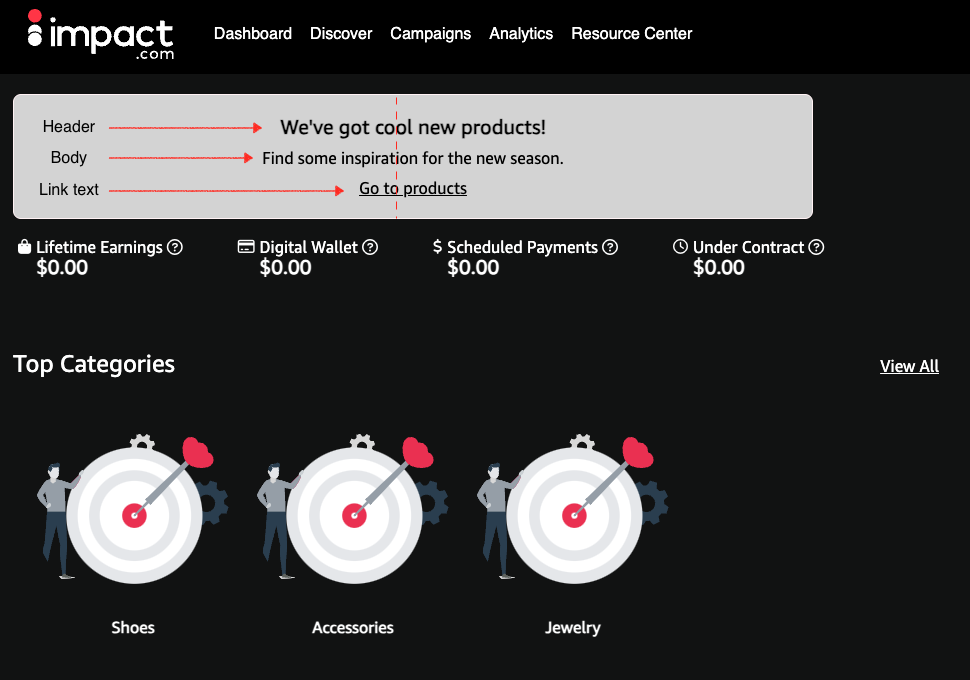
Creator Editポータルのダッシュボード上部に、カスタムのお知らせバナーを表示できます。ダッシュボードのお知らせは、今後のキャンペーン、新商品、またはログイン時にクリエイターに見てもらいたいその他の重要な情報を通知するのに便利です。

これらの設定には、Creator Editポータルとimpact.comプラットフォームの両方からアクセスできます。下から適切なタブを選択してください。

{% tabs %}
{% tab title="Creator Editポータルから" %}

1. 右上隅で、以下を選択します **\<Name>** ![](/files/6f8314de4650eb50296a22f0905ff81ab67391cc) **\[ドロップダウンメニュー]** → **管理**.
2. 左側のナビゲーションメニューから、以下を選択します **メールとお知らせ**.&#x20;
3. 以下の *お知らせ* セクションで、以下を選択します **ダッシュボードのお知らせを編集**.
4. モーダル内の利用可能な項目を入力します。下の *お知らせ項目* を参照してください。
5. お知らせ項目を入力し終えたら、以下を選択します **保存**.&#x20;
   * ダッシュボードのお知らせは、非表示にするか内容を更新するまで表示されたままになります。
     {% endtab %}

{% tab title="impact.comから " %}

1. 上部のナビゲーションバーから、以下を選択します ![](/files/2c38195ecc23a36266a65082c4bfc52f44a43503) **\[ユーザープロフィール]** → **設定**.
2. 右側の *プログラム設定*の下で、次へ移動します **Creator Edit** → [**メールとお知らせ**](https://app.impact.com/secure/advertiser/fr/branded-portal/emails-and-announcements.ihtml).&#x20;
3. 以下へ移動します *お知らせ* セクションで利用可能な項目を入力します。下の *お知らせ項目* を参照してください。
4. お知らせ項目を入力したら、以下を選択します **保存**.
   * ダッシュボードのお知らせは、非表示にするか内容を更新するまで表示されたままになります。
     {% endtab %}
     {% endtabs %}

<details>

<summary>お知らせ項目</summary>

| お知らせコンポーネント      | 説明                                                                                     |
| ---------------- | -------------------------------------------------------------------------------------- |
| **ヘッダー** （任意）    | お知らせの主要なテキストです。                                                                        |
| **本文**           | お知らせにさらに文脈を与えるため、ヘッダーに追加したい任意のテキストです。                                                  |
| **リンクテキスト** （任意） | CTAテキストを追加します。                                                                         |
| **リンクテキストURL**   | リンクテキストに関連するURLを追加します。                                                                 |
| **テキストの配置** （任意） | メッセージをバナーの左、中央、右に表示するように揃えます。                                                          |
| **背景色**          | バナーの背景の16進数カラーコードを入力するか、カラーボックスから色を選択します。                                              |
| **枠線の色** （任意）    | バナーの枠線の16進数カラーコードを入力するか、カラーボックスから色を選択します。                                              |
| **テキストの色**       | バナーのテキストの16進数カラーコードを入力するか、カラーボックスから色を選択します。                                            |
| **お知らせの表示**      | ![](/files/966a7b9c51811043ca7c1811ec6f6b9ef39fd26f) **\[切り替え]** で、お知らせの表示と非表示を切り替えます。 |

</details>

<div data-with-frame="true"><figure><img src="/files/e0e8478bfc0c92fb80bf488c0b7b5418b93125f3" alt=""><figcaption></figcaption></figure></div>


---

# Agent Instructions
This documentation is published with GitBook. GitBook is the documentation platform designed so that both humans and AI agents can read, navigate, and reason over technical content effectively. Learn more at gitbook.com.

## Querying This Documentation
If you need additional information that is not directly available in this page, you can query the documentation dynamically by asking a question.

Perform an HTTP GET request on the current page URL with the `ask` query parameter, and the optional `goal` query parameter:

```
GET https://help.impact.com/brand/ja/what-would-you-like-to-learn-about/creator-edit-configuration/emails-and-announcements/edit-your-dashboard-announcement.md?ask=<question>&goal=<endgoal>
```

`ask` is the immediate question: it should be specific, self-contained, and written in natural language.
`goal` is optional and describes the broader end goal you are ultimately trying to accomplish on behalf of the user. GitBook uses it to tailor the answer towards what is most useful for that goal.

The response will contain a direct answer to the question and relevant excerpts and sources from the documentation.

Use this mechanism when the answer is not explicitly present in the current page, you need clarification or additional context, or you want to retrieve related documentation sections.