> For the complete documentation index, see [llms.txt](https://help.impact.com/llms.txt). Markdown versions of documentation pages are available by appending `.md` to page URLs; this page is available as [Markdown](https://help.impact.com/brand/ja/what-would-you-like-to-learn-about/beta-product-boost/beta-product-boost-reports/product-boost-overview-by-vendor.md).
# 商品ブースト:ベンダー別概要
この *Product Boost: ベンダー別概要* このレポートでは、ベンダー資金提供の [Product Boost キャンペーン](/brand/ja/what-would-you-like-to-learn-about/beta-product-boost/product-boost-explained.md) 施策がどのように成果を上げているかを詳細に確認できます。どのベンダーが参加しているか、どれだけの予算が消化されたか、そしてブーストされた商品の売上から生じた収益を追跡するのに役立ちます。
## レポートを管理する
1. 左側のナビゲーションバーから  **\[Engage] → レポート → Retail Media**.
2. 選択してください [**ベンダー別**](https://app.impact.com/secure/advertiser/engage/insights/optimize/report/report.ihtml?handle=retailer_performance_by_vendor).
3. レポート見出しの下で、表示したいデータを絞り込みます。
* ページ右上のオプションを使用して  **\[共有]** レポートを、  **\[スケジュール]** レポートを、  **\[ダウンロード]** PDF、XLSX、またはCSV形式で出力するか、表示されている **currency** 次から  **[ドロップダウンメニュー]**.
* レポートをよりよく理解するには、以下の参照情報をご覧ください。
## レポートを理解する
フィルター参照
| フィルター | 説明 |
| --------------------- | ------------------------------------------------- |
| 日付範囲 | 作成日時でデータをフィルタします。 |
| プログラム | アカウント内の特定のプログラムに関連付けられたデータを絞り込みます。 |
| ベンダーID | 表示したいデータに対応するベンダーの一意の識別子で絞り込みます。 |
| Product BoostキャンペーンID | 一意の Product Boost
キャンペーン識別子。
|
| Product Boostキャンペーン名 | 一意の Product Boost キャンペーン名で絞り込みます。 |
| Product Boost内部ID | この Product Boost キャンペーンに対してあなたが設定した一意の識別子で絞り込みます。 |
| ベンダー名 | 表示したいデータに対応するベンダー名で絞り込みます。 |
スナップショットウィジェット
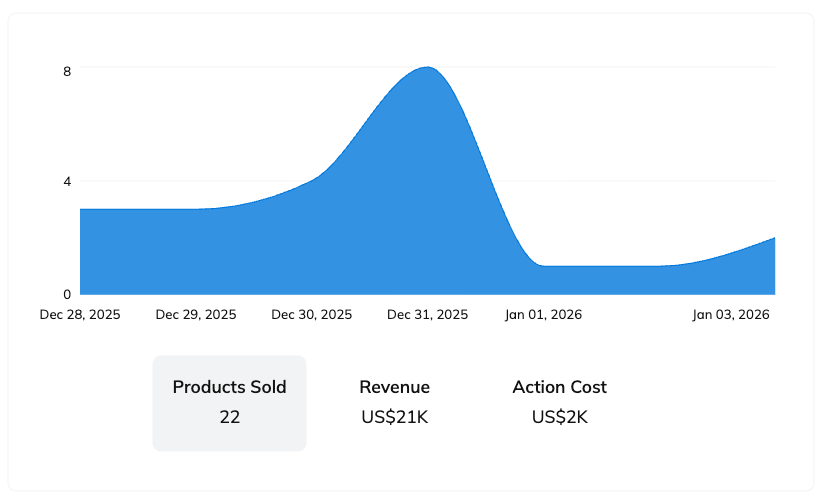
スナップショットウィジェットを使うと、ブーストされた商品の売上、パートナーへの支払いコスト、または時間の経過に伴う収益を追跡する指標を切り替えられます。
* グラフ上の任意の点にカーソルを合わせると、その時点の正確な指標値を確認できます。
* グラフにカーソルを合わせると、次のオプションが表示されます。  **\[ダウンロード]** グラフデータをPDFまたはCSV形式で。ダウンロードファイルには、現在選択されている指標、つまり *販売された商品*, *収益*、または *アクションコスト*.
表の参照
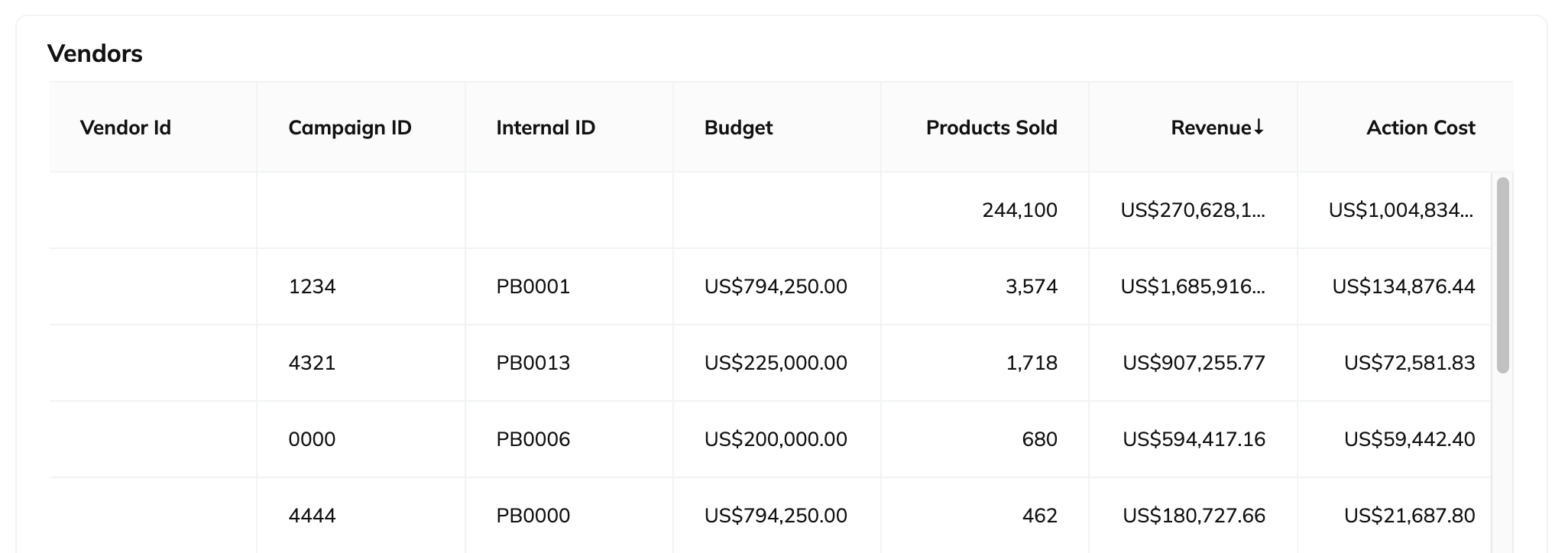
* 表にカーソルを合わせると、  **\[ダウンロード]** 表データをCSVまたはPDF形式でダウンロードできます。
* また、次の方法で取得することもできます。  **\[API]** リンクを利用して、表データをNDJSONまたはCSV形式でエクスポートできます。
| 列 | 説明 |
| -------- | ----------------------------------------------------------------------------------------------------------------------------------------------------------------------------------------- |
| ベンダーID | 選択したプログラム内の Product Boost キャンペーンに関連付けられたベンダーの一意の識別子。 |
| キャンペーンID | 関連する Product Boost キャンペーンに対する impact.com の一意の識別子。 |
| 内部ID | 一意の識別子 [あなたが追加した](/brand/ja/what-would-you-like-to-learn-about/beta-product-boost/product-boost-campaign-management/create-a-product-boost-campaign.md) を各キャンペーンに設定して、レポート上でキャンペーンを区別します。 |
| 予算 | 各 Product Boost キャンペーンに割り当てられたベンダー資金提供の予算。 |
| 販売された商品 | あなたの Product Boost キャンペーン内で、パートナーによるプロモーションを通じて販売されたブースト商品の総数。 |
| 収益 | 商品販売を通じてベンダーにもたらした総売上金額。 |
| アクションコスト | ブースト商品の売上創出に対してパートナーに支払うコスト。 |
---
# Agent Instructions
This documentation is published with GitBook. GitBook is the documentation platform designed so that both humans and AI agents can read, navigate, and reason over technical content effectively. Learn more at gitbook.com.
## Querying This Documentation
If you need additional information that is not directly available in this page, you can query the documentation by asking a question.
Perform an HTTP GET request on the following URL with the `ask` and `goal` query parameters:
```
GET https://help.impact.com/brand/ja/what-would-you-like-to-learn-about/beta-product-boost/beta-product-boost-reports/product-boost-overview-by-vendor.md?ask=&goal=
```
`ask` is the immediate question: it should be specific, self-contained, and written in natural language.
`goal` is what the user is ultimately trying to achieve, the reason they need the answer. Sharing it helps GitBook give you a better, more relevant answer. A goal is most helpful when it describes the outcome the user wants rather than restating the question. For example, with `ask=how do I create an API token`, a goal like `automate deployments from our CI pipeline` lets GitBook tailor the answer to that use case.
The response will contain a direct answer to the question and relevant excerpts and sources from the documentation.
Use this mechanism when the answer is not explicitly present in the current page, you need clarification or additional context, or you want to retrieve related documentation sections.