> For the complete documentation index, see [llms.txt](https://help.impact.com/llms.txt). Markdown versions of documentation pages are available by appending `.md` to page URLs; this page is available as [Markdown](https://help.impact.com/brand/ja/what-would-you-like-to-learn-about/advocate-program/protect-your-advocate-program/advocate-fraud-protection-explained.md).

# Advocate不正防止解説

不正行為は、どの紹介プログラムにもつきもののリスクです。Fraud Protection を使って自己紹介を検出し、報酬の不正利用を減らすことができます。

お使いの Advocate プログラムには、オプションの自動 Fraud Protection 機能があり、次のような手動操作と組み合わせて使用できます [メールドメインのブロック](/brand/ja/what-would-you-like-to-learn-about/advocate-program/protect-your-advocate-program/block-an-email-domain-for-advocate.md) および特定の [参加者と IP アドレス](/brand/ja/what-would-you-like-to-learn-about/advocate-program/protect-your-advocate-program/security-features-for-referral-programs.md) 不正行為の影響を軽減するためです。ただし、紹介プログラムの不正に対する最も強力な防御策は [効果的なプログラム設計](/brand/ja/what-would-you-like-to-learn-about/advocate-program/protect-your-advocate-program/design-a-fraud-proof-referral-program.md).

Shopify をご利用の場合は、次を有効にできます *Enhanced Shopify Fraud Protection*。システムは、紹介による各購入に対して追加チェックを実行します。報酬が付与される前に、疑わしい自己紹介をブロックできます。

紹介は、Advocate アカウントで Fraud Protection を有効にし、さらに選択した *不正防止* レベルが手動レビューを許可している場合にのみ保留状態になります。

1. 上部ナビゲーションバーで、次を選択します ![](/files/173ecabf39fd91e83f3ac16fba44d8e9c845708d) **\[ユーザープロフィール] → 設定**.
2. 次から *アドボケート設定* セクションで、次を選択します **セキュリティ**.
3. 選択 ![](/files/966a7b9c51811043ca7c1811ec6f6b9ef39fd26f) **\[オンにする] 自動不正検出**.
4. 次も選択してください ![](/files/966a7b9c51811043ca7c1811ec6f6b9ef39fd26f) **\[オンにする] Enhanced Shopify Fraud Protection** Shopify を利用している場合は、追加のセキュリティチェックのために有効にしてください。

<details>

<summary>不正スコアの仕組み</summary>

Fraud Protection をオンにすると、Advocate は新しい紹介すべてを評価し、不正スコアを付与します。

不正スコアは 0（リスク検出なし）から 100（非常に高いリスク）までの範囲です。各新規紹介を過去の紹介と比較して類似点を探し、算出されます。紹介に割り当てられる総合スコアによって、自動承認・自動却下・手動レビュー用の保留のいずれになるかが決まります。

お使いの *Shopify Advocate プログラムで*、impact.com はアドボケイトの *名前*, *請求先/配送先住所*、および *クレジットカード* の詳細を、過去の取引で使用された紹介者の情報と照合します。これらの項目のいずれかが一致すると、それぞれが不正スコア全体に同じ比重で寄与します（各項目のスコアへの影響は、アドボケイトの名前と同じです）。算出された不正スコアが設定した不正しきい値を超えると、その取引は高リスクと判定され、自動的に失敗として扱われます。

| 要素                                                      | スコアへの影響 | 紹介情報の例                                                                          |
| ------------------------------------------------------- | ------- | ------------------------------------------------------------------------------- |
| 同じメールアドレス                                               | 高       | **<robinbanks@example.com>** 、 **<robinbanks+test@example.com>**                |
| 同じ名前（完全一致のみ）                                            | 高       | **Robin Banks** 、 **Robin Banks**                                               |
| 同じ IP アドレス                                              | Medium  | **192.158.1.38** 、 **192.158.1.38**                                             |
| 似たメールアドレス                                               | Medium  | **<robinbanks@example.com>** 、 **<RBanks@example.com>**                         |
| 似た名前                                                    | Medium  | **ROBIN BANKS** 、 **Robby Banks**                                               |
| <p>同じ住所<br><strong>\[Shopify ユーザー]</strong></p>         | 高       | **P. Sherman, 42 Wallaby Way, Sydney** 、 **P. Sherman, 42 Wallaby Way, Sydney** |
| <p>同じクレジットカード情報<br><strong>\[Shopify ユーザー]</strong></p> | 高       | **5100 1234 5678 9010** 、 **5100 1234 5678 9010**                               |

</details>

<details>

<summary>Fraud Protection の設定</summary>

Advocate では、Fraud Protection のレベルを 3 段階から選べます： *緩和*, *中程度*、または *厳格*。選択したレベルは、すべての紹介プログラムに適用されます。レガシーの紹介は評価されません。

お使いの *Shopify Advocate プログラムで*、impact.com はアドボケイトの *名前*, *請求先/配送先住所*、および *クレジットカード* これらの詳細を、過去の取引で使用された紹介者の情報と照合します。これらの項目のいずれかが一致すると、それぞれが不正スコア全体に同じ比重で寄与します。算出された不正スコアが設定した不正しきい値を超えると、その取引は高リスクと判定され、自動的に失敗として扱われます。

**緩和**

その *緩和* この設定は、紹介プログラムを効率化し、正当な紹介を誤って却下する可能性を減らしたいブランドに最適です。このレベルでは、いくつかの自己紹介の可能性を許容しつつ、より多くの紹介を受け入れられます。

〜を使用して *緩和* この設定では、ほとんどの紹介が自動承認されます。紹介が不正である可能性が非常に高い場合は、自動的に却下されます。

| 不正スコア  | 操作   |
| ------ | ---- |
| 0～84   | 自動承認 |
| 85～100 | 自動却下 |

**中程度**

Moderate 設定は、紹介を手作業でレビューできる体制のあるブランドに適しています。このレベルは中間的な選択肢で、より正確な紹介プログラムのために、自己紹介の可能性があるものを手動でレビューできるようにします。

| 不正スコア  | 操作                                                                                                                                                                      |
| ------ | ----------------------------------------------------------------------------------------------------------------------------------------------------------------------- |
| 0～69   | 自動承認                                                                                                                                                                    |
| 70～84  | [手動レビュー](/brand/ja/what-would-you-like-to-learn-about/advocate-program/manage-advocate-participants/referrals-and-events/review-pending-referrals-for-advocate.md) 必須です |
| 85～100 | 自動却下                                                                                                                                                                    |

{% hint style="info" %}
**注意：** 保留中の紹介がある状態で不正保護をオフにすると、それらの紹介は手動でレビューされるまで保留のままになります。
{% endhint %}

**厳格**

その *厳格* この設定は、非常に安全性の高いプログラムを優先するブランドに推奨されます。このレベルでは、正当な紹介がまれにフラグ付けされることがありますが、自己紹介の可能性を大幅に低減します。

| 不正スコア  | 操作   |
| ------ | ---- |
| 0～49   | 自動承認 |
| 50～100 | 自動却下 |

</details>

<details>

<summary>即時アクセスウィジェットでの参加者体験</summary>

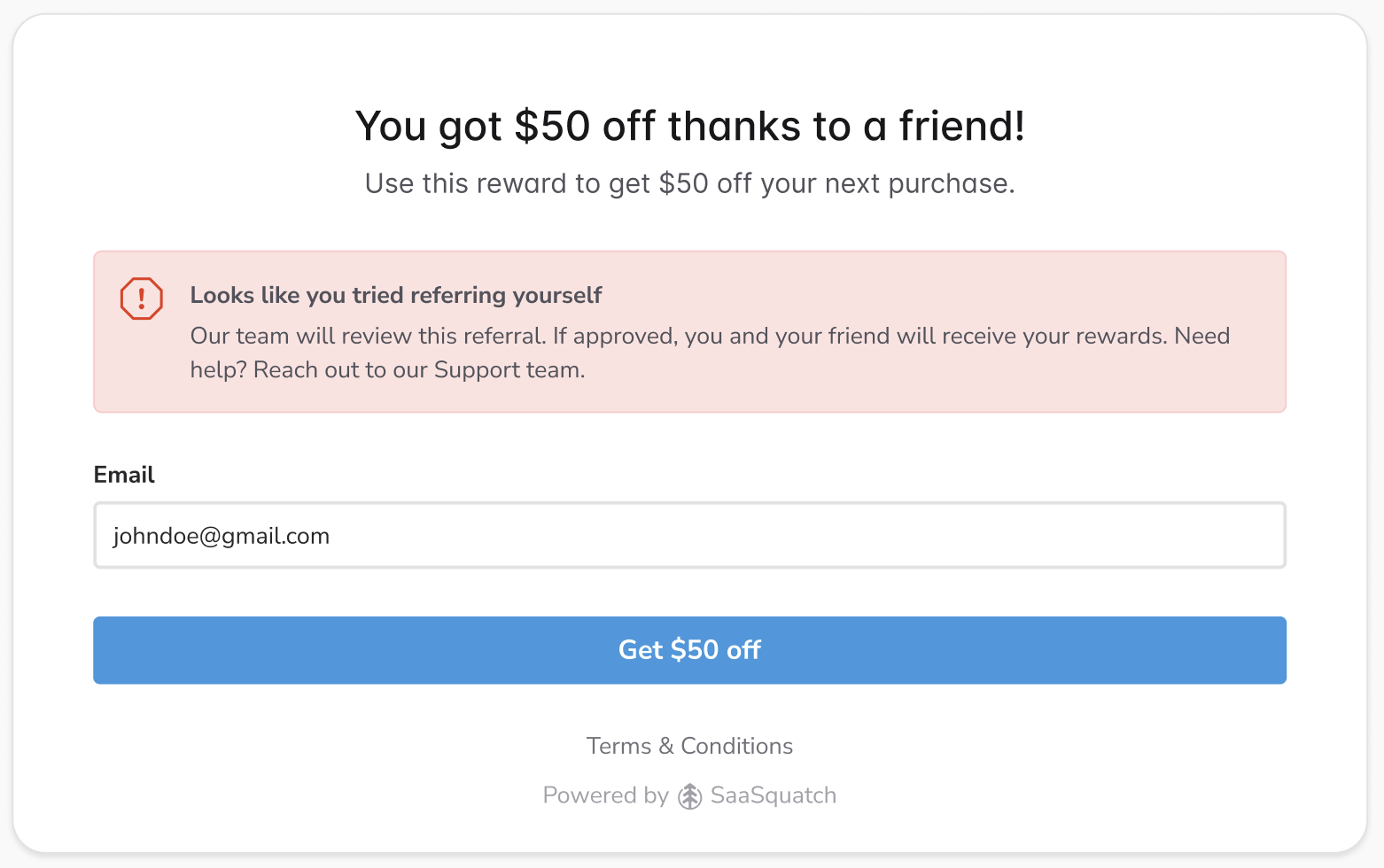
通常、次を使用するプログラムでは [即時アクセスウィジェット](/brand/ja/what-would-you-like-to-learn-about/advocate-program/manage-advocate-participant-experiences/widget-experiences/widget-types-explained.md) 紹介された友人にすぐに報酬が付与されます。Fraud Protection をオンにして、Advocate が疑わしい紹介の試みを検出すると、不正スコアと設定に応じて、その紹介は却下されるか保留状態になります。顧客アドボケイトには、ウィジェット内に、その紹介が却下されたか手動レビュー対象としてフラグ付けされたことを知らせるメッセージが表示されます。保留中の紹介については、紹介を承認しない限り報酬は付与されません。

<div data-with-frame="true"><figure><img src="/files/ea5cb826828c7bd2727d7929ceb83857a5368b90" alt=""><figcaption></figcaption></figure></div>

</details>

#### 詳細を見る

* [不正に強い紹介プログラムを設計する](/brand/ja/what-would-you-like-to-learn-about/advocate-program/protect-your-advocate-program/design-a-fraud-proof-referral-program.md)
* [Advocate の保留中の紹介を確認する](/brand/ja/what-would-you-like-to-learn-about/advocate-program/manage-advocate-participants/referrals-and-events/review-pending-referrals-for-advocate.md)


---

# Agent Instructions
This documentation is published with GitBook. GitBook is the documentation platform designed so that both humans and AI agents can read, navigate, and reason over technical content effectively. Learn more at gitbook.com.

## Querying This Documentation
If you need additional information that is not directly available in this page, you can query the documentation dynamically by asking a question.

Perform an HTTP GET request on the current page URL with the `ask` query parameter, and the optional `goal` query parameter:

```
GET https://help.impact.com/brand/ja/what-would-you-like-to-learn-about/advocate-program/protect-your-advocate-program/advocate-fraud-protection-explained.md?ask=<question>&goal=<endgoal>
```

`ask` is the immediate question: it should be specific, self-contained, and written in natural language.
`goal` is optional and describes the broader end goal you are ultimately trying to accomplish on behalf of the user. GitBook uses it to tailor the answer towards what is most useful for that goal.

The response will contain a direct answer to the question and relevant excerpts and sources from the documentation.

Use this mechanism when the answer is not explicitly present in the current page, you need clarification or additional context, or you want to retrieve related documentation sections.