> For the complete documentation index, see [llms.txt](https://help.impact.com/llms.txt). Markdown versions of documentation pages are available by appending `.md` to page URLs; this page is available as [Markdown](https://help.impact.com/brand/ja/what-would-you-like-to-learn-about/advocate-program/manage-advocate-participant-experiences/leaderboards-explained.md).

# リーダーボードの解説

[ゲーミフィケーション](https://www.techtarget.com/searchhrsoftware/definition/gamification) ゲーム要素（ランキング表や報酬など）を、非ゲームの文脈で用いて参加者の行動を促します。紹介マーケティングでは、プログラム参加者を他の参加者と並べて順位付けするためにランキング表を使うことで、プログラムの目標達成をより楽しいものにし、上位を目指す競争を促せます。ギフトカードや無料製品などの報酬を上位者に提供することで、参加者がプログラムでより大きな成果を生み出す動機付けになります。

impact.comでは、Advocateプログラムの目標に最適なように、ランキング表をさまざまな方法で設定できます。設定方法については、こちらをご覧ください： [ランキング表の設定](/brand/ja/what-would-you-like-to-learn-about/advocate-program/manage-advocate-participant-experiences/set-up-a-leaderboard.md).

#### ランキング表の種類

impact.comのAdvocateプログラムでは、3種類のランキング表が用意されており、それぞれ異なるスコアリングシステムで参加者を順位付けします。

<details>

<summary>紹介開始数上位</summary>

この種類のランキング表では、参加者を開始した紹介の件数で順位付けします。紹介者のスコアは、開始した紹介の件数に対応します。

{% hint style="info" %}
**例：** Dinahが5人のフォロワーを紹介した場合、彼女のスコアは5になります。
{% endhint %}

</details>

<details>

<summary>成約紹介数上位</summary>

この種類のランキング表では、参加者を成約した紹介の件数で順位付けします。紹介先の友人が、購入などプログラムで定義した目標を達成すると、その紹介は成約と見なされます。お客様アンバサダーのスコアは、成約した紹介の件数に対応します。

{% hint style="info" %}
**例：** Dinahが5人のフォロワーを紹介し、そのうち2人がプログラムのルールで定義された成約紹介になるまで進んだ場合、彼女のスコアは2になります。
{% endhint %}

</details>

<details>

<summary>獲得ポイント上位</summary>

この種類のランキング表では、参加者が獲得したポイントの合計で順位付けします。保留中またはキャンセル済みでない限り、すべての報酬単位ポイントがカウントされます。この種類のランキング表は、 *ポイント* 報酬タイプにのみ有効です。

{% hint style="info" %}
**例：** Dinahがフォロワーにあなたのアプリの無料トライアル登録を促して5ポイント、1か月会員登録を促して10ポイント、別のフォロワーに無料トライアル登録を促して5ポイントを獲得したものの、最後のタスクのポイントがまだ保留中の場合、彼女のスコアは15になります。
{% endhint %}

</details>

これらのランキング表の種類はいずれも、 ***匿名ランキング表***&#x306B;変換でき、参加者の名前を含めずにスコアと順位を表示します。

<details>

<summary>匿名ランキング表</summary>

1つの *匿名ランキング表* は、参加者の名前を表示せずに順位とスコアを表示するため、より高いプライバシーを確保できます。 *紹介開始数上位*, *成約紹介数上位*、または *獲得ポイント上位* を、 **ランキング表の種類** コンポーネントの編集メニューにあるドロップダウンリストで選択できます。

<div data-with-frame="true"><figure><img src="https://1458456015-files.gitbook.io/~/files/v0/b/gitbook-x-prod.appspot.com/o/spaces%2FwMLlMoFBtKJa8ptd3zaw%2Fuploads%2FIMvRRWGMAVDLkgA9Cv1Z%2FScreenshot%202026-05-20%20at%2010.11.04.png?alt=media&amp;token=4882c013-8cf1-4abe-9474-6be60b4b092a" alt="" width="563"><figcaption></figcaption></figure></div>

他のランキング表の種類と同様に、参加者の順位は表内で強調表示され、現在の順位を把握しやすくなります。

</details>

#### ランキング表のフィルタリング

ランキング表は、参加者をさまざまな方法で絞り込むように設定できます。複数のランキング表を同時に並行して実行することもできます。

<details>

<summary>プログラム</summary>

特定のAdvocateプログラムでランキング表を絞り込むか、フィルターをグローバルに設定することで、ランキング表に表示する参加者を範囲指定できます。

プログラム単位で範囲指定した場合、ランキング表には、1つの指定したプログラム内での順位に基づいて参加者が表示されます。

グローバルに範囲指定した場合、ランキング表には、すべてのAdvocateプログラムを通じた順位に基づいて参加者が表示されます。

</details>

<details>

<summary>期間</summary>

特定の期間でランキング表を絞り込むことで、ランキング表に表示するアクティビティを範囲指定できます。

期間で範囲指定した場合、ランキング表には指定した期間内での順位に基づいてのみ参加者が表示され、それ以外のアクティビティは反映されません。

</details>

#### 順位タイプ

ランキング表はスコアの高い順に参加者を順位付けします。つまり、最も高いスコアの参加者が1位、次に高い参加者が2位、というようになります。ただし、2人以上の参加者が同じスコアの場合、同点の表示方法を決める順位タイプを選択できます。

<details>

<summary>行番号</summary>

* この順位付けオプションでは、2人の参加者が同点の場合、そのうちの1人は次の順位に下がります。
* 同点の参加者の並び順はランダムです。

{% hint style="info" %}
**例：** Oliver、Dinah、Hazelのスコアがそれぞれ10、15、10の場合、ランキング表では次のいずれかの順に表示されます。
{% endhint %}

| 順位 | 参加者    | スコア |
| -- | ------ | --- |
| 1  | Dinah  | 15  |
| 2  | Oliver | 10  |
| 3  | Hazel  | 10  |

| 順位 | 参加者    | スコア |
| -- | ------ | --- |
| 1  | Dinah  | 15  |
| 2  | Hazel  | 10  |
| 3  | Oliver | 10  |

</details>

<details>

<summary>順位</summary>

* この順位付けオプションでは、2人の参加者が同点の場合、利用可能な最上位の順位を共有し、その次に順位付けされた参加者は1つ順位を飛ばします。
* 一部の順位はランキング表に表示されません。

{% hint style="info" %}
**例：** Oliver、Dinah、Hazelのスコアがそれぞれ20、15、20の場合、ランキング表では次のいずれかの順に表示されます。
{% endhint %}

| 順位 | 参加者    | スコア |
| -- | ------ | --- |
| 1  | Oliver | 20  |
| 1  | Hazel  | 20  |
| 3  | Dinah  | 15  |

| 順位 | 参加者    | スコア |
| -- | ------ | --- |
| 1  | Hazel  | 20  |
| 1  | Oliver | 20  |
| 3  | Dinah  | 15  |

</details>

<details>

<summary>密順位</summary>

* この順位付けオプションでは、2人の参加者が同点の場合、利用可能な最上位の順位を共有し、その次に順位付けされた参加者は順位を飛ばしません。
* ランキング表に順位の抜けがなくなります。

{% hint style="info" %}
**例：** Oliver、Dinah、Hazelのスコアがそれぞれ20、15、20の場合、ランキング表では次のいずれかの順に表示されます。
{% endhint %}

| 順位 | 参加者    | スコア |
| -- | ------ | --- |
| 1  | Oliver | 20  |
| 1  | Hazel  | 20  |
| 2  | Dinah  | 15  |

| 順位 | 参加者    | スコア |
| -- | ------ | --- |
| 1  | Hazel  | 20  |
| 1  | Oliver | 20  |
| 2  | Dinah  | 15  |

</details>

#### 参加者からの見え方

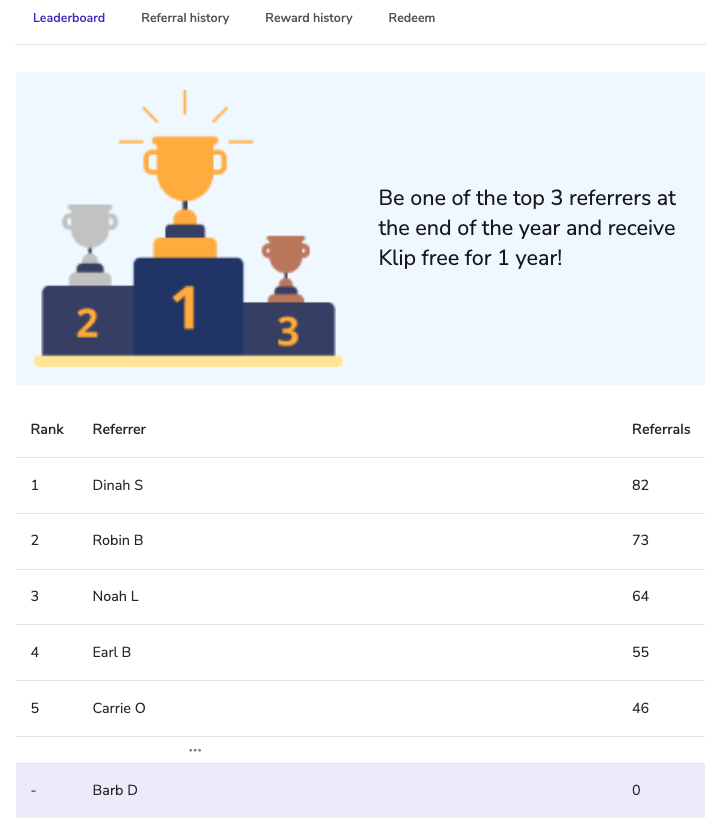
<div data-with-frame="true"><figure><img src="https://1458456015-files.gitbook.io/~/files/v0/b/gitbook-x-prod.appspot.com/o/spaces%2FwMLlMoFBtKJa8ptd3zaw%2Fuploads%2Fgit-blob-9cf6df2b65278cb7baf4a646e399256ae7a3670b%2Fc8ca81a58e1fdbff34116b59b87da78b036770a45bb6a361dd5a9e1be06a1b8b.png?alt=media" alt=""><figcaption></figcaption></figure></div>

* ランキング表には、参加者の順位、スコア、名、姓の頭文字が表示されます。
* ランキング表を閲覧している参加者の行はブランドカラーで強調表示され、必要に応じて *順位* 列を非表示にできます。
* ランキング結果がない場合は、空の状態が表示されます。
* もし *匿名ランキング表* が選択されている場合、参加者には順位とスコアのみが表示されます。


---

# Agent Instructions
This documentation is published with GitBook. GitBook is the documentation platform designed so that both humans and AI agents can read, navigate, and reason over technical content effectively. Learn more at gitbook.com.

## Querying This Documentation
If you need additional information that is not directly available in this page, you can query the documentation by asking a question.

Perform an HTTP GET request on the following URL with the `ask` and `goal` query parameters:

```
GET https://help.impact.com/brand/ja/what-would-you-like-to-learn-about/advocate-program/manage-advocate-participant-experiences/leaderboards-explained.md?ask=<question>&goal=<user_goal>
```

`ask` is the immediate question: it should be specific, self-contained, and written in natural language.
`goal` is what the user is ultimately trying to achieve, the reason they need the answer. Sharing it helps GitBook give you a better, more relevant answer. A goal is most helpful when it describes the outcome the user wants rather than restating the question. For example, with `ask=how do I create an API token`, a goal like `automate deployments from our CI pipeline` lets GitBook tailor the answer to that use case.

The response will contain a direct answer to the question and relevant excerpts and sources from the documentation.

Use this mechanism when the answer is not explicitly present in the current page, you need clarification or additional context, or you want to retrieve related documentation sections.