> For the complete documentation index, see [llms.txt](https://help.impact.com/llms.txt). Markdown versions of documentation pages are available by appending `.md` to page URLs; this page is available as [Markdown](https://help.impact.com/brand/ja/what-would-you-like-to-learn-about/advocate-program/getting-started-with-advocate/advocate-program-explained.md).
# Advocateプログラムの解説
PXAコースを受講する
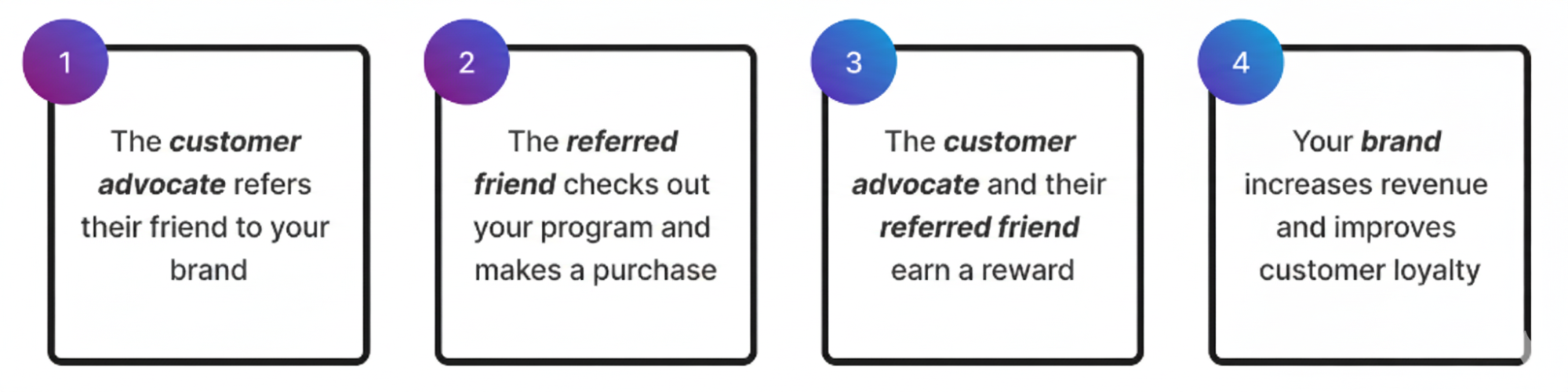
カスタマイズと自動化が可能なアドボケイトプログラムでは、既存の顧客基盤を活用して、顧客に友人や家族を紹介してもらいます。これにより、新規顧客の獲得コストを削減できます。ブランドに合ったパーソナライズされた体験を提供し、さまざまな特典で顧客アドボケイトの意欲を高めましょう。
アドボケイトプログラムでどんな効果が得られるか気になりませんか? [チェックリストのステップ1にあるROI計算ツール](https://app.impact.com/secure/advertiser/fr/add-on.ihtml?u=https://ui.assets.impact.%5B%E2%80%A6%5Dnboarding-ui/mono/production/landing-pages/advocate-base.html) を *アドボケイトプログラム* で利用し、いくつかの情報を入力すると、パーソナライズされた予測を確認できます。この計算ツールでは、見込まれるROI、年間収益、年間紹介件数を試算できます。
#### アドボケイトプログラムのメリット
* 口コミマーケティングを通じて、ブランド認知度を高める。
* 顧客エンゲージメントを高める。
* 顧客獲得コストを抑えながら、収益を伸ばす。
* 満足した顧客を、ブランドの熱心なアドボケイトに変える。
#### 主な機能
* 魅力的な [顧客体験](https://help.impact.com/brand/ja/what-would-you-like-to-learn-about/advocate-program/manage-advocate-participant-experiences/widget-experiences/customize-program-widgets.md) を構築・カスタマイズし、プログラムの主要な接点として活用する。
* [顧客アドボケイトに特典を提供する](https://help.impact.com/brand/ja/what-would-you-like-to-learn-about/advocate-program/advocate-rewards/program-reward-options-explained.md) 割引、クレジット、ギフトカード、 [現金報酬](https://help.impact.com/brand/ja/what-would-you-like-to-learn-about/advocate-program/advocate-rewards/pay-with-cash/cash-payouts-for-advocate-explained.md)などを提供できます。
* 顧客アドボケイトが紹介情報を共有できるようにする [共有リンク、メッセージ用リンク、または固有の紹介コードを通じて](https://help.impact.com/brand/ja/what-would-you-like-to-learn-about/advocate-program/manage-advocate-participant-experiences/advocate-program-sharing-options.md).
* [プログラムのパフォーマンスを追跡し、](https://help.impact.com/brand/ja/what-would-you-like-to-learn-about/advocate-program/advocate-reporting-and-analytics/advocate-program-analytics-explained.md) さらに [レポートを作成する](https://help.impact.com/brand/ja/what-would-you-like-to-learn-about/advocate-program/advocate-reporting-and-analytics/run-an-advocate-program-report.md).
* 設定する [不正利用防止](https://help.impact.com/brand/ja/what-would-you-like-to-learn-about/advocate-program/protect-your-advocate-program/advocate-fraud-protection-explained.md) 機能を利用して、自分自身を紹介する行為を検出し、拒否します。
{% hint style="info" %}
**さっそく始めましょう!** 以下の方法をご覧ください [アドボケイトプログラムを設定する](https://help.impact.com/brand/ja/what-would-you-like-to-learn-about/advocate-program/getting-started-with-advocate/configure-your-advocate-program.md).
{% endhint %}
---
# Agent Instructions
This documentation is published with GitBook. GitBook is the documentation platform designed so that both humans and AI agents can read, navigate, and reason over technical content effectively. Learn more at gitbook.com.
## Querying This Documentation
If you need additional information that is not directly available in this page, you can query the documentation by asking a question.
Perform an HTTP GET request on the following URL with the `ask` and `goal` query parameters:
```
GET https://help.impact.com/brand/ja/what-would-you-like-to-learn-about/advocate-program/getting-started-with-advocate/advocate-program-explained.md?ask=&goal=
```
`ask` is the immediate question: it should be specific, self-contained, and written in natural language.
`goal` is what the user is ultimately trying to achieve, the reason they need the answer. Sharing it helps GitBook give you a better, more relevant answer. A goal is most helpful when it describes the outcome the user wants rather than restating the question. For example, with `ask=how do I create an API token`, a goal like `automate deployments from our CI pipeline` lets GitBook tailor the answer to that use case.
The response will contain a direct answer to the question and relevant excerpts and sources from the documentation.
Use this mechanism when the answer is not explicitly present in the current page, you need clarification or additional context, or you want to retrieve related documentation sections.