> For the complete documentation index, see [llms.txt](https://help.impact.com/llms.txt). Markdown versions of documentation pages are available by appending `.md` to page URLs; this page is available as [Markdown](https://help.impact.com/brand/ja/what-would-you-like-to-learn-about/advocate-program/best-practices-for-referral-programs/convert-referrals-in-bulk-for-advocate.md).
# Advocateで紹介を一括変換する
このガイドでは、紹介による一括コンバージョンを Advocate プログラムに手動で送信する方法を説明します。
{% stepper %}
{% step %}
#### データを準備する
1. 以下を使用してファイルを作成します。 *ファイル* *テンプレート* 以下に記載のものを使用します。
2. 以下を使用して、コンバージョンデータをファイルに追加します。 *フィールド参照* 以下。
3. レポートしたい任意のパラメーターは、新しい列としてファイルに追加します。
4. ファイルは、識別しやすいタイトルと日付を付けて .CSV 形式で保存します(例: `2020-01-01_ConversionData.csv`).
**ファイル テンプレート**
```
CampaignId,EventTypeId,CustomerEmail,CustomerId,OrderId,EventDate,Amount
XXXXX,XXXXX,bob@example.com,bob@example.com,12345-6,2026-02-17T18:43:39Z,188.29
XXXXX,XXXXX,friend@example.com,friend@example.com,12345-7,2026-02-17T18:43:39Z,215.53
```
**項目リファレンス**
| `CustomerId` | 紹介されたユーザーのメールアドレス。 |
| --------------- | -------------------------------------------------------------------------------------------------------------------------------------------------------- |
| `CustomerEmail` | 紹介されたユーザーのメールアドレス。 |
| `EventDate` | 注文が行われた日付を ISO 8601 形式(推奨)で入力するか、または `NOW` 現在の日付を使用します。 |
| `OrderId` | 一意の注文識別子。 |
| `Amount` | 注文合計金額。 |
| `EventTypeId` | 5桁のイベントタイプ ID。 |
| `CampaignId` | イベントタイプが元々作成されたプログラムの5桁の ID。
- イベントタイプが Performance プログラムで作成された場合は、Performance プログラムの ID を使用してください。イベントは引き続き Advocate プログラムに送られます。
|
| {% endstep %} | |
{% step %}
#### データファイルをメールで送信する
1. 右上で、次を選択します。  **\[ユーザープロフィール] → 設定**.
2. 次の下で *トラッキング* セクションで、 [**イベントタイプ**](https://app.impact.com/secure/advertiser/tracking-settings/actiontracker/view-actiontracker-flow.ihtml).
3. イベントタイプにカーソルを合わせ、次を選択します。  **\[詳細] → 表示 / 編集**.
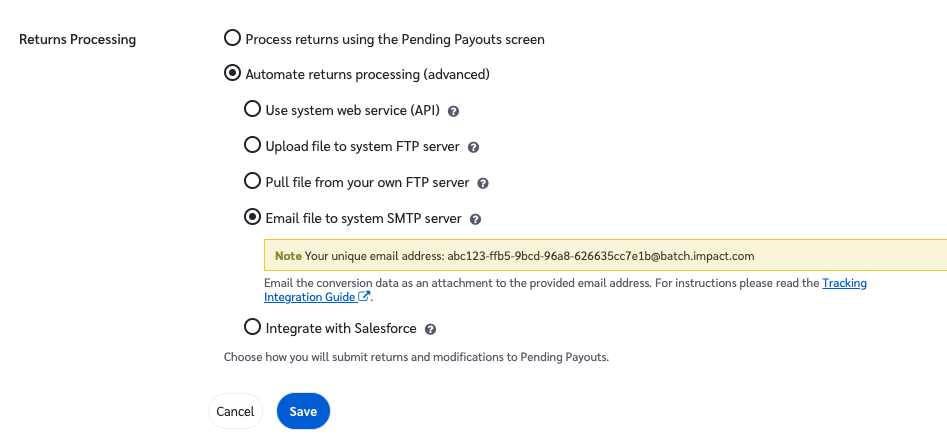
4. 選択してください **返品処理**.
5. 選択してください  **Automate Returns Processing(詳細設定)**
6. を選択します。その後、  **ファイルをシステムSMTPサーバーにメール送信** を選択して、一意のメールアドレスをコピーします。
7. 任意のメールクライアントを使用して、イベントデータファイルを添付ファイルとして一意のアドレスにメールを送信します。
* 一意のメールアドレスのみを `宛先:` 欄に入力してください。このファイルを他の人にも送る必要がある場合は、 `CC:` 行に含めます。
* 件名欄と本文は空欄のままでかまいません。
{% endstep %}
{% endstepper %}
---
# Agent Instructions
This documentation is published with GitBook. GitBook is the documentation platform designed so that both humans and AI agents can read, navigate, and reason over technical content effectively. Learn more at gitbook.com.
## Querying This Documentation
If you need additional information that is not directly available in this page, you can query the documentation by asking a question.
Perform an HTTP GET request on the following URL with the `ask` and `goal` query parameters:
```
GET https://help.impact.com/brand/ja/what-would-you-like-to-learn-about/advocate-program/best-practices-for-referral-programs/convert-referrals-in-bulk-for-advocate.md?ask=&goal=
```
`ask` is the immediate question: it should be specific, self-contained, and written in natural language.
`goal` is what the user is ultimately trying to achieve, the reason they need the answer. Sharing it helps GitBook give you a better, more relevant answer. A goal is most helpful when it describes the outcome the user wants rather than restating the question. For example, with `ask=how do I create an API token`, a goal like `automate deployments from our CI pipeline` lets GitBook tailor the answer to that use case.
The response will contain a direct answer to the question and relevant excerpts and sources from the documentation.
Use this mechanism when the answer is not explicitly present in the current page, you need clarification or additional context, or you want to retrieve related documentation sections.