> For the complete documentation index, see [llms.txt](https://help.impact.com/llms.txt). Markdown versions of documentation pages are available by appending `.md` to page URLs; this page is available as [Markdown](https://help.impact.com/brand/ja/what-would-you-like-to-learn-about/advocate-program/advocate-rewards/pay-with-cash/page-1.md).

# Advocateの現金報酬に自動資金供給を設定する

アカウントへの資金補充を自動化して、アドボケイトへの支払いを滞りなく期日どおりに行えるようにします。 *アドボケイト自動資金補充* これにより、アカウント残高を手動で補充する必要がなくなり、資金不足による支払い遅延を防げます。

### 始める前に

* **通貨要件**：この機能は現在、 **USD建てのブランド** のみです。
* [**財務設定**](https://help.impact.com/brand/what-would-you-like-to-learn-about/platform-features/finance/finance-settings/finance-settings-overview-for-brands)：impact.comアカウントに資金供給元（例：ACH/電信送金）が接続されている必要があります。

### 自動資金補充の仕組み

アドボケイトプログラムを運用すると、現金報酬によってアカウント残高がすぐに減少することがあります。自動資金補充では、 **毎日の残高チェック** と **10日間の予測ウィンドウ** を使用して今後の支払いを予測し、必要な資金を自動的にアカウントへ送金します。

#### 10日間の支払いバッファー

アカウントへの資金補充に使うACH送金は通常5〜7営業日かかるため、10日間の支払いバッファーを設けることで、システムがアドボケイトへの支払いを試行する前に資金が十分に入金反映される時間を確保できます。このバッファーにより、「資金不足」エラーを防ぎ、スムーズな運用を実現します。

### 自動資金補充を設定

アドボケイトプログラムで自動資金補充を有効にするには、まずACH入金を正常に完了する必要があります。自動支払いの設定方法について詳しくは、 [ブランドとして自動支払いを設定する](https://help.impact.com/brand/what-would-you-like-to-learn-about/platform-features/finance/add-funds-to-your-funding-account/set-up-automatic-payments-as-a-brand).

システムでは、毎日の残高チェックと10日間の予測ウィンドウを選択することを推奨しています。

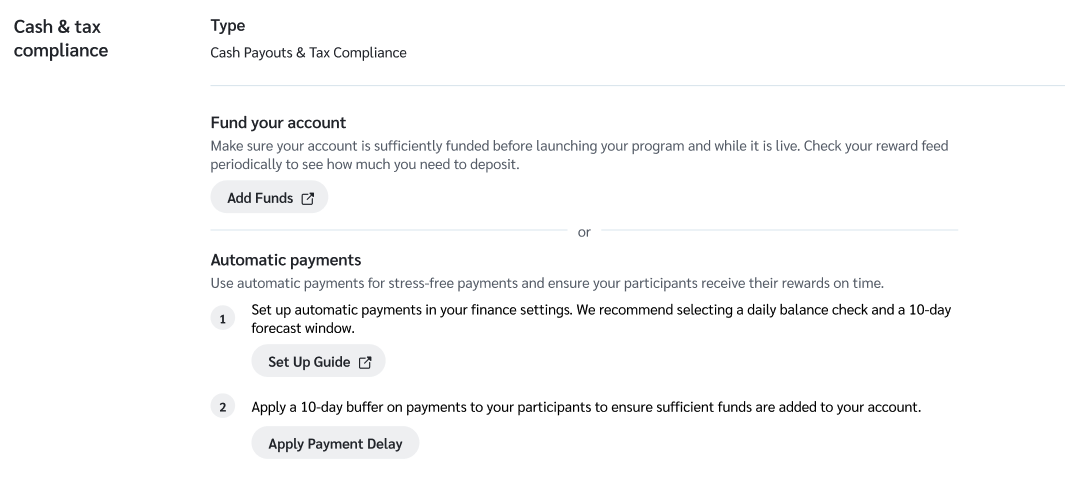
1. 選択 **始める** の下の *アカウントに入金する* アドボケイトチェックリストの設定内のタブで。これにより、一般設定ページに移動し、自動支払いを設定できるようになります。

<div data-with-frame="true"><figure><img src="/files/4aedb77739dccb244d20f347022ba39f77b9db69" alt=""><figcaption></figcaption></figure></div>

2. ステップ1の *自動支払い* セクションで、 **設定ガイド** ボタンを押して、自動資金補充機能の一般的な設定方法の詳細をご確認ください。
3. ステップ2では、 **支払い遅延を適用** ボタンを選択して、推奨される10日間の支払いバッファー期間を設定します。

{% hint style="danger" %}
**重要**：ステップ2はアドボケイトプログラムで必須の手順です。バッファーを適用しないと、新しい資金が到着する前にアカウント残高がゼロになるおそれがあります。資金不足になると、手動で資金を追加している間に支払い失敗やアドボケイトへの遅延が発生します。
{% endhint %}

<div data-with-frame="true"><figure><img src="/files/48eeb10faaa82c831dfd8352b201488374431379" alt=""><figcaption></figcaption></figure></div>

### 報酬のステータス

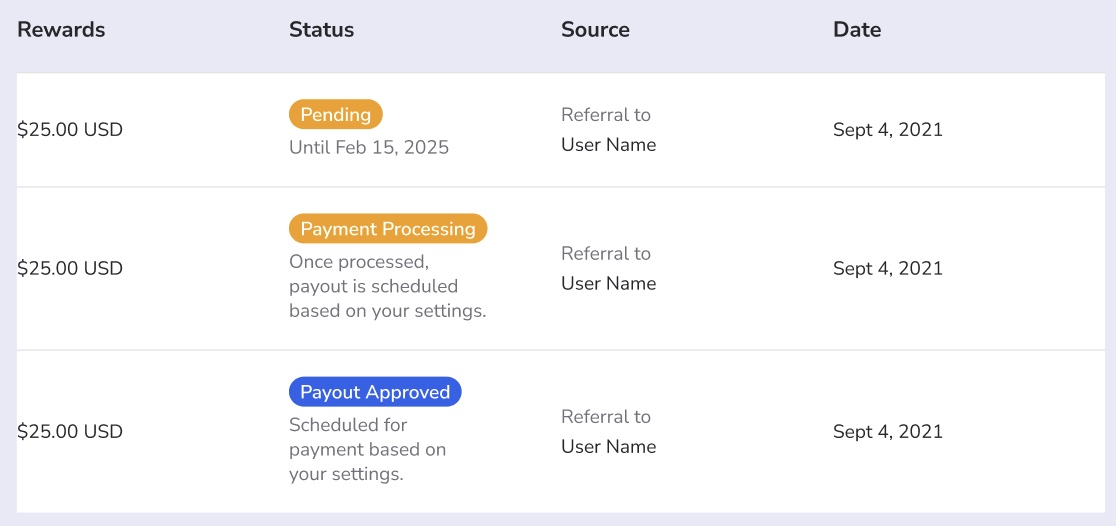
この機能を有効にすると、アドボケイトは報酬ダッシュボードで更新されたステータスを確認でき、支払い日についての認識を調整できます。

<table><thead><tr><th width="256.078125">ステータス</th><th>説明</th></tr></thead><tbody><tr><td>保留</td><td>報酬は獲得済みですが、待機期間中です（例：〜まで保留 <code>[日付]</code>).</td></tr><tr><td>支払い処理中</td><td>報酬は承認済みで、10日間のバッファーが有効です（例：〜に支払い反映予定 <code>[日付]</code>).</td></tr><tr><td>支払い承認済み</td><td>資金は確保されており、ユーザーの支払い設定に基づいて支払いを実行できる状態です。</td></tr></tbody></table>

<div data-with-frame="true"><figure><img src="/files/003c2f3f89b6378418dc0c7b68207ee874f6c175" alt=""><figcaption></figcaption></figure></div>


---

# Agent Instructions
This documentation is published with GitBook. GitBook is the documentation platform designed so that both humans and AI agents can read, navigate, and reason over technical content effectively. Learn more at gitbook.com.

## Querying This Documentation
If you need additional information that is not directly available in this page, you can query the documentation dynamically by asking a question.

Perform an HTTP GET request on the current page URL with the `ask` query parameter, and the optional `goal` query parameter:

```
GET https://help.impact.com/brand/ja/what-would-you-like-to-learn-about/advocate-program/advocate-rewards/pay-with-cash/page-1.md?ask=<question>&goal=<endgoal>
```

`ask` is the immediate question: it should be specific, self-contained, and written in natural language.
`goal` is optional and describes the broader end goal you are ultimately trying to accomplish on behalf of the user. GitBook uses it to tailor the answer towards what is most useful for that goal.

The response will contain a direct answer to the question and relevant excerpts and sources from the documentation.

Use this mechanism when the answer is not explicitly present in the current page, you need clarification or additional context, or you want to retrieve related documentation sections.