> For the complete documentation index, see [llms.txt](https://help.impact.com/llms.txt). Markdown versions of documentation pages are available by appending `.md` to page URLs; this page is available as [Markdown](https://help.impact.com/brand/ja/what-would-you-like-to-learn-about/advocate-program/advocate-rewards/fuel-tank-rewards-explained.md).
# Fuel Tank報酬の解説
**制限あり**:ギフトカードの報酬は、特定のプログラムエディションでのみ利用できます。 [サポートにお問い合わせください](https://app.impact.com/support/portal.ihtml?createTicket=true&) アドボケイトプログラムをアップグレードしてアクセス権を取得するために。
fuel tank機能は、固有のクーポンコードを使って報酬を配布するための簡潔な方法です。アドボケイトは、これらのコードを割引、クレジット、その他の報酬タイプを含む報酬に交換できます。
クーポンコードは、impact.comアカウントで追加、削除、または管理できます。詳細は [フューエルタンク報酬を設定する](/brand/ja/what-would-you-like-to-learn-about/advocate-program/advocate-rewards/set-up-a-fuel-tank-reward.md) をご覧ください。必要に応じて、どのクーポンがどのアドボケイトに付与されたかを追跡し、その報酬を取り消すこともできます。
fuel tank用のクーポンコードは、お客様が用意します。これらのコードはご自身で作成することも、既存のeコマースまたは請求プラットフォームを使って作成してもらうこともできます。Shopify、WooCommerce、Magento、BigCommerce、Recurlyなどの主要なeコマース/請求プラットフォームの多くは、一括でコードを生成でき、エクスポートも可能です。
eコマースプラットフォームでコードを生成する際に、その動作も定義します。たとえば、次のように決めます:
* 各コードの金額
* コードが適用される商品またはサービス
* コードを使用する前に必要な最低購入金額
{% hint style="info" %}
**注:** コードの動作を管理するのは、作成元のeコマースまたは請求プラットフォームであり、アドボケイトプログラムではありません。これにShopifyを使っている場合は、次のこともできます [同期済みコードを設定する](/brand/ja/what-would-you-like-to-learn-about/advocate-program/advocate-rewards/set-up-a-fuel-tank-reward.md#synced-codes-for-shopify-0-3) 当社の [Shopify連携](https://integrations.impact.com/integration-guides/for-brands/plugin-integrations/e-commerce/integrate-with-shopify).
{% endhint %}
fuel tankの報酬は、 [即時アクセスウィジェット](/brand/ja/what-would-you-like-to-learn-about/advocate-program/manage-advocate-participant-experiences/widget-experiences/set-up-an-instant-access-widget.md), [認証済みアクセスウィジェット](/brand/ja/what-would-you-like-to-learn-about/advocate-program/manage-advocate-participant-experiences/widget-experiences/widget-types-explained.md)、および [マイクロサイト](/brand/ja/what-would-you-like-to-learn-about/advocate-program/manage-advocate-participant-experiences/microsite-experiences/set-up-a-microsite.md).
#### 参加者の体験
クーポンコードは、プログラムのウィジェットまたはマイクロサイトに組み込むことができ、アドボケイトと、そのアドボケイトが紹介した友人への報酬として使用できます。
アドボケイトは通常、自分が紹介した友人がコンバージョンすると報酬を獲得します。コンバージョンが成功すると、アドボケイトには自動的にメールで通知されます。その後、報酬と引き換えられる固有のクーポンコードが届きます。
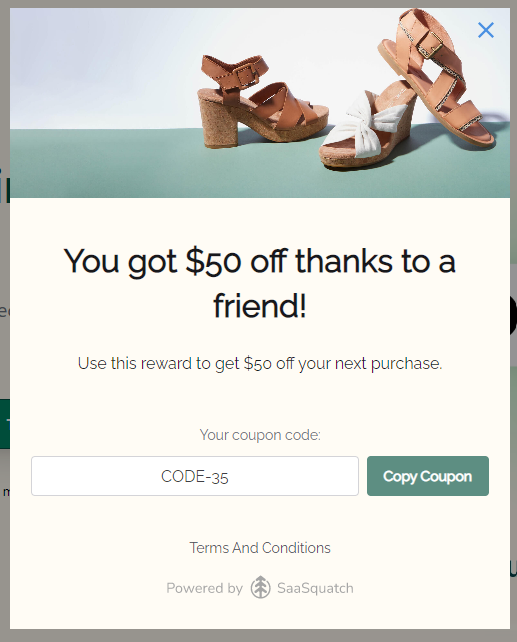
紹介された友人にとって理想的な体験は、アドボケイトの共有リンクをクリックした直後に割引コードを受け取り、最初のチェックアウトで使用できることです。これを実現するために、プログラムのランディングページに友人向けウィジェットを設置できます。
{% hint style="info" %}
**フロー例:** アドボケイトがリンクを共有 → 友人がリンクを開いてランディングページに移動 → 友人向けウィジェットがポップアップ表示される(または埋め込まれる) → 友人がメールアドレスを入力 → 友人に割引コードが表示される。
{% endhint %}
友人がすぐに購入しない場合は、割引コードをメールで送信することもできます。
---
# Agent Instructions
This documentation is published with GitBook. GitBook is the documentation platform designed so that both humans and AI agents can read, navigate, and reason over technical content effectively. Learn more at gitbook.com.
## Querying This Documentation
If you need additional information that is not directly available in this page, you can query the documentation by asking a question.
Perform an HTTP GET request on the following URL with the `ask` and `goal` query parameters:
```
GET https://help.impact.com/brand/ja/what-would-you-like-to-learn-about/advocate-program/advocate-rewards/fuel-tank-rewards-explained.md?ask=&goal=
```
`ask` is the immediate question: it should be specific, self-contained, and written in natural language.
`goal` is what the user is ultimately trying to achieve, the reason they need the answer. Sharing it helps GitBook give you a better, more relevant answer. A goal is most helpful when it describes the outcome the user wants rather than restating the question. For example, with `ask=how do I create an API token`, a goal like `automate deployments from our CI pipeline` lets GitBook tailor the answer to that use case.
The response will contain a direct answer to the question and relevant excerpts and sources from the documentation.
Use this mechanism when the answer is not explicitly present in the current page, you need clarification or additional context, or you want to retrieve related documentation sections.