> For the complete documentation index, see [llms.txt](https://help.impact.com/llms.txt). Markdown versions of documentation pages are available by appending `.md` to page URLs; this page is available as [Markdown](https://help.impact.com/brand/ja/what-would-you-like-to-learn-about/advocate-program/advocate-rewards/create-a-reward-unit.md).

# 報酬ユニットを作成する

[リワード](/brand/ja/what-would-you-like-to-learn-about/advocate-program/advocate-rewards/program-reward-options-explained.md) は、アドボケイトとその紹介先の友人が紹介プログラムに参加するよう促すために使用されます。設定する際には *クレジット* 報酬を設定する場合は、参加者にクレジットが何を与えるか（たとえばプレミアムサービスプランの1か月分無料など）を定義するための報酬単位も作成する必要があります。

1. 左側のナビゲーションメニューから、次を選択します ![](/files/7ddd72d8e69e7055d9408cf4847c5c54abf9f71d) **\[Engage] → 報酬 → 報酬単位**.
2. 右上隅で、次を選択します **報酬単位を作成**.
3. 次を選択してください **報酬単位の種類**.

{% tabs %}
{% tab title="クレジット" %}

* 次から **通貨** ドロップダウンリストから、この報酬単位の通貨を選択します。選択できる通貨は1つだけです。

通貨としてUSDを選択し、 [W-9コンプライアンス](/brand/ja/what-would-you-like-to-learn-about/advocate-program/advocate-program-settings/w-9-compliance-explained-for-advocate.md) がアドボケイトプログラムで有効になっている場合、報酬を獲得する参加者は [報酬](/brand/ja/what-would-you-like-to-learn-about/advocate-program/advocate-rewards/create-a-reward.md) この報酬単位に基づくものについては、報酬単位の価値がその年の課税対象総額に算入されます。
{% endtab %}

{% tab title="現金" %}

1. ![](/files/966a7b9c51811043ca7c1811ec6f6b9ef39fd26f) **\[オンに切り替え]** **通貨** この報酬単位に通貨を割り当てるには。
2. ドロップダウンリストから、1つ以上の通貨を選択します。

   <div data-gb-custom-block data-tag="hint" data-style="success" class="hint hint-success"><p><strong>注意：</strong> 複数通貨サポートは、一部のAdvocateエディションでのみ利用できます。ご興味がある場合は、CSM（または <a href="https://app.impact.com/support/portal.ihtml?createTicket=true&#x26;&#x26;">サポートにお問い合わせください</a>）にアップグレードについてお問い合わせください。</p></div>
3. もし [現金支払い](/brand/ja/what-would-you-like-to-learn-about/advocate-program/advocate-rewards/pay-with-cash/cash-payouts-for-advocate-explained.md) がアカウントで有効になっている場合は、 ![](/files/cee708af81ce6ea11e1b8e19926313a76dcf097e) **\[チェック済みのボックス]** **impact.comを使用して参加者に支払いを送信します**.
   {% endtab %}

{% tab title="月" %}
Monthの報酬単位は、カスタマイズできない標準単位です。
{% endtab %}

{% tab title="ポイント" %}
Pointsの報酬単位は、カスタマイズできない標準単位です。
{% endtab %}

{% tab title="カスタム" %}

1. 次を入力してください: **単位ID**。単位IDはプログラムルールと報酬で使用されるため、impact.comでは短くても説明的なIDを推奨しています。例： `TICKETS`.
2. ![](/files/966a7b9c51811043ca7c1811ec6f6b9ef39fd26f) **\[オンに切り替え]** **通貨** この報酬単位に通貨を割り当てるには。
3. ドロップダウンリストから、1つ以上の通貨を選択します。

   <div data-gb-custom-block data-tag="hint" data-style="success" class="hint hint-success"><p><strong>注意：</strong> 複数通貨サポートは、一部のAdvocateエディションでのみ利用できます。ご興味がある場合は、CSM（または <a href="https://app.impact.com/support/portal.ihtml?createTicket=true&#x26;&#x26;">サポートにお問い合わせください</a>）にアップグレードについてお問い合わせください。</p></div>

{% endtab %}
{% endtabs %}

4. 説明的な **名前**.
5. 選択した報酬単位タイプに固有の設定手順を完了してください。
6. 必要に応じて、 **詳細設定** を展開して、報酬単位をさらに設定します。
   * を割り当てる **米国課税対象額** をこの報酬単位に。
     * その *米国課税対象額* このカスタマイズにより、USDを直接報酬として付与しない報酬に課税対象額を割り当てられます。次の場合はこのオプションの使用を推奨します： [W-9コンプライアンス](/brand/ja/what-would-you-like-to-learn-about/advocate-program/advocate-program-settings/w-9-compliance-explained-for-advocate.md) がアドボケイトプログラムで有効になっており、この報酬単位を報酬上限の対象にしたい場合。
     * 報酬単位の値を定義するにはJSONata式が必要です。変数 `totalValue` 、 `件数` を式内で使用できます。

       <div data-gb-custom-block data-tag="hint" data-style="info" class="hint hint-info"><p><strong>例：</strong> 各カスタム報酬単位に$5 USDの課税対象額を設定したい場合は、次のような式を入力します。 <code>500*totalValue</code>.</p></div>
   * 次を入力してください: **報酬の表示値** を使って、この報酬単位が参加者にどのように表示されるかを定義します。
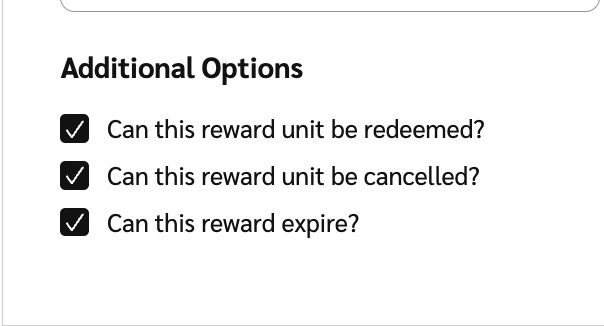
   * の選択を解除すると **追加オプション** 報酬単位を〜にしたくない場合は **引き換えられる**、この単位を使用する報酬が **期限切れになる**、または **キャンセルされる**.

     <div data-with-frame="true"><figure><img src="/files/fe2c63bfb563f9169c1756eb26b69200a80ff057" alt="" width="302"><figcaption></figcaption></figure></div>
7. 選択 **報酬単位を作成**.

#### 詳細を見る

* [プログラム報酬オプションの説明](/brand/ja/what-would-you-like-to-learn-about/advocate-program/advocate-rewards/program-reward-options-explained.md)
* [報酬を作成](/brand/ja/what-would-you-like-to-learn-about/advocate-program/advocate-rewards/create-a-reward.md)


---

# Agent Instructions
This documentation is published with GitBook. GitBook is the documentation platform designed so that both humans and AI agents can read, navigate, and reason over technical content effectively. Learn more at gitbook.com.

## Querying This Documentation
If you need additional information that is not directly available in this page, you can query the documentation dynamically by asking a question.

Perform an HTTP GET request on the current page URL with the `ask` query parameter, and the optional `goal` query parameter:

```
GET https://help.impact.com/brand/ja/what-would-you-like-to-learn-about/advocate-program/advocate-rewards/create-a-reward-unit.md?ask=<question>&goal=<endgoal>
```

`ask` is the immediate question: it should be specific, self-contained, and written in natural language.
`goal` is optional and describes the broader end goal you are ultimately trying to accomplish on behalf of the user. GitBook uses it to tailor the answer towards what is most useful for that goal.

The response will contain a direct answer to the question and relevant excerpts and sources from the documentation.

Use this mechanism when the answer is not explicitly present in the current page, you need clarification or additional context, or you want to retrieve related documentation sections.