> For the complete documentation index, see [llms.txt](https://help.impact.com/llms.txt). Markdown versions of documentation pages are available by appending `.md` to page URLs; this page is available as [Markdown](https://help.impact.com/brand/ja/what-would-you-like-to-learn-about/advocate-program/advocate-rewards/create-a-reward.md).
# 報酬を作成する
PXAコースを受講する
[報酬](/brand/ja/what-would-you-like-to-learn-about/advocate-program/advocate-rewards/program-reward-options-explained.md) 顧客アドボケートとその紹介先の友人が紹介プログラムに参加するよう促すために使用されます。Advocateプログラムでは、4種類の基本的な報酬タイプから選択し、ニーズに合わせてカスタマイズできます。報酬は、すべての紹介プログラムで利用可能にすることも(グローバル報酬)、1つのプログラムのみに限定することもできます(プログラム固有の報酬)。
{% embed url="" %}
#### グローバル報酬を作成
グローバル報酬は一度設定すれば、何度でも再利用できます。次の場合はグローバル報酬の作成をおすすめします:
* 報酬を複数の紹介プログラムで利用できるようにしたい。
* 報酬の価値や金額が固定されている。
1. 左側のナビゲーションメニューから、次を選択します  **\[Engage] → 報酬 → カタログ**.
2. 右上隅で、次を選択します **報酬を作成**.
3. 説明的な **報酬名**.
4. を選択します **報酬タイプ** を入力し、設定手順に従います。
{% tabs %}
{% tab title="割引" %}
1. 検索バーの横にある **割引率**.
2. 必要に応じて、  **\[オンに切り替える]** **報酬保留期間** 報酬を一定期間保留状態にするため。
* 保留期間は次の単位で設定できます **年**, **月**、および/または **日**.
* 保留期間は、参加者がもはや報酬の受給条件を満たさなくなった場合の安全策として機能します。たとえば、報酬は14日間の返品期間が終了してからのみ引き換え可能にできます。
3. 必要に応じて、  **\[オンに切り替える]** **報酬の有効期限** この報酬に有効期限を設定するには
* 有効期限は次の単位で設定できます **年**, **月**、および/または **日**.
* 有効期限は、報酬が適切なタイミングで引き換えられるようにしたい場合に役立ちます。たとえば、参加者は報酬獲得後3か月以内に割引を申請する必要があります。
{% endtab %}
{% tab title="クレジット" %}
{% hint style="danger" %}
**警告:** クレジット報酬の場合、まず [報酬単位を作成する](/brand/ja/what-would-you-like-to-learn-about/advocate-program/advocate-rewards/create-a-reward-unit.md) ことで、そのクレジットが参加者に何を付与するのか(たとえば、プレミアムサービスプランの1か月無料など)を定義する必要があります。
{% endhint %}
1. を選択します **報酬単位** ドロップダウンリストから
2. リソースの **クレジット額**.
3. 必要に応じて、  **\[オンに切り替える]** **報酬保留期間** 報酬を一定期間保留状態にするため。
* 保留期間は次の単位で設定できます **年**, **月**、および/または **日**.
* 保留期間は、参加者がもはや報酬の受給条件を満たさなくなった場合の安全策として機能します。たとえば、報酬は14日間の返品期間が終了してからのみ引き換え可能にできます。
4. 必要に応じて、  **\[オンに切り替える]** **報酬の有効期限** この報酬に有効期限を設定するには
* 有効期限は次の単位で設定できます **年**, **月**、および/または **日**.
* 有効期限は、報酬が適切なタイミングで引き換えられるようにしたい場合に役立ちます。たとえば、参加者は報酬獲得後3か月以内にポイントを引き換える必要があります。
{% endtab %}
{% tab title="フューエルタンク" %}
を参照してください [フューエルタンク報酬を設定する](/brand/ja/what-would-you-like-to-learn-about/advocate-program/advocate-rewards/set-up-a-fuel-tank-reward.md) 手順については
{% endtab %}
{% tab title="ギフトカード" %}
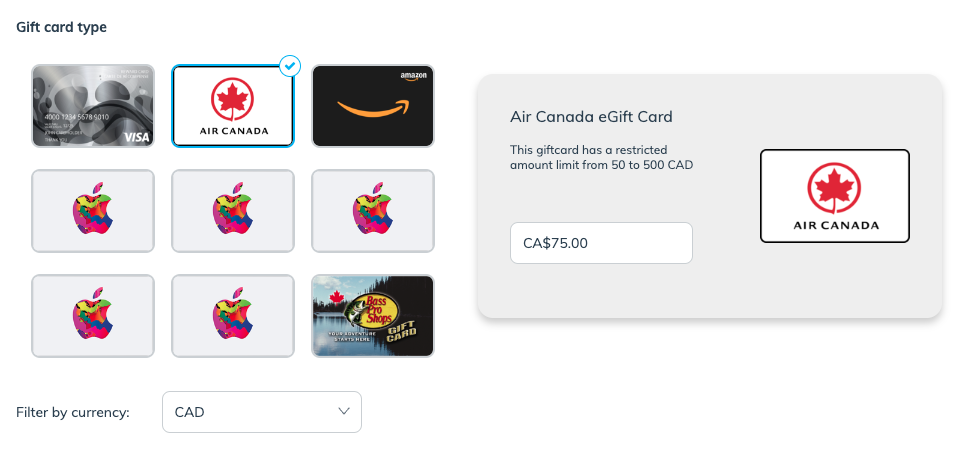
ギフトカード報酬を設定するには、アカウントが [Tango Cardと連携されている必要があります](https://integrations.impact.com/integration-guides/for-brands/advocate/advocate-plugin-integration/tango-card-integration-overview-for-advocate/integrate-with-tango-card-for-advocate-programs)。サポートが必要な場合は、impact.comから割り当てられた導入エンジニアにお問い合わせください。
1. を選択します **ギフトカードの種類**.
* 必要に応じて、 **通貨で絞り込む** 特定の通貨で利用可能なギフトカードのみを表示したい場合。
2. 選択したカードで、 **金額** ギフトカードに割り当てる金額を入力します。
* ギフトカード報酬に動的な値を割り当てることはできません。発行される各ギフトカードは、ここで入力した金額のみとなります。
3. 任意で、 **カスタムTangoCardメールテンプレートID**.
* メールテンプレートはTango Cardの機能で、報酬が獲得されたときに参加者へ送信するメールを設定できます。詳細はこちらをご覧ください [メールテンプレート](https://help.rewardsgenius.com/s/article/EmailTemplatesFAQ) Tango Cardのヘルプセンターをご覧ください。
4. 必要に応じて、  **\[オンに切り替える]** **報酬保留期間** 報酬を一定期間保留状態にするため。
* 保留期間は次の単位で設定できます **年**, **月**、および/または **日**.
* 保留期間は、参加者がもはや報酬の受給条件を満たさなくなった場合の安全策として機能します。たとえば、報酬は14日間の返品期間が終了してからのみ引き換え可能にできます。
{% endtab %}
{% endtabs %}
#### プログラム固有の報酬を作成
プログラム固有の報酬は、単一のプログラム目標のアクションに紐づきます。プログラムルールを設定するときに構成します。次の場合はプログラム固有の報酬をおすすめします:
* この報酬を他の紹介プログラムで再利用する予定がない。
* 動的な値の報酬を発行したい。たとえば、コミッションに基づく報酬です。
* ギフトカード報酬は例外です。固定値でしか設定できません。
設定手順については、 *報酬を作成セクション* 次のいずれか [アドボケイトプログラムを設定する](/brand/ja/what-would-you-like-to-learn-about/advocate-program/getting-started-with-advocate/configure-your-advocate-program.md).
#### 詳細を見る
* [プログラム報酬オプションの説明](/brand/ja/what-would-you-like-to-learn-about/advocate-program/advocate-rewards/program-reward-options-explained.md)
* [報酬ユニットを作成](/brand/ja/what-would-you-like-to-learn-about/advocate-program/advocate-rewards/create-a-reward-unit.md)
* [フューエルタンク報酬の説明](/brand/ja/what-would-you-like-to-learn-about/advocate-program/advocate-rewards/fuel-tank-rewards-explained.md)
* [ギフトカード報酬の説明](/brand/ja/what-would-you-like-to-learn-about/advocate-program/advocate-rewards/gift-card-rewards-explained.md)
---
# Agent Instructions
This documentation is published with GitBook. GitBook is the documentation platform designed so that both humans and AI agents can read, navigate, and reason over technical content effectively. Learn more at gitbook.com.
## Querying This Documentation
If you need additional information that is not directly available in this page, you can query the documentation by asking a question.
Perform an HTTP GET request on the following URL with the `ask` and `goal` query parameters:
```
GET https://help.impact.com/brand/ja/what-would-you-like-to-learn-about/advocate-program/advocate-rewards/create-a-reward.md?ask=&goal=
```
`ask` is the immediate question: it should be specific, self-contained, and written in natural language.
`goal` is what the user is ultimately trying to achieve, the reason they need the answer. Sharing it helps GitBook give you a better, more relevant answer. A goal is most helpful when it describes the outcome the user wants rather than restating the question. For example, with `ask=how do I create an API token`, a goal like `automate deployments from our CI pipeline` lets GitBook tailor the answer to that use case.
The response will contain a direct answer to the question and relevant excerpts and sources from the documentation.
Use this mechanism when the answer is not explicitly present in the current page, you need clarification or additional context, or you want to retrieve related documentation sections.