> For the complete documentation index, see [llms.txt](https://help.impact.com/llms.txt). Markdown versions of documentation pages are available by appending `.md` to page URLs; this page is available as [Markdown](https://help.impact.com/brand/ja/what-would-you-like-to-learn-about/advocate-program/advocate-reporting-and-analytics/advocate-program-analytics-explained.md).

# Advocateプログラム分析の解説

<a href="https://pxa.impact.com/student/activity/1687872?sid=0c0e3e5c-54c9-4435-9bee-ebcdccb7f292&#x26;sid_i=0?utm_source=app.impact.com&#x26;utm_medium=owned-platform&#x26;utm_content=&#x26;utm_campaign=help-center" class="button primary">PXAコースを受講する</a>

impact.comでは、アドボケイトプログラムの健全性と成果を評価するために、さまざまな指標や分析情報を利用できます。

この記事では、 *プログラム分析* ページについて説明します。このページでは、選択した期間における個々のアドボケイトプログラムの分析情報を確認できます。アドボケイトプログラムの全期間の実績や、複数のプログラムの比較については、 [アドボケイト分析の概要について](https://help.impact.com/brand/ja/what-would-you-like-to-learn-about/advocate-program/advocate-reporting-and-analytics/advocate-analytics-overview-explained.md).

{% hint style="success" %}
**注：** 不正として [マークされた紹介](https://help.impact.com/brand/ja/what-would-you-like-to-learn-about/advocate-program/protect-your-advocate-program/advocate-fraud-protection-explained.md) は分析情報から除外されます。
{% endhint %}

## プログラム分析にアクセスする

1. 左側のナビゲーションメニューから、 ![](https://1458456015-files.gitbook.io/~/files/v0/b/gitbook-x-prod.appspot.com/o/spaces%2FwMLlMoFBtKJa8ptd3zaw%2Fuploads%2Fgit-blob-230534471fef5f40808e921e41ee44e4a06ded03%2Fe6cb9548999afdc1ed3ce4942e4cb5b45b5cecbd323267aac2a7cd1915fccc09.svg?alt=media) **\[Engage] → Reporting → Program Analytics**.
2. ページ上部で、分析情報を表示する **プログラム** と **期間** を選択します。
3. 分析情報を確認するには、 *プログラム分析* を確認します。

   * 利用可能な分析情報の説明については、 [*指標*](#metrics) および [*チャートとグラフ*](#charts-and-graphs) のセクションを参照してください。

   <div data-with-frame="true"><figure><img src="https://1458456015-files.gitbook.io/~/files/v0/b/gitbook-x-prod.appspot.com/o/spaces%2FwMLlMoFBtKJa8ptd3zaw%2Fuploads%2FP6fMu1R1mTStVHzzydOw%2FUntitled%20design%20(71).png?alt=media&amp;token=f1caf26f-efac-4ef1-968d-3b3d327e65a8" alt="" width="563"><figcaption></figcaption></figure></div>
4. 任意で、レポートを定期的に受け取るには、右上隅の ![](https://1458456015-files.gitbook.io/~/files/v0/b/gitbook-x-prod.appspot.com/o/spaces%2FwMLlMoFBtKJa8ptd3zaw%2Fuploads%2FQFIT1y1HfVo3CoaOUIa0%2Fshare.svg?alt=media\&token=dff0558a-ac24-4a4d-be5b-e0db67327da5) **共有** ![](https://1458456015-files.gitbook.io/~/files/v0/b/gitbook-x-prod.appspot.com/o/spaces%2FwMLlMoFBtKJa8ptd3zaw%2Fuploads%2Fgit-blob-c2cb550b55c51ea1eeff0acbd6f437a03b621a2c%2F60d033ae8a04c14498d5229c3c0160ac05feea7f605dbd770741793c900469f0.svg?alt=media) **\[ドロップダウンメニュー]** → ![](https://1458456015-files.gitbook.io/~/files/v0/b/gitbook-x-prod.appspot.com/o/spaces%2FwMLlMoFBtKJa8ptd3zaw%2Fuploads%2F0hJGvjhVTSRji5T7zANU%2Fschedule-report.svg?alt=media\&token=8cdc2a42-2d6a-4309-9e12-f212a495f7b7) **\[時計]** **レポートをスケジュール** を選択します。
   * スケジュールされた各レポートには、スケジュール時に選択したプログラム、期間、フィルターが適用されます。たとえば、 *今週*を選択すると、すべてのレポートに今週のデータが含まれます。
   * 頻度、形式、配信オプションについては、 [**レポートをスケジュールする**](https://help.impact.com/brand/ja/what-would-you-like-to-learn-about/platform-features/multi-program-reports/report-management/schedule-reports.md#schedule-a-report).

{% hint style="success" %}
**注：** 選択した期間によって、このレポート全体で、 *指標* と *チャートとグラフ*の両方におけるユニーク訪問者の集計方法が決まります。たとえば、1月に共有リンクをクリックし、2月にも再度クリックした訪問者は、期間を1月1日～2月28日にすると紹介訪問者1人としてカウントされますが、各月を別々に表示すると、それぞれの月で1人としてカウントされます。
{% endhint %}

## 指標

各指標カードでは、メインの数値の下に変化の指標が表示され、選択した期間と、その直前の同じ長さの期間が比較されます。たとえば、8月1日～8月31日の分析情報は、7月1日～7月31日のデータと比較されます。

<div data-with-frame="true"><figure><img src="https://1458456015-files.gitbook.io/~/files/v0/b/gitbook-x-prod.appspot.com/o/spaces%2FwMLlMoFBtKJa8ptd3zaw%2Fuploads%2Fgit-blob-e72effb4252ed0faeadbc5b24c282a7e77ddebe5%2F90f3a05972b6600ad68ece259bf6344525ef50435ab7d30bbaf16b74d725c7e7.png?alt=media" alt=""><figcaption></figcaption></figure></div>

<details>

<summary>指標の説明</summary>

| 指標           | 説明                                                                                                                                                                                                                                                   |
| ------------ | ---------------------------------------------------------------------------------------------------------------------------------------------------------------------------------------------------------------------------------------------------- |
| アクティブなアドボケイト | 選択した期間内に、紹介リンクをコピーして共有した、またはそのリンクから訪問したユーザーが紹介を開始した、ユニークな紹介者の数です。                                                                                                                                                                                    |
| 紹介された訪問者     | 紹介者の共有リンクをクリックしたユニークユーザーの数です。これには、次のいずれかに該当する参加者が含まれます。 *開始した* および／または *コンバージョンした* 紹介。                                                                                                                                                               |
| 開始された紹介      | <p>プログラムの最初のルールを完了した紹介です。</p><div data-gb-custom-block data-tag="hint" data-style="info" class="hint hint-info"><p><strong>例</strong>：プログラムのルールで、紹介された友人がサービスの無料トライアルに登録することを求めているとします。このプログラムルールを完了すると、その紹介は開始されたものとみなされます。</p></div>               |
| コンバージョンした紹介  | <p>プログラムのルールで定義された、新規顧客の獲得につながった紹介です。</p><div data-gb-custom-block data-tag="hint" data-style="info" class="hint hint-info"><p><strong>例：</strong> プログラムのコンバージョンルールが、紹介された友人による購入だとします。紹介された友人が初めて商品やサービスを購入した時点で、その紹介はコンバージョンしたものとみなされます。</p></div> |
| 売上           | 最初の紹介のアトリビューションから最終コンバージョンまで（最終コンバージョンを含む）に、紹介された友人が行ったすべての購入の合計金額です。最終コンバージョンの時点は、プログラムルールの設定によって決まります。                                                                                                                                             |

</details>

## チャートとグラフ

チャートとグラフのセクションでは、プログラムのパフォーマンスを視覚的に確認できます。

<details>

<summary>紹介者</summary>

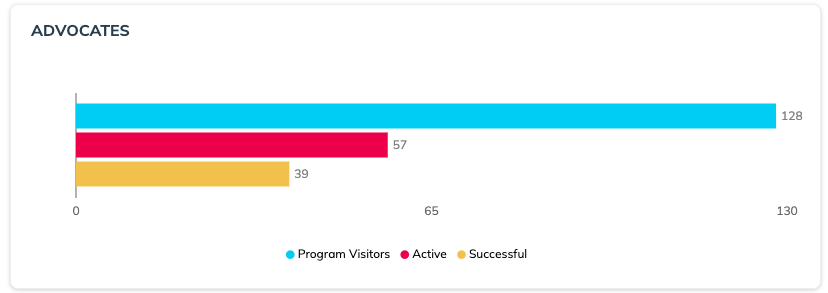
「 *紹介者* 」チャートには、選択した期間内のプログラム参加者数と、プログラムへの参加状況が表示されます。

<div data-with-frame="true"><figure><img src="https://1458456015-files.gitbook.io/~/files/v0/b/gitbook-x-prod.appspot.com/o/spaces%2FwMLlMoFBtKJa8ptd3zaw%2Fuploads%2Fgit-blob-efd5163f63ad8beaf830d6edb740fda461e0a2db%2Fee0abc4a7ec20a42e92e7e746e6697957cc9c70cacde4f0af0b408bcfd0bb03f.png?alt=media" alt=""><figcaption></figcaption></figure></div>

| 指標       | 説明                                                                                                                                                                                                                                                                                                                                                                                                                                                                                                                                                                                                                                                |
| -------- | ------------------------------------------------------------------------------------------------------------------------------------------------------------------------------------------------------------------------------------------------------------------------------------------------------------------------------------------------------------------------------------------------------------------------------------------------------------------------------------------------------------------------------------------------------------------------------------------------------------------------------------------------- |
| プログラム訪問者 | <p>次のいずれかを行った紹介者のユニーク数：</p><ul><li>マイクロサイトを閲覧した。</li><li>ウィジェットを閲覧した（ <a href="https://help.impact.com/brand/ja/what-would-you-like-to-learn-about/advocate-program/manage-advocate-participant-experiences/widget-experiences/widget-types-explained.md#verified-access-widgets">Verified Accessウィジェット</a>).</li><li>共有リンクを生成するために、氏名やメールアドレスなどの情報を入力した。</li><li>「 <a href="https://help.impact.com/brand/ja/what-would-you-like-to-learn-about/advocate-program/manage-advocate-participant-experiences/widget-experiences/shopify-post-checkout-widget.md">Shopify購入後ウィジェット</a>」を閲覧した。Shopifyアカウントにログインしているユーザーには、共有リンクがすでに表示されています。</li></ul> |
| アクティブ    | 共有リンクを共有した紹介者の数です。                                                                                                                                                                                                                                                                                                                                                                                                                                                                                                                                                                                                                                |
| 成功       | 成功した紹介（コンバージョンに至った紹介）を行った紹介者の数です。                                                                                                                                                                                                                                                                                                                                                                                                                                                                                                                                                                                                                 |

</details>

<details>

<summary>紹介</summary>

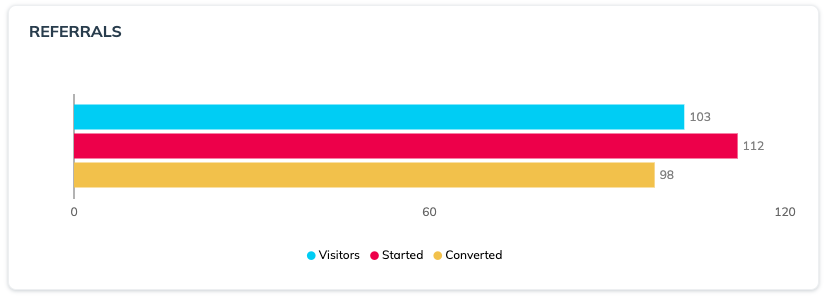
「 *紹介* 」チャートには、紹介された友人の視点から見た紹介の流れが表示されます。

<div data-with-frame="true"><figure><img src="https://1458456015-files.gitbook.io/~/files/v0/b/gitbook-x-prod.appspot.com/o/spaces%2FwMLlMoFBtKJa8ptd3zaw%2Fuploads%2Fgit-blob-303eff4aa73c0404f01004a7eefe7fa53f94169c%2Fb7b01052077bf9736f276dfb447529860069b3e65d1a87d15a7e7653799aaefd.png?alt=media" alt=""><figcaption></figcaption></figure></div>

| 指標      | 説明                                                             |
| ------- | -------------------------------------------------------------- |
| 訪問者     | 共有リンクをクリックした紹介ユーザーの数です。                                        |
| 開始      | 紹介の流れを開始した紹介ユーザーの数です。つまり、プログラムルールに定められた「紹介開始」ルールを完了したユーザーの数です。 |
| コンバージョン | プログラムルールで定義されたコンバージョンルールを達成した紹介ユーザーの数です。例： *紹介されたユーザーが購入した*.   |

</details>

<details>

<summary>紹介アクティビティ</summary>

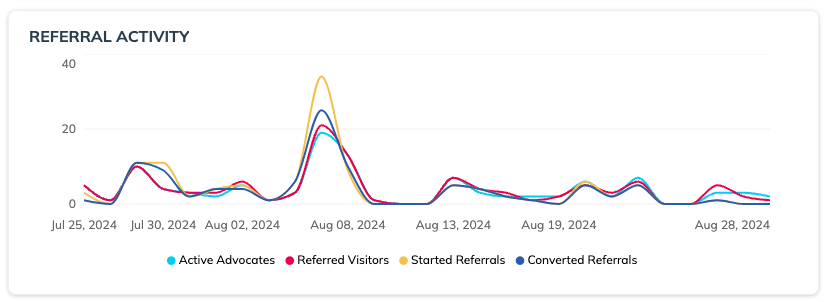
「 *紹介アクティビティ* このタイムラインでは、選択した期間におけるアドボケイトと紹介されたユーザーの行動の推移を確認できます。プロモーション、マーケティング施策、繁忙期などの外部要因が紹介プログラムにどのような影響を与えているかを把握するのに役立つグラフです。

<div data-with-frame="true"><figure><img src="https://1458456015-files.gitbook.io/~/files/v0/b/gitbook-x-prod.appspot.com/o/spaces%2FwMLlMoFBtKJa8ptd3zaw%2Fuploads%2Fgit-blob-625244662c09bd6e4a6eff2af52df028b41c923a%2Fd7f984ade9ec79182aa3e226938761db59684a1d263888a3b566f5ff0b1226d0.png?alt=media" alt=""><figcaption></figcaption></figure></div>

</details>

<details>

<summary>目標</summary>

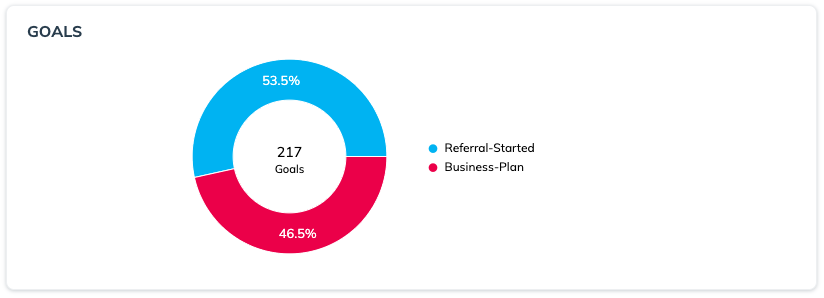
「 *目標* 」グラフには、プログラム内で完了したルールの内訳（コンバージョンルールと非コンバージョンルールの両方）が表示されます。

プログラムに複数のルールがある場合、この情報から、紹介プログラムのファネルにおける「中間」のステップ、つまり紹介が開始されてからコンバージョンに至るまでの期間について、貴重な知見を得られます。

<div data-with-frame="true"><figure><img src="https://1458456015-files.gitbook.io/~/files/v0/b/gitbook-x-prod.appspot.com/o/spaces%2FwMLlMoFBtKJa8ptd3zaw%2Fuploads%2Fgit-blob-c703e3da7f075dc211001add04ecf79cee19b0f4%2F36ed83f4eba5a1026b8c96be4172dfed4370f6a8fa6fcb5cb4d63a85fb128c1d.png?alt=media" alt=""><figcaption></figcaption></figure></div>

</details>

<details>

<summary>エンゲージメント手段</summary>

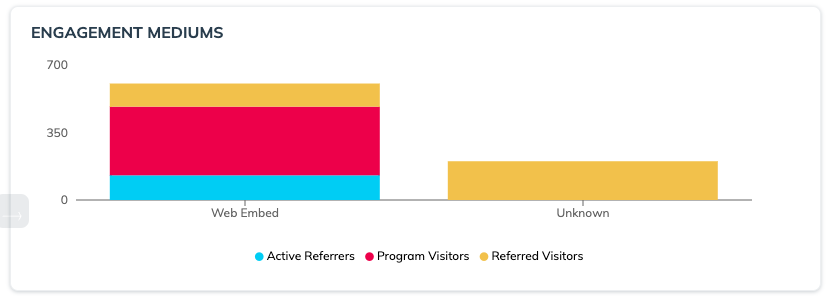
「 *エンゲージメント手段* 」グラフには、訪問者が紹介プログラムにアクセスしたさまざまな方法が表示されます。

紹介プログラムが製品やウェブサイトの複数の場所に表示されている場合、この情報を使って、どのタッチポイントが最もよく利用されているかを評価できます。また、ウェブアプリとモバイルアプリなど、媒体ごとの紹介プログラムのユーザー体験を明らかにし、プラットフォーム間の体験の違いを把握するのにも役立ちます。

このグラフには、アクティブな紹介者とプログラム訪問者がシェアリンクを取得した方法と、そのエンゲージメント手段によって発生した紹介訪問者数が表示されます。パフォーマンスの低いタッチポイントを特定し、アプローチを調整するのに役立ちます。

{% hint style="info" %}
**注**：エンゲージメント手段は、アドボケイトがコピー ボタンまたは利用可能なソーシャル共有オプションを使用したかどうかに基づいて記録されます。「不明」は、アドボケイトがコピー ボタンもソーシャル共有オプションも使用しなかったことを示します。
{% endhint %}

<div data-with-frame="true"><figure><img src="https://1458456015-files.gitbook.io/~/files/v0/b/gitbook-x-prod.appspot.com/o/spaces%2FwMLlMoFBtKJa8ptd3zaw%2Fuploads%2Fgit-blob-fccf938fc93103e97051d01337b258ae5979f5b2%2Fd5701a6fe3f90f90f99ff9202c9c54e79b1fecf0eb733c5e69b2b38c7ae11f39.png?alt=media" alt=""><figcaption></figcaption></figure></div>

| 手段         | 説明                                                                                                                                                                                                                                                         |
| ---------- | ---------------------------------------------------------------------------------------------------------------------------------------------------------------------------------------------------------------------------------------------------------- |
| ウェブポップアップ  | この手段には、ウェブページへの訪問時に自動的にポップアップするよう設定された *即時アクセス* または *認証済みアクセス* [ウィジェット](https://help.impact.com/brand/ja/what-would-you-like-to-learn-about/advocate-program/manage-advocate-participant-experiences/widget-experiences/widget-types-explained.md) が含まれます。 |
| ウェブ埋め込み    | この手段には、ウェブページに埋め込まれた *認証済みアクセス* ウィジェットが含まれます。                                                                                                                                                                                                              |
| ホスト型ウィジェット | <p>この手段には、セルフホスト型の <a href="https://integrations.impact.com/integration-guides/for-brands/advocate/build-a-custom-advocate-experience-with-graphql">カスタムアドボケイト体験</a>.</p><p>この手段には、ウェブページのモバイル版でのエンゲージメントが含まれます。</p>                                       |
| モバイルアプリ    | この手段には、モバイルアプリで [impact.com モバイル SDK](https://integrations.impact.com/integration-guides/for-brands/advocate/mobile-options-for-advocate/mobile-options-for-advocate-programs).                                                                            |
| メール        | この手段には、プログラムのトランザクションメール、またはメッセージリンクを含むマーケティングメールを介したエンゲージメントが含まれます。この指標にカウントするには、メッセージリンクのパラメーターに `EMAIL` を含める必要があります。                                                                                                                                    |
| 不明         | 他の手段に分類されないエンゲージメントは、不明なエンゲージメントとして表示されます。プログラムで不明なエンゲージメントが多くなる理由はさまざまです。たとえば、紹介コードを使って紹介を行う、あるいは利用可能なコピー ボタンやソーシャル共有オプションを使用していない、エンゲージメント数の多い顧客アドボケイトが数名いる場合などです。                                                                                       |

</details>

<details>

<summary>共有手段</summary>

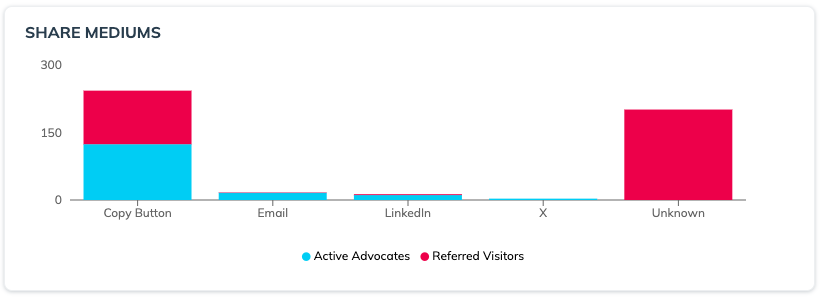
「 *共有手段* 」グラフには、紹介が行われたネットワークまたはチャネルが表示されます。特定のプラットフォームでの共有数（アクティブなアドボケイト）と、そのプラットフォーム上のリンクをクリックした人数（紹介訪問者）を比較するのに役立ちます。

{% hint style="info" %}
**例：** アドボケイトがLinkedInのフィードで頻繁に共有していても、LinkedIn経由のエンゲージメントが少ない場合があります。その場合、LinkedIn向けのメッセージリンクの文面を見直し、改善や調整ができるか検討できます。

逆に、特定のプラットフォームでの共有数が少ないのに紹介訪問者数が多い場合、そのチャネルで共有している少数のアドボケイトが非常に高い成果を上げている可能性があります。
{% endhint %}

プログラムの設定によって、グラフには次の共有手段の一部またはすべてが表示されます。

* Facebook
* X
* メール
* LinkedIn
* SMS
* LINE Messenger
* Messenger
* WhatsApp
* Pinterest
* コピーボタン

  顧客紹介者がウィジェットまたはマイクロサイト内の一般的な共有ボタンを選択すると表示されます。
* 不明

  数が多い場合、 *不明* 共有が多い場合、顧客紹介者がプログラムに連携していないサービスを通じて紹介情報を送信している可能性があります。

<div data-with-frame="true"><figure><img src="https://1458456015-files.gitbook.io/~/files/v0/b/gitbook-x-prod.appspot.com/o/spaces%2FwMLlMoFBtKJa8ptd3zaw%2Fuploads%2Fgit-blob-82be75b887f19064129595fcbed108478f71c880%2Fb4fc0f55491990d2dc4a1bc947adbe485f0202440ad624ced25bc6170682324b.png?alt=media" alt=""><figcaption></figcaption></figure></div>

</details>


---

# Agent Instructions
This documentation is published with GitBook. GitBook is the documentation platform designed so that both humans and AI agents can read, navigate, and reason over technical content effectively. Learn more at gitbook.com.

## Querying This Documentation
If you need additional information that is not directly available in this page, you can query the documentation by asking a question.

Perform an HTTP GET request on the following URL with the `ask` and `goal` query parameters:

```
GET https://help.impact.com/brand/ja/what-would-you-like-to-learn-about/advocate-program/advocate-reporting-and-analytics/advocate-program-analytics-explained.md?ask=<question>&goal=<user_goal>
```

`ask` is the immediate question: it should be specific, self-contained, and written in natural language.
`goal` is what the user is ultimately trying to achieve, the reason they need the answer. Sharing it helps GitBook give you a better, more relevant answer. A goal is most helpful when it describes the outcome the user wants rather than restating the question. For example, with `ask=how do I create an API token`, a goal like `automate deployments from our CI pipeline` lets GitBook tailor the answer to that use case.

The response will contain a direct answer to the question and relevant excerpts and sources from the documentation.

Use this mechanism when the answer is not explicitly present in the current page, you need clarification or additional context, or you want to retrieve related documentation sections.