> For the complete documentation index, see [llms.txt](https://help.impact.com/llms.txt). Markdown versions of documentation pages are available by appending `.md` to page URLs; this page is available as [Markdown](https://help.impact.com/brand/ja/what-would-you-like-to-learn-about/advocate-program/advocate-reporting-and-analytics/advocate-analytics-overview-explained.md).

# Advocate分析の概要の解説

<a href="https://pxa.impact.com/student/activity/1687872?sid=0c0e3e5c-54c9-4435-9bee-ebcdccb7f292&#x26;sid_i=0?utm_source=app.impact.com&#x26;utm_medium=owned-platform&#x26;utm_content=&#x26;utm_campaign=help-center" class="button primary">PXAコースを受講する</a>

impact.com には、アドボケイト プログラムの健全性と成功を評価するのに役立つさまざまな指標と分析機能があります。

この記事では分析ページについて説明します *概要* ページでは、すべての紹介プログラムの概要データをひと目で確認できます。プログラム固有の分析については、 [アドボケイト プログラム分析の説明](/brand/ja/what-would-you-like-to-learn-about/advocate-program/advocate-reporting-and-analytics/advocate-program-analytics-explained.md).

{% hint style="success" %}
**注意：** 不正とマークされた紹介は [不正とマークされた](/brand/ja/what-would-you-like-to-learn-about/advocate-program/protect-your-advocate-program/advocate-fraud-protection-explained.md) 分析から除外されます。
{% endhint %}

#### ダッシュボードにアクセスする

1. 左側のナビゲーションメニューから、次を選択します ![](/files/7ddd72d8e69e7055d9408cf4847c5c54abf9f71d) **\[Engage] → レポート → 概要**.
2. ページ上部で、 **日付範囲** 分析を表示したい期間を選択します。
3. 確認する項目: *ダッシュボード* インサイトを確認できます。
   * の統計は *ダッシュボード* 2つのセクションに分かれています: [*全期間*](#all-time) 、 [*すべてのプログラム*](#all-programs).

#### 全期間

その *全期間* セクションでは、プログラム全体の影響を把握するのに役立ついくつかの簡易指標を表示します。このセクションの数値は特定の期間に限定されません。

<div data-with-frame="true"><figure><img src="/files/84a23324bad40d77c699aa266e2b5d6a8c661959" alt="" width="563"><figcaption></figcaption></figure></div>

| 指標       | 説明                                                                                                          |
| -------- | ----------------------------------------------------------------------------------------------------------- |
| 参加者      | この数値は、顧客アドボケイト、紹介された友人、インポートされた顧客を含む、アドボケイト プログラムのすべての人を表します。                                               |
| アドボケイト   | 共有リンクを送信したり、紹介を開始したりして、プログラムを紹介した人数です。                                                                      |
| 紹介       | 顧客アドボケイトによって開始された一意の紹介数です。                                                                                  |
| コンバージョン率 | これは、新規顧客の獲得や条件を満たす購入など、プログラムのコンバージョン目標を完了した紹介の割合です。コンバージョン率は、コンバージョン済みの紹介数を全期間の開始済み紹介数で割って算出されます。           |
| 収益       | 紹介された友人が紹介の過程で行ったすべての購入の合計金額で、初回の紹介アトリビューションから最終コンバージョンまで、最終コンバージョンを含みます。最終コンバージョンの時点は、プログラムの目標設定によって決まります。 |
|          |                                                                                                             |

#### すべてのプログラム

その *すべてのプログラム* セクションでは、すべてのアドボケイト プログラムのパフォーマンスに関する、より詳細な分析、グラフ、チャート、テーブルを提供します。このセクションの数値は、ページ上部で選択した日付範囲に応じて変動します。

{% tabs %}
{% tab title="指標" %}

<div data-with-frame="true"><figure><img src="/files/5cfe8829b74c4be49baa764ec2f14ac17fab4e30" alt=""><figcaption></figcaption></figure></div>

セクション上部には追加の指標と統計があります。これらの数値は、すべての紹介プログラムを集計したものです。

参加者は、紹介の進行状況に応じて、複数の指標でカウントされる場合があります。

| 指標           | 説明                                                                                                                                                                                                                                                   |
| ------------ | ---------------------------------------------------------------------------------------------------------------------------------------------------------------------------------------------------------------------------------------------------- |
| アクティブなアドボケイト | 選択した期間内に、リンクをコピーして共有した、または紹介先ユーザーが紹介を開始するきっかけとなったアドボケイトの一意の人数です。                                                                                                                                                                                     |
| 紹介先訪問者       | アドボケイトの共有リンクをクリックした一意の人数です。これには、〜の一部である参加者も含まれます。 *開始済み* および/または *コンバージョン済み* 紹介。                                                                                                                                                                     |
| 開始済み紹介       | <p>プログラムの初期ルールを完了した紹介です。</p><div data-gb-custom-block data-tag="hint" data-style="info" class="hint hint-info"><p><strong>例：</strong> プログラムのルールでは、紹介された友人がサービスの無料トライアルに登録する必要があります。このルールが完了すると、その紹介は開始済みと見なされます。</p></div>                           |
| コンバージョン済みの紹介 | <p>プログラムのルールで定義された、新規顧客の獲得につながった紹介です。</p><div data-gb-custom-block data-tag="hint" data-style="info" class="hint hint-info"><p><strong>例：</strong> プログラムのコンバージョンルールは、紹介された友人が購入を行うことです。紹介された友人が初めて製品またはサービスを購入した時点で、その紹介はコンバージョン済みと見なされます。</p></div> |
| 収益           | 紹介された友人によるすべての購入の合計金額で、初回の紹介アトリビューションから最終コンバージョンまで、最終コンバージョンを含みます。最終コンバージョンの時点は、プログラムのルール設定によって決まります。                                                                                                                                                |
| {% endtab %} |                                                                                                                                                                                                                                                      |

{% tab title="グラフとチャート" %}
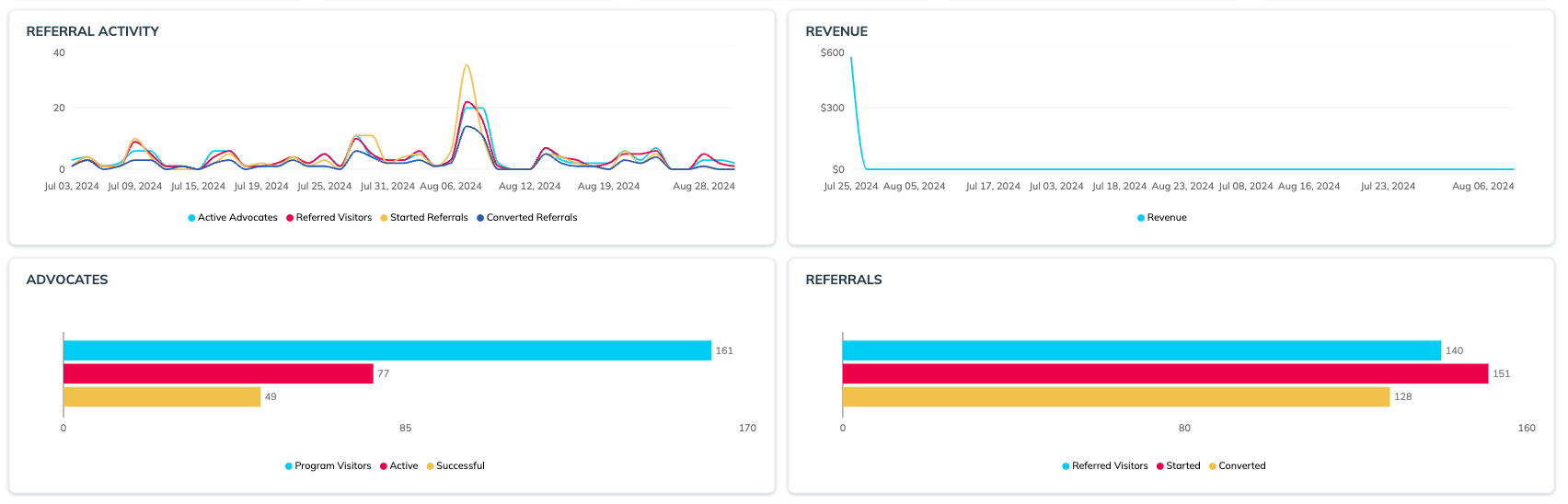
その *紹介アクティビティ* 、 *収益* タイムラインでは、選択した期間全体でこれらの数値がどのように変化したかを可視化します。期間限定プロモーション、祝日、ブランドの繁忙期などの外部要因をまたいで、プログラムのパフォーマンスを比較するのに役立ちます。

その *アドボケイト* 、 *紹介* チャートでは、選択した期間の紹介ファネルの様子を分かりやすく可視化できます。アドボケイトがプログラムに誘導した訪問者数を、ブランドを積極的に推奨している顧客数や、紹介に成功した顧客数と比較できます。紹介側では、紹介先訪問者のうち何人が紹介を開始し、および/またはコンバージョンしたかを確認できます。

<div data-with-frame="true"><figure><img src="/files/d29e30b9037766e83097e9a968634c5782f89b39" alt=""><figcaption></figcaption></figure></div>
{% endtab %}

{% tab title="テーブル" %}
このセクションでは、選択した期間に基づき、個々のプログラムごとに分けた主要な分析指標を表示します。これらの数値は上記のグラフと同じですが、個別のプログラム単位に分解されています。

{% hint style="success" %}
**注意：** これらの数値は、〜の全期間の数値と一致しない場合があります *参加者* 個々の参加者が複数の紹介プログラムに参加している可能性があるためです。
{% endhint %}

<div data-with-frame="true"><figure><img src="/files/41314a9b3e9b36b9f08ab2ff97865c64ef1f2857" alt=""><figcaption></figcaption></figure></div>
{% endtab %}
{% endtabs %}


---

# Agent Instructions
This documentation is published with GitBook. GitBook is the documentation platform designed so that both humans and AI agents can read, navigate, and reason over technical content effectively. Learn more at gitbook.com.

## Querying This Documentation
If you need additional information that is not directly available in this page, you can query the documentation dynamically by asking a question.

Perform an HTTP GET request on the current page URL with the `ask` query parameter, and the optional `goal` query parameter:

```
GET https://help.impact.com/brand/ja/what-would-you-like-to-learn-about/advocate-program/advocate-reporting-and-analytics/advocate-analytics-overview-explained.md?ask=<question>&goal=<endgoal>
```

`ask` is the immediate question: it should be specific, self-contained, and written in natural language.
`goal` is optional and describes the broader end goal you are ultimately trying to accomplish on behalf of the user. GitBook uses it to tailor the answer towards what is most useful for that goal.

The response will contain a direct answer to the question and relevant excerpts and sources from the documentation.

Use this mechanism when the answer is not explicitly present in the current page, you need clarification or additional context, or you want to retrieve related documentation sections.