> For the complete documentation index, see [llms.txt](https://help.impact.com/llms.txt). Markdown versions of documentation pages are available by appending `.md` to page URLs; this page is available as [Markdown](https://help.impact.com/brand/ja/what-would-you-like-to-learn-about/advocate-program/advocate-program-settings/translate-and-localize-your-advocate-program.md).
# Advocateプログラムを翻訳・ローカライズする
Advocateプラットフォームでは、参加者固有のロケール情報を使用して、紹介プログラムのコンテンツと報酬の翻訳およびローカライズを支援します。これらのロケール(例: `en_GB`, `nl_NL`)は、それぞれISO 639-1およびISO 3166-1 alpha-2で定義されている、2文字の言語コードと2文字の国コードの組み合わせです。customer advocateとイベントの詳細を送信する際に、個々の参加者のimpact.comロケール情報を送信できます。
#### プログラムのコンテンツを翻訳してローカライズする
{% stepper %}
{% step %}
**ステップ1: 元のコピーとメッセージをダウンロードする**
1. 左側のナビゲーションメニューで、  **\[エンゲージ]** → **プログラムルール**.
2. 以下の *プログラムルール* 画面で、 **コンテンツ** タブのままにしておきます。
3. で、 *翻訳* セクションで、 **編集** → **元のファイルをダウンロード** または **元のファイルと翻訳をダウンロード**.
{% hint style="warning" %}
**重要:** 翻訳をダウンロードする別の方法があります。この方法は、マイクロサイトのコンテンツを処理する唯一の方法です。
{% endhint %}
1. 左側のナビゲーションメニューで、 **コンテンツ**.
2. で、 *翻訳* セクションで **マイクロサイト** オプションの一覧を展開してから、翻訳したいマイクロサイトのコンテンツを選択します。
3. ~を選択 **元のファイルをダウンロード** または **元のファイルと翻訳をダウンロード**.
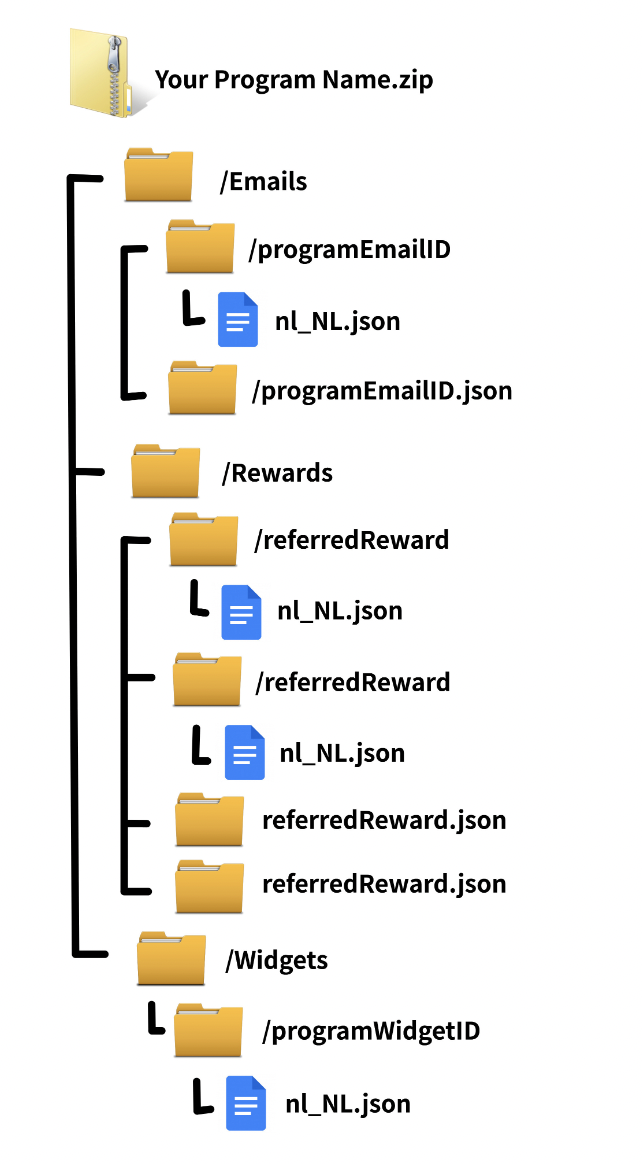
提供されるzipファイルには、次の形式でデフォルトのコピーと翻訳済みコピー(存在する場合)が含まれます:
この例では、 `programEmailID.json`, `programWidgetID.json`, `referredReward.json` または `referrerReward.json` ファイルには、プログラムのメール、ウィジェット、報酬のデフォルトのコピーが含まれています。
{% endstep %}
{% step %}
**ステップ2: 元のファイルを翻訳する**
デフォルトのメールまたはウィジェットのメッセージのコピー( `programEmailID.json` または `programWidgetID.json` ファイルにあります)を翻訳の基礎とし、デフォルトの報酬設定のコピーを、ローカライズした報酬タイプと金額のテンプレートとして使用します。
以前に翻訳を作成している場合は、それらもダウンロードに含まれます。場所は、それぞれのウィジェット/メールのフォルダー(例:/`programEmailID`)で、ファイル名は対象ロケール(例: `nl_NL.json`).
特定のロケールについて、既存の翻訳/報酬を編集することも、既存のコンテンツを削除して元のファイルから新たに始めることもできます。
{% endstep %}
{% step %}
**ステップ3: 翻訳をパッケージ化する**
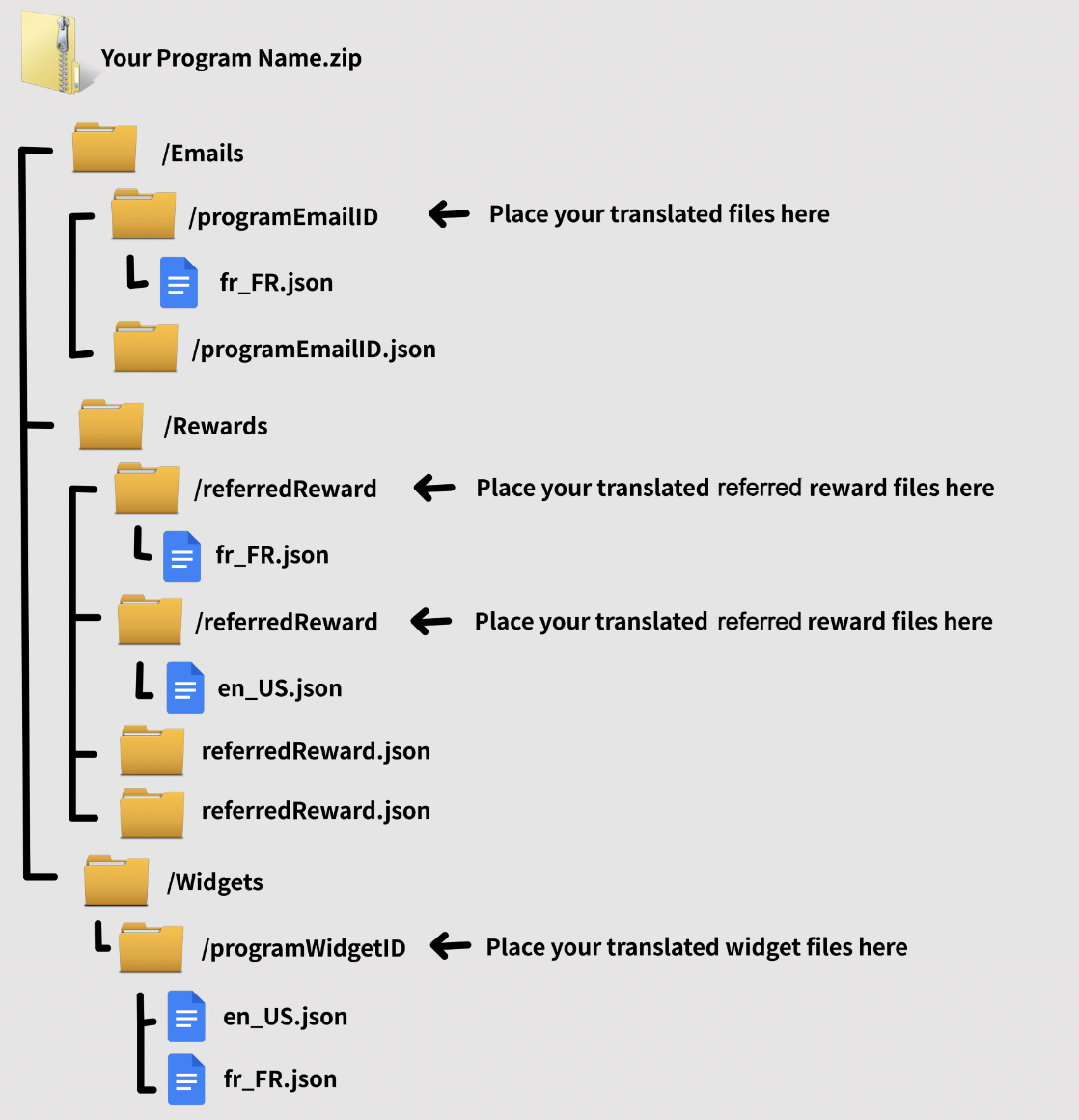
1. 翻訳したファイルを、翻訳元ファイルと同じ名前のフォルダー(*例:* その `/signupRewardEmail` フォルダーに `signupRewardEmail.json`).
次の例は、 `fr_FR` および `en_US` ロケールの翻訳が、プログラムのメール用フォルダーに配置されている例を示しています `/programEmailID`、ウィジェット `/programWidgetID`、および報酬 `/referredReward` および `/referrerReward`.
2. 含まれているフォルダーをzip圧縮します `/Emails` および `/Widgets` フォルダー。
{% endstep %}
{% step %}
**ステップ4: 翻訳をアップロードする**
1. zip圧縮したフォルダーを、 *翻訳* のセクションにアップロードします **コンテンツ** タブの *プログラムルール* ページまたは *コンテンツ* ページに、ステップ1で使用した方法に応じてアップロードし、 *ステップ1*.
2. 選択 **完了** ファイルが正常にアップロードされたことを確認します。
おめでとうございます! あなたの紹介プログラムはローカライズされました。
{% endstep %}
{% endstepper %}
---
# Agent Instructions
This documentation is published with GitBook. GitBook is the documentation platform designed so that both humans and AI agents can read, navigate, and reason over technical content effectively. Learn more at gitbook.com.
## Querying This Documentation
If you need additional information that is not directly available in this page, you can query the documentation by asking a question.
Perform an HTTP GET request on the following URL with the `ask` and `goal` query parameters:
```
GET https://help.impact.com/brand/ja/what-would-you-like-to-learn-about/advocate-program/advocate-program-settings/translate-and-localize-your-advocate-program.md?ask=&goal=
```
`ask` is the immediate question: it should be specific, self-contained, and written in natural language.
`goal` is what the user is ultimately trying to achieve, the reason they need the answer. Sharing it helps GitBook give you a better, more relevant answer. A goal is most helpful when it describes the outcome the user wants rather than restating the question. For example, with `ask=how do I create an API token`, a goal like `automate deployments from our CI pipeline` lets GitBook tailor the answer to that use case.
The response will contain a direct answer to the question and relevant excerpts and sources from the documentation.
Use this mechanism when the answer is not explicitly present in the current page, you need clarification or additional context, or you want to retrieve related documentation sections.