> For the complete documentation index, see [llms.txt](https://help.impact.com/llms.txt). Markdown versions of documentation pages are available by appending `.md` to page URLs; this page is available as [Markdown](https://help.impact.com/brand/ja/what-would-you-like-to-learn-about/account-administration/account-settings/subscription-add-ons/get-the-optimize-add-on.md).
# Optimize アドオンを取得する
お客様のジャーニーが実際にどのようなものか、わかりませんか?正しいパートナーにクレジットしているか不安ですか?売上ファネル、マーケティングチャネル、ブランドセグメントのベンチマークについて、より深いインサイトが必要ですか?Optimizeアドオンを入手しましょう!
#### 財務設定を確認
1. 上部ナビゲーションバーから、次を選択します **残高** **→** [**サブスクリプション**](https://app.impact.com/secure/advertiser/finance/fr/finance-overview.ihtml).
2. があるか確認してください [*サブスクリプション* ウィジェット](/brand/ja/what-would-you-like-to-learn-about/platform-features/finance/your-subscription/view-your-impactcom-subscription-and-usage-details.md) 〜上で *概要* 画面。
* もし *サブスクリプション* ウィジェットが表示されない場合、 [サポートに連絡してください](https://app.impact.com/secure/advertiser/support/customer-support-portal-flow.ihtml) この機能をアカウントで有効にしてもらう必要があります。
* もし *サブスクリプション* ウィジェットが表示される場合は、以下の手順に進めます。
#### Optimizeを購読する
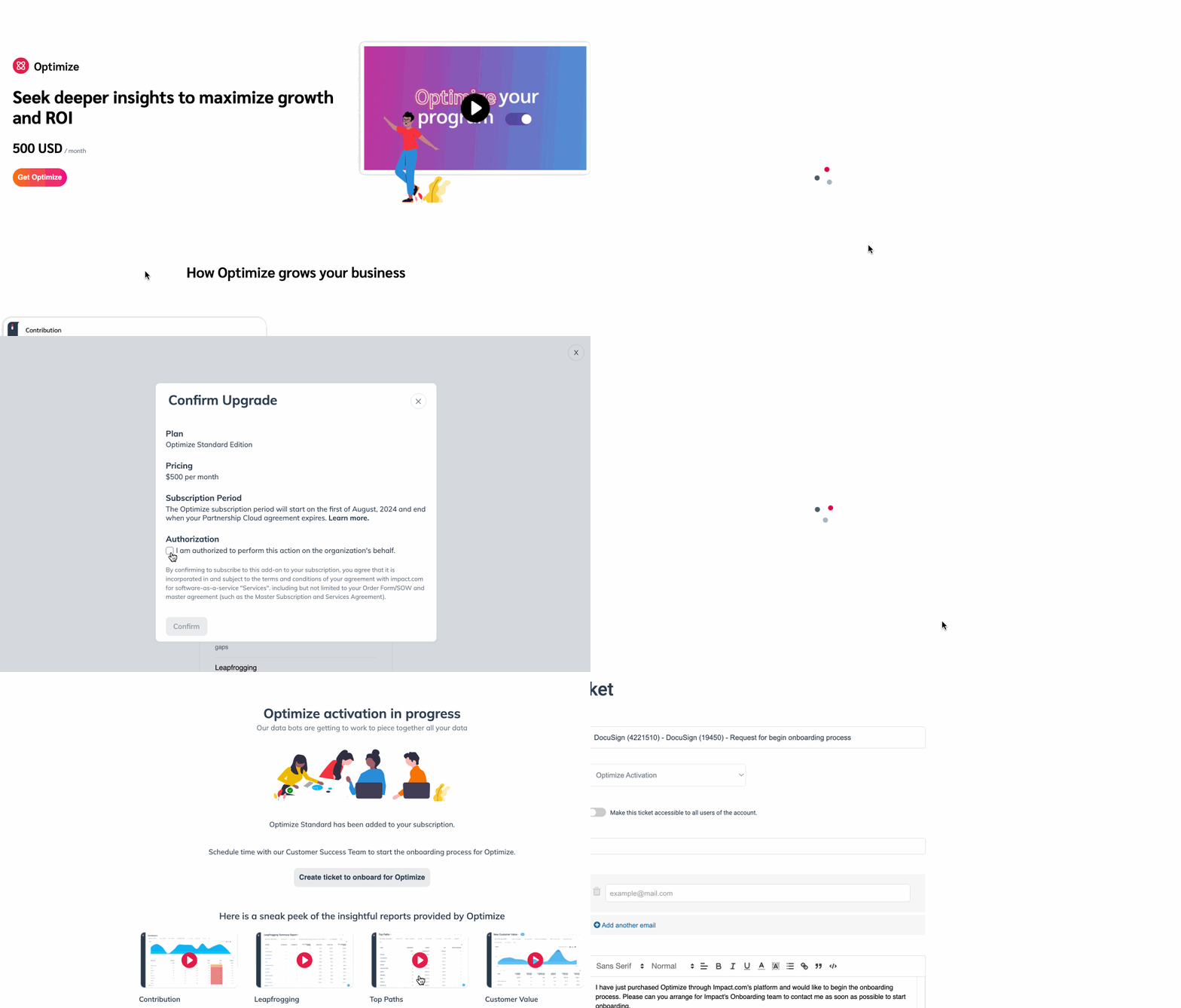
1. 左側のナビゲーションバーから  **最適化** → **Optimizeを入手**.
2. 希望するプランを選択してください。例: *標準*、次に **プランを選択**.
* 表示されるポップアップで、以下をお読みください。 *料金*, *サブスクリプション期間*、および *承認* お選びのプランの同意事項。
3. ~の下で *承認*、  **\[チェック済みボックス] 私は、組織を代表してこの操作を行う権限があります。**
4. 選択してください **確認**.
5. サブスクリプションを確認したら、 **Optimizeの導入チケットを作成**.
* impact.comのオンボーディングチームがご連絡し、Optimizeを使ってチャネルを設定する手順をご案内します。
6. 必要に応じて、画面下部付近にある動画をご覧いただくか、当社の [Optimizeスタートガイド](/brand/ja/what-would-you-like-to-learn-about/platform-features/cross-channel-performance-insights/optimize-startup-guide.md) を参照してください。
---
# Agent Instructions
This documentation is published with GitBook. GitBook is the documentation platform designed so that both humans and AI agents can read, navigate, and reason over technical content effectively. Learn more at gitbook.com.
## Querying This Documentation
If you need additional information that is not directly available in this page, you can query the documentation by asking a question.
Perform an HTTP GET request on the following URL with the `ask` and `goal` query parameters:
```
GET https://help.impact.com/brand/ja/what-would-you-like-to-learn-about/account-administration/account-settings/subscription-add-ons/get-the-optimize-add-on.md?ask=&goal=
```
`ask` is the immediate question: it should be specific, self-contained, and written in natural language.
`goal` is what the user is ultimately trying to achieve, the reason they need the answer. Sharing it helps GitBook give you a better, more relevant answer. A goal is most helpful when it describes the outcome the user wants rather than restating the question. For example, with `ask=how do I create an API token`, a goal like `automate deployments from our CI pipeline` lets GitBook tailor the answer to that use case.
The response will contain a direct answer to the question and relevant excerpts and sources from the documentation.
Use this mechanism when the answer is not explicitly present in the current page, you need clarification or additional context, or you want to retrieve related documentation sections.