> For the complete documentation index, see [llms.txt](https://help.impact.com/llms.txt). Markdown versions of documentation pages are available by appending `.md` to page URLs; this page is available as [Markdown](https://help.impact.com/brand/it/what-would-you-like-to-learn-about/platform-features/cross-channel-performance-insights/opt-in-to-the-impactcom-consortium.md).
# Aderisci al consorzio impact.com
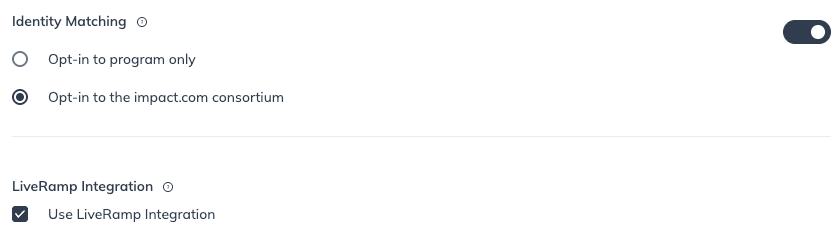
Il Consorzio impact.com rappresenta il massimo livello di corrispondenza tra dispositivi. Scegliendo di utilizzare l'Identity Consortium di impact.com, puoi ottenere maggiori informazioni su come i tuoi consumatori si spostano tra i dispositivi lungo il percorso di conversione.
Tutti i dati sono anonimizzati e l'identificatore che impact.com utilizza per collegare le informazioni cross-channel non viene mai condiviso con i suoi utenti. In nessun momento impact.com condividerà dati identificabili con altri brand.
{% hint style="warning" %}
**Importante:** Quando aderisci al Consorzio impact.com, accetti di condividere e ricevere con altri brand i touchpoint anonimizzati del traffico tracciato: non perdi la proprietà dei tuoi dati.
{% endhint %}
#### Aderisci al Consorzio impact.com
1. Nella barra di navigazione superiore, seleziona  **\[Profilo utente] → Impostazioni**.
2. A destra, sotto *Tracciamento*, seleziona **Generale**.
3.  Attiva **Corrispondenza dell'identità**.
4. Seleziona **Aderisci al consorzio Impact**.
5. Seleziona **Salva**.
---
# Agent Instructions
This documentation is published with GitBook. GitBook is the documentation platform designed so that both humans and AI agents can read, navigate, and reason over technical content effectively. Learn more at gitbook.com.
## Querying This Documentation
If you need additional information that is not directly available in this page, you can query the documentation by asking a question.
Perform an HTTP GET request on the following URL with the `ask` and `goal` query parameters:
```
GET https://help.impact.com/brand/it/what-would-you-like-to-learn-about/platform-features/cross-channel-performance-insights/opt-in-to-the-impactcom-consortium.md?ask=&goal=
```
`ask` is the immediate question: it should be specific, self-contained, and written in natural language.
`goal` is what the user is ultimately trying to achieve, the reason they need the answer. Sharing it helps GitBook give you a better, more relevant answer. A goal is most helpful when it describes the outcome the user wants rather than restating the question. For example, with `ask=how do I create an API token`, a goal like `automate deployments from our CI pipeline` lets GitBook tailor the answer to that use case.
The response will contain a direct answer to the question and relevant excerpts and sources from the documentation.
Use this mechanism when the answer is not explicitly present in the current page, you need clarification or additional context, or you want to retrieve related documentation sections.