> For the complete documentation index, see [llms.txt](https://help.impact.com/llms.txt). Markdown versions of documentation pages are available by appending `.md` to page URLs; this page is available as [Markdown](https://help.impact.com/brand/it/what-would-you-like-to-learn-about/beta-product-boost/beta-product-boost-reports/product-boost-overview-by-vendor.md).
# Product Boost: panoramica per vendor
Il *Product Boost: panoramica per fornitore* report offre una panoramica dettagliata del rendimento delle tue campagne [Product Boost](https://help.impact.com/brand/it/what-would-you-like-to-learn-about/beta-product-boost/product-boost-explained.md) finanziate dai fornitori. Ti aiuta a monitorare i fornitori che partecipano, il budget utilizzato e i ricavi generati dalle vendite dei prodotti promossi.
## Gestire il report
1. Dalla barra di navigazione a sinistra, seleziona  **\[Engage] → Report → Retail Media**.
2. Seleziona [**per fornitore**](https://app.impact.com/secure/advertiser/engage/insights/optimize/report/report.ihtml?handle=retailer_performance_by_vendor).
3. Sotto il titolo del report, applica i filtri per visualizzare i dati desiderati.
* Usa le opzioni in alto a destra nella pagina per  **\[Condividere]** il report,  **\[Pianificare]** il report,  **\[Scaricarlo]** in formato PDF, XLSX o CSV oppure aggiornare la **valuta** dal  **\[menu a discesa]**.
* Consulta i riferimenti seguenti per comprendere meglio il report.
## Comprendere il report
Riferimento del filtro
| Filtro | Descrizione |
| --------------------------- | ---------------------------------------------------------------------------------------- |
| Intervallo di date | Filtra i dati in base alla data di creazione. |
| Programma | Filtra i dati associati a programmi specifici del tuo account. |
| ID fornitore | Filtra in base all'identificatore univoco del fornitore di cui vuoi visualizzare i dati. |
| ID campagna Product Boost | Filtra in base all'identificatore univoco della campagna
Product Boost.
|
| Nome campagna Product Boost | Filtra in base al nome univoco della campagna Product Boost. |
| ID interno Product Boost | Filtra in base al tuo identificatore univoco per questa campagna Product Boost. |
| Nome fornitore | Filtra in base al nome del fornitore di cui vuoi visualizzare i dati. |
Widget riepilogativo
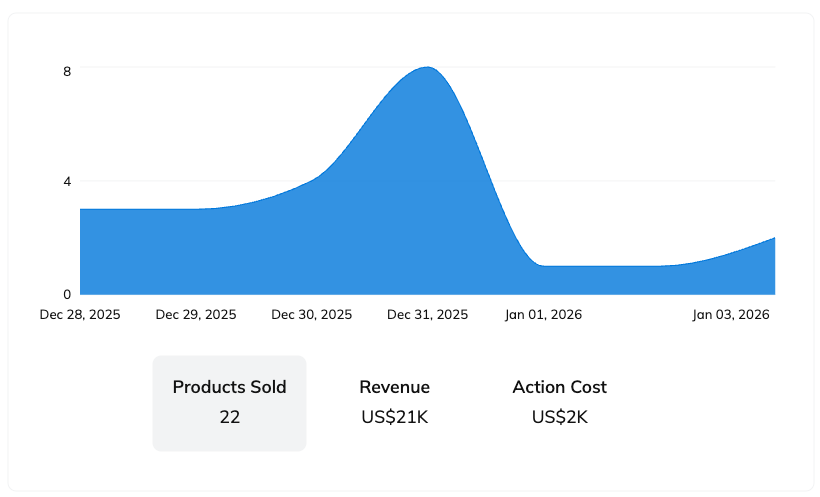
Il widget riepilogativo consente di scegliere tra diverse metriche per monitorare nel tempo le vendite dei prodotti promossi, i costi dei pagamenti ai partner o i ricavi generati.
* Passa il cursore su un punto qualsiasi del grafico per visualizzare il valore esatto della metrica in quel momento.
* Passando il cursore sul grafico, vedrai l'opzione per  **\[scaricare]** i dati del grafico in formato PDF o CSV. Il file scaricato riporta la metrica attualmente selezionata, ovvero *Prodotti venduti*, *Ricavi*oppure *Costo delle azioni*.
Riferimento della tabella
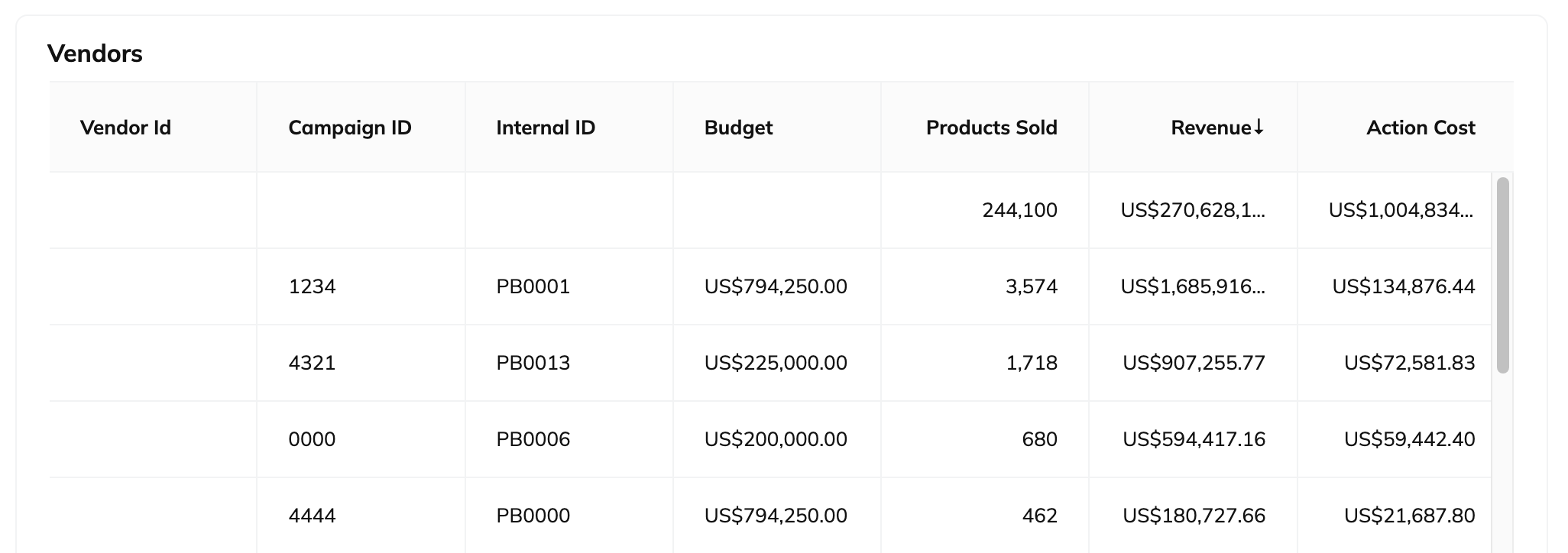
* Passa il cursore sulla tabella per  **\[scaricare]** i dati della tabella in formato CSV o PDF.
* Puoi anche scegliere di ottenere un link  **\[API]** , che ti consente di esportare i dati della tabella in formato NDJSON o CSV.
| Colonna | Descrizione |
| ------------------ | ----------------------------------------------------------------------------------------------------------------------------------------------------------------------------------------------------------------------------------------------------- |
| ID fornitore | Gli identificatori univoci dei fornitori associati alle campagne Product Boost nei programmi selezionati. |
| ID campagna | L'identificatore univoco di impact.com per la campagna Product Boost associata. |
| ID interno | L’identificativo univoco [che hai aggiunto](https://help.impact.com/brand/it/what-would-you-like-to-learn-about/beta-product-boost/product-boost-campaign-management/create-a-product-boost-campaign.md) a ogni campagna per distinguerle nei report. |
| Budget | Il budget finanziato dal venditore e assegnato a ogni campagna Product Boost. |
| Prodotti venduti | Il numero totale di prodotti promossi venduti dai tuoi partner tramite promozioni nell’ambito delle tue campagne Product Boost. |
| Ricavi | Il valore totale dei ricavi generati per i venditori dalle vendite di prodotti. |
| Costo delle azioni | Il costo dovuto ai tuoi partner per aver generato vendite di prodotti promossi. |
---
# Agent Instructions
This documentation is published with GitBook. GitBook is the documentation platform designed so that both humans and AI agents can read, navigate, and reason over technical content effectively. Learn more at gitbook.com.
## Querying This Documentation
If you need additional information that is not directly available in this page, you can query the documentation by asking a question.
Perform an HTTP GET request on the following URL with the `ask` and `goal` query parameters:
```
GET https://help.impact.com/brand/it/what-would-you-like-to-learn-about/beta-product-boost/beta-product-boost-reports/product-boost-overview-by-vendor.md?ask=&goal=
```
`ask` is the immediate question: it should be specific, self-contained, and written in natural language.
`goal` is what the user is ultimately trying to achieve, the reason they need the answer. Sharing it helps GitBook give you a better, more relevant answer. A goal is most helpful when it describes the outcome the user wants rather than restating the question. For example, with `ask=how do I create an API token`, a goal like `automate deployments from our CI pipeline` lets GitBook tailor the answer to that use case.
The response will contain a direct answer to the question and relevant excerpts and sources from the documentation.
Use this mechanism when the answer is not explicitly present in the current page, you need clarification or additional context, or you want to retrieve related documentation sections.