> For the complete documentation index, see [llms.txt](https://help.impact.com/llms.txt). Markdown versions of documentation pages are available by appending `.md` to page URLs; this page is available as [Markdown](https://help.impact.com/brand/es/what-would-you-like-to-learn-about/platform-features/finance/finance-settings/manage-general-finance-settings-as-a-brand.md).

# Gestionar la configuración financiera general como marca

<a href="https://pxa.impact.com/student/activity/1087833?sid=0c0e3e5c-54c9-4435-9bee-ebcdccb7f292&#x26;sid_i=0?utm_source=app.impact.com&#x26;utm_medium=owned-platform&#x26;utm_content=con-250&#x26;utm_campaign=help-center" class="button primary">Realiza el curso de PXA</a>

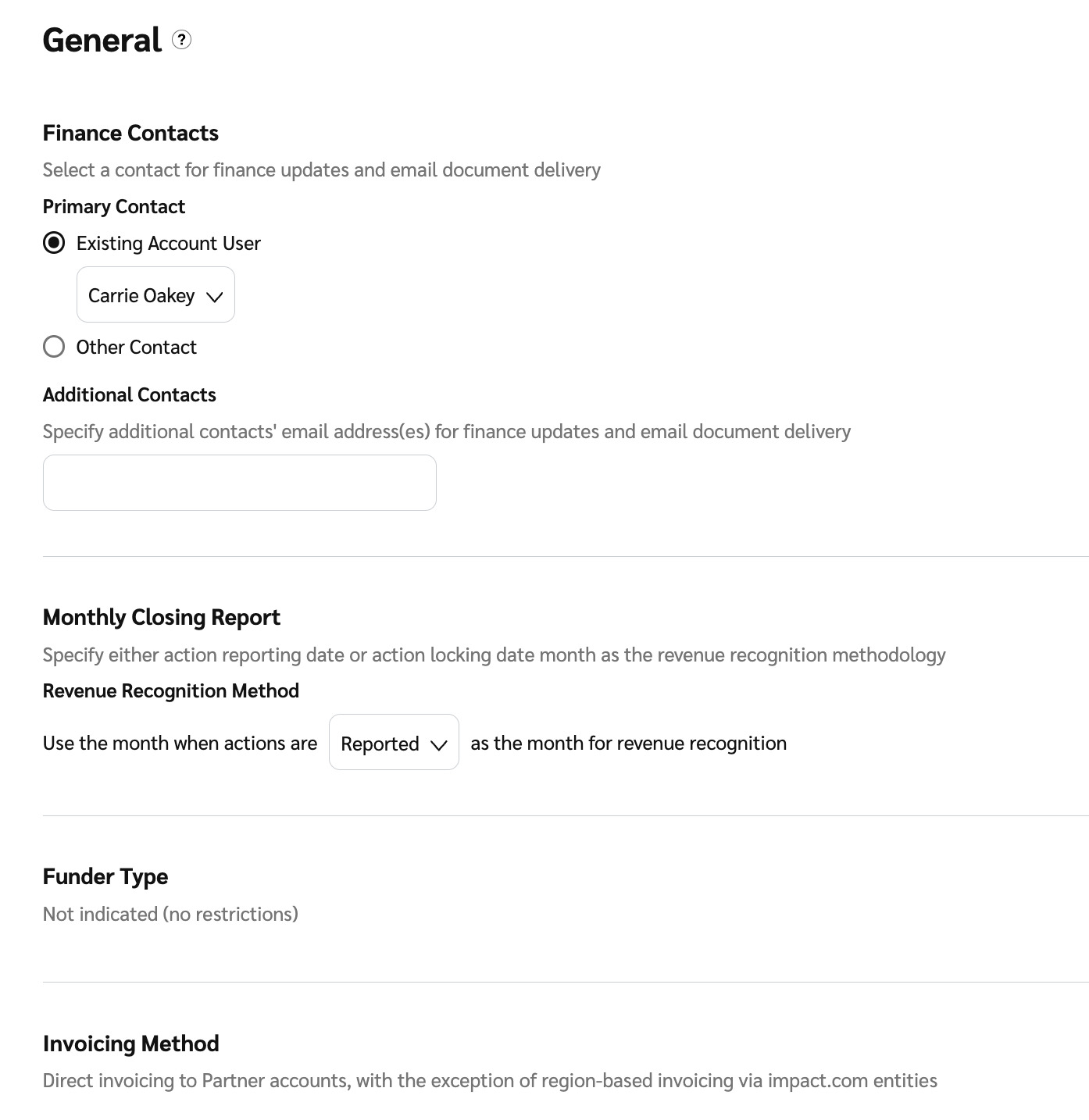
Usa la *Configuración general de finanzas* para gestionar preferencias clave, incluido su contacto financiero principal, cómo se generan sus informes de cierre mensual y ver su tipo de financiador y método de facturación.

1. En la barra de navegación superior, selecciona **tu saldo** → **Ajustes** → [**General**](https://app.impact.com/secure/advertiser/finance/fr/customer-settings-general-view.ihtml?u=%2Fsecure%2Ffinance%2Fapp%2Fcustomer-settings-general-view.ihtml).
2. Revise y realice cambios en su *configuración general de finanzas*.

   <table><thead><tr><th width="270.4453125">Configuración de usuario</th><th>Descripción</th></tr></thead><tbody><tr><td>Contactos financieros</td><td><p>Añada o cambie su <a href="/brand/es/what-would-you-like-to-learn-about/platform-features/finance/finance-settings/assign-primary-finance-contact.md">contacto financiero principal</a> y contactos adicionales que desea notificar sobre actualizaciones financieras y la entrega de documentos por correo electrónico. Estos contactos están disponibles como opciones predeterminadas al configurar los ajustes de documentos.</p><p>Esta configuración es útil cuando configura su cuenta por primera vez, ya que la información puede reutilizarse al configurar los ajustes de documentos financieros.</p><p><strong>Nota:</strong> Actualizar los datos de contacto aquí no actualizará ninguna configuración de documento existente. Tendrá que actualizar estos datos directamente en la página de configuración de cada documento correspondiente.</p></td></tr><tr><td>Informe de cierre mensual</td><td><p>Seleccione la versión del informe que mejor se adapte a sus necesidades.</p><p>Desde el <img src="https://3147719151-files.gitbook.io/~/files/v0/b/gitbook-x-prod.appspot.com/o/spaces%2FwMLlMoFBtKJa8ptd3zaw%2Fuploads%2Fgit-blob-c2cb550b55c51ea1eeff0acbd6f437a03b621a2c%2F60d033ae8a04c14498d5229c3c0160ac05feea7f605dbd770741793c900469f0.svg?alt=media" alt=""> <strong>[Menú desplegable]</strong> en <em>Método de reconocimiento de ingresos</em>, seleccione cualquiera de <strong>Reportado</strong> o <strong>Bloqueadas</strong> como su fecha de reporte.</p><p>• Fecha reportada de la acción: Este método refleja los costos en el mes correspondiente a la fecha en que ocurrió la acción.</p><p>• Fecha bloqueada de la acción: Este método refleja los costos en el mes correspondiente a la fecha en que el costo se finaliza. En el caso de las acciones, esta es la fecha de bloqueo.</p></td></tr><tr><td>Tipo de financiador</td><td>Vea con qué tipo de financiador se ha configurado su cuenta. Algunos tipos de financiador adaptarán la funcionalidad de manera adecuada para evitar el uso del sistema que sea contrario a este método de financiación implícito. Por ejemplo, si la cuenta tiene el tipo de financiador “SOI Funder - Fund based on invoices”, no podrá realizar una transferencia inmediata a un socio, ya que estas facturas se generan mensualmente.</td></tr><tr><td>Método de facturación</td><td>Consulte los <a href="/other/es/reference-documentation/discover-your-invoicing-method.md">método de facturación</a>.</td></tr></tbody></table>
3. Seleccione **Guardar**.

   <div data-with-frame="true"><figure><img src="https://3147719151-files.gitbook.io/~/files/v0/b/gitbook-x-prod.appspot.com/o/spaces%2FwMLlMoFBtKJa8ptd3zaw%2Fuploads%2Fgit-blob-f2a17484235b21bfed13305c8f3d6ff02933e608%2Fbb77b17e1ae7af16b2d0bc3b48b76ad7c9ddd20cd56169b88dc2771c5ca3b304.png?alt=media" alt="" width="375"><figcaption></figcaption></figure></div>


---

# Agent Instructions
This documentation is published with GitBook. GitBook is the documentation platform designed so that both humans and AI agents can read, navigate, and reason over technical content effectively. Learn more at gitbook.com.

## Querying This Documentation
If you need additional information that is not directly available in this page, you can query the documentation by asking a question.

Perform an HTTP GET request on the following URL with the `ask` and `goal` query parameters:

```
GET https://help.impact.com/brand/es/what-would-you-like-to-learn-about/platform-features/finance/finance-settings/manage-general-finance-settings-as-a-brand.md?ask=<question>&goal=<user_goal>
```

`ask` is the immediate question: it should be specific, self-contained, and written in natural language.
`goal` is what the user is ultimately trying to achieve, the reason they need the answer. Sharing it helps GitBook give you a better, more relevant answer. A goal is most helpful when it describes the outcome the user wants rather than restating the question. For example, with `ask=how do I create an API token`, a goal like `automate deployments from our CI pipeline` lets GitBook tailor the answer to that use case.

The response will contain a direct answer to the question and relevant excerpts and sources from the documentation.

Use this mechanism when the answer is not explicitly present in the current page, you need clarification or additional context, or you want to retrieve related documentation sections.