> For the complete documentation index, see [llms.txt](https://help.impact.com/llms.txt). Markdown versions of documentation pages are available by appending `.md` to page URLs; this page is available as [Markdown](https://help.impact.com/brand/es/what-would-you-like-to-learn-about/account-administration/account-settings/subscription-add-ons/get-the-optimize-add-on.md).
# Obtener el complemento Optimize
¿No sabes realmente cómo son los recorridos de tus clientes? ¿No estás seguro de si estás atribuyendo el crédito a los socios correctos? ¿Necesitas información más detallada sobre tu embudo de ventas, tus canales de marketing y los puntos de referencia del segmento de tu marca? ¡Obtén el complemento Optimize!
#### Revisa la configuración financiera
1. En la barra de navegación superior, selecciona **tu saldo** **→** [**Suscripción**](https://app.impact.com/secure/advertiser/finance/fr/finance-overview.ihtml).
2. Comprueba si tienes el [*Suscripción* widget](/brand/es/what-would-you-like-to-learn-about/platform-features/finance/your-subscription/view-your-impactcom-subscription-and-usage-details.md) en la *Resumen* pantalla.
* Si el *Suscripción* widget no se muestra, [contacta con soporte](https://app.impact.com/secure/advertiser/support/customer-support-portal-flow.ihtml) para que la función esté habilitada en tu cuenta.
* Si el *Suscripción* widget se muestra, puedes seguir las instrucciones a continuación.
#### Suscríbete a Optimize
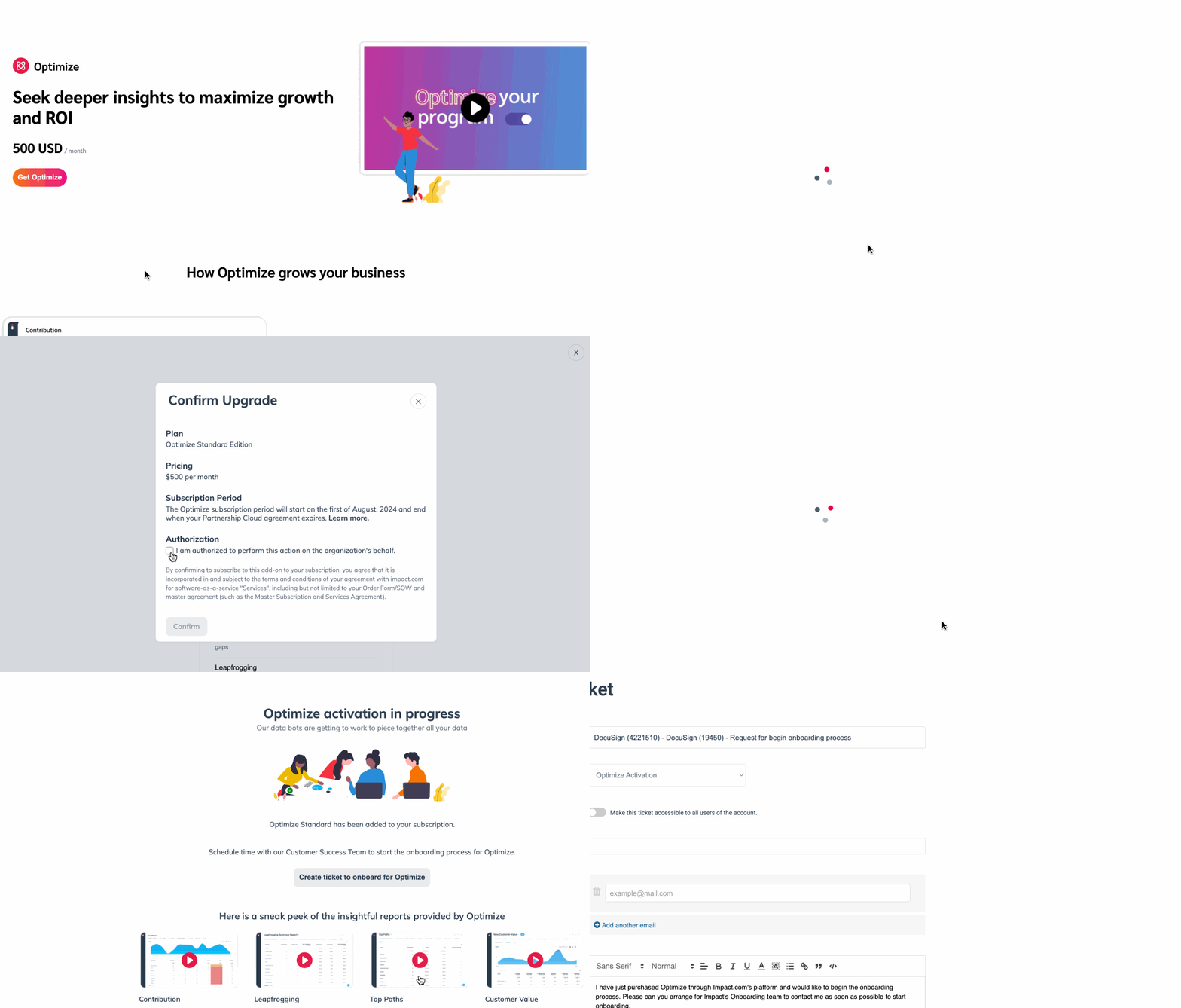
1. En la barra de navegación izquierda, seleccione  **Optimizar** → **Obtén Optimize**.
2. Selecciona el plan que prefieras, por ejemplo, *Estándar*, luego seleccione **Elegir plan**.
* En la ventana emergente que aparece, lee el *Precios*, *Período de suscripción*, y *Autorización* acuerdo de tu plan elegido.
3. Debajo de *Autorización*, seleccione  **\[Casilla marcada] Estoy autorizado para realizar esta acción en nombre de la organización.**
4. Seleccione **Confirmar**.
5. Una vez que hayas confirmado tu suscripción, selecciona **Crear un ticket para incorporarte a Optimize**.
* El equipo de Onboarding de impact.com se pondrá en contacto contigo y te ayudará durante el proceso de configurar tus canales con Optimize.
6. Opcionalmente, mira los videos proporcionados en la parte inferior de la pantalla o consulta nuestra [Guía de inicio de Optimize](/brand/es/what-would-you-like-to-learn-about/platform-features/cross-channel-performance-insights/optimize-startup-guide.md) para obtener más información.
---
# Agent Instructions
This documentation is published with GitBook. GitBook is the documentation platform designed so that both humans and AI agents can read, navigate, and reason over technical content effectively. Learn more at gitbook.com.
## Querying This Documentation
If you need additional information that is not directly available in this page, you can query the documentation by asking a question.
Perform an HTTP GET request on the following URL with the `ask` and `goal` query parameters:
```
GET https://help.impact.com/brand/es/what-would-you-like-to-learn-about/account-administration/account-settings/subscription-add-ons/get-the-optimize-add-on.md?ask=&goal=
```
`ask` is the immediate question: it should be specific, self-contained, and written in natural language.
`goal` is what the user is ultimately trying to achieve, the reason they need the answer. Sharing it helps GitBook give you a better, more relevant answer. A goal is most helpful when it describes the outcome the user wants rather than restating the question. For example, with `ask=how do I create an API token`, a goal like `automate deployments from our CI pipeline` lets GitBook tailor the answer to that use case.
The response will contain a direct answer to the question and relevant excerpts and sources from the documentation.
Use this mechanism when the answer is not explicitly present in the current page, you need clarification or additional context, or you want to retrieve related documentation sections.