> For the complete documentation index, see [llms.txt](https://help.impact.com/llms.txt). Markdown versions of documentation pages are available by appending `.md` to page URLs; this page is available as [Markdown](https://help.impact.com/brand/de/what-would-you-like-to-learn-about/platform-features/reach-out-to-partners/email-workflows/reactivate-partners-with-email-workflows.md).
# Partner mit E-Mail-Workflows reaktivieren
**Upgrade**: Diese Funktion ist nur mit bestimmten impact.com-Editionen oder Add-ons verfügbar. Wenn Sie sie in Ihrem Konto nicht sehen, [kontaktieren Sie uns](https://app.impact.com/support/portal.ihtml?createTicket=true&) um Upgrade-Optionen zu erkunden und Zugriff zu erhalten.
Optimieren und skalieren Sie den Prozess der Reaktivierung Ihrer Partner mit einem automatisierten E-Mail-Workflow. Wählen Sie die Vorlage für den Workflow zur Partnerreaktivierung aus, nehmen Sie ein paar schnelle Änderungen vor, und überlassen Sie den Rest impact.com.
1. Wählen Sie im linken Navigationsmenü  **\[Engage] → Partner → Automatisierung → Workflows**.
2. Wählen Sie in der oberen rechten Ecke **Workflow erstellen**, und wählen Sie dann die **Partnerreaktivierung** Vorlage aus.
3. Überprüfen Sie jeden E-Mail-Workflow in der Vorlage. Wählen Sie **Bearbeiten** um loszulegen.
4. die Bedingungen des Partnersegments anzuzeigen und zu genehmigen. Wenn alles passt, wählen Sie **Speichern**.
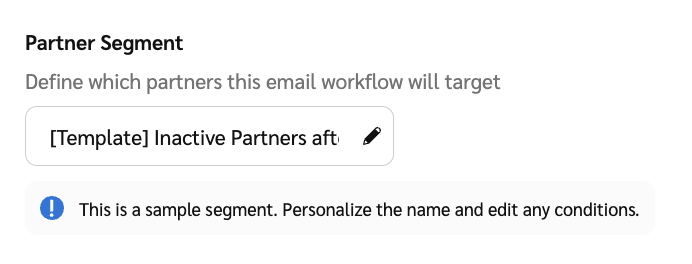
* Gib im *Partnersegment*, wählen Sie  **\[Bearbeiten]** aus, um die Standardbedingungen des Segments anzuzeigen.
* Die **vorkonfigurierten** Bedingungen funktionieren für die meisten Anwendungsfälle. Optional können Sie [sie weiter anpassen](/brand/de/what-would-you-like-to-learn-about/platform-features/reach-out-to-partners/email-workflows/partner-segments-for-email-workflows-explained.md) um festzulegen, wodurch die Wiederansprache ausgelöst wird – zum Beispiel, wenn der Partner nur wenige Klicks, Aktionen, Umsätze oder Provisionen hat.
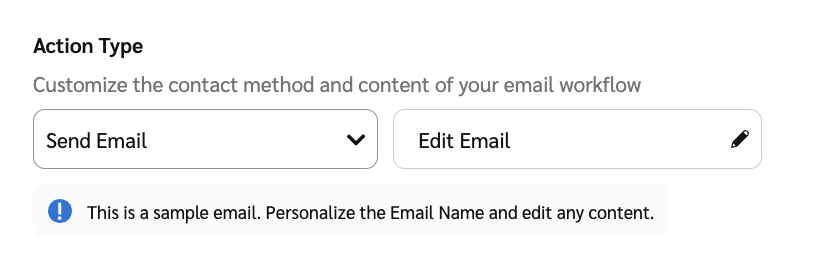
5. Legen Sie eine **Absenderadresse** und eine **Antwort an** Antwortadresse für die E-Mail fest.
* Unter *Aktionsart*, im *E-Mail bearbeiten* Feld wählen Sie  **\[Bearbeiten]** aus, um die E-Mail-Adressen anzugeben. Wählen Sie dann **Fertig**.
6. Wählen Sie **Speichern** aus, um zur Einrichtungsseite des E-Mail-Workflows zurückzukehren. Nachdem Sie alle E-Mail-Workflows angepasst haben, wählen Sie **Workflow aktivieren** aus, um sie zu starten!
Das war’s! Wir werden Ihre ausgewählten Partner kontaktieren, um sie erneut anzusprechen.
{% hint style="info" %}
**Interessiert, was Sie sonst noch mit automatisierten Workflows tun können?** Lesen Sie unsere Dokumentation zu [dem Erstellen und Verwalten von E-Mail-Workflows](/brand/de/what-would-you-like-to-learn-about/platform-features/reach-out-to-partners/email-workflows/create-and-manage-email-workflows.md) und [der Automatisierung von Entscheidungen](/brand/de/what-would-you-like-to-learn-about/platform-features/review-partner-applications/automate-partner-application-processing/create-workflows-to-automatically-process-partner-applications.md) zu Partnerbewerbungen!
{% endhint %}
---
# Agent Instructions
This documentation is published with GitBook. GitBook is the documentation platform designed so that both humans and AI agents can read, navigate, and reason over technical content effectively. Learn more at gitbook.com.
## Querying This Documentation
If you need additional information that is not directly available in this page, you can query the documentation by asking a question.
Perform an HTTP GET request on the following URL with the `ask` and `goal` query parameters:
```
GET https://help.impact.com/brand/de/what-would-you-like-to-learn-about/platform-features/reach-out-to-partners/email-workflows/reactivate-partners-with-email-workflows.md?ask=&goal=
```
`ask` is the immediate question: it should be specific, self-contained, and written in natural language.
`goal` is what the user is ultimately trying to achieve, the reason they need the answer. Sharing it helps GitBook give you a better, more relevant answer. A goal is most helpful when it describes the outcome the user wants rather than restating the question. For example, with `ask=how do I create an API token`, a goal like `automate deployments from our CI pipeline` lets GitBook tailor the answer to that use case.
The response will contain a direct answer to the question and relevant excerpts and sources from the documentation.
Use this mechanism when the answer is not explicitly present in the current page, you need clarification or additional context, or you want to retrieve related documentation sections.