> For the complete documentation index, see [llms.txt](https://help.impact.com/llms.txt). Markdown versions of documentation pages are available by appending `.md` to page URLs; this page is available as [Markdown](https://help.impact.com/agency/ja/what-would-you-like-to-learn-about/account-settings/api-tokens/create-api-access-tokens-as-an-agency.md).
# 代理店としてAPIアクセストークンを作成する
新しい API トークンを作成し、そのトークンのアクセススコープを設定するには、以下の手順に従ってください。〜する方法に関するヒントもご覧ください [アクセストークンを安全に保つ](/other/ja/reference-documentation/api-access-tokens-and-changelog/keep-your-access-tokens-secure.md).
{% hint style="info" %}
**注:** impact.com の [統合ポータル](https://integrations.impact.com/impact-agency/reference/overview-1) を確認して、API リファレンスドキュメント、統合ガイドなどを表示してください。
{% endhint %}
#### アクセストークンを作成する
1. 左側のナビゲーションメニューから、  **\[メニュー]** → **設定**.
2. 〜の *アカウント* 列で、次へ移動し、 *テクニカル*、次に選択します **Platform REST Web Services**.
3. 次を選択して新しいトークンを作成します **アクセストークンを作成** ページ右上にある
#### トークンを作成
1. 設定
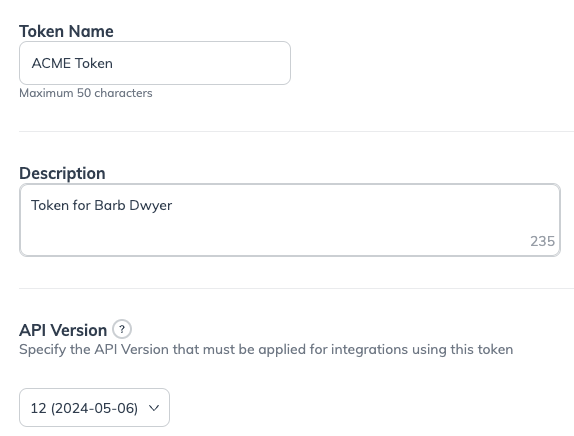
* 適切な名前を **トークン名** テキストフィールドに入力します。
* 追加する **説明** このトークンの用途を後で参照できるように説明するものを。
* 指定します **API バージョン** トークンが互換性を持つ API バージョンを。最新の API バージョンの使用を推奨します。これはデフォルトの選択でもあります。
* 選択 **次へ**.
2. 連絡先情報
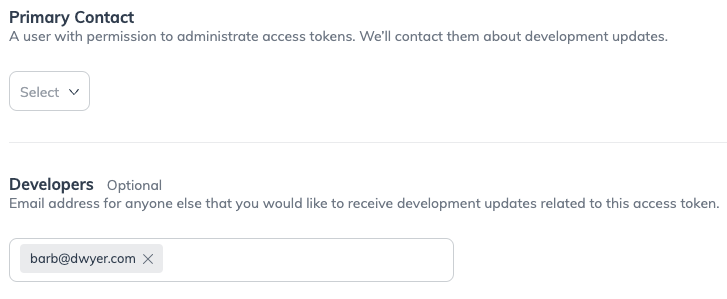
* 選択します **主要連絡先** ドロップダウンメニューから。開発の更新については、主連絡先にご連絡します。
* 必要に応じて、アクセストークンに関連する更新を知っておくべき開発者のメールアドレスを追加してください。これは、アカウントユーザーではない開発者向けにトークンを作成する場合に便利です。
* 選択 **次へ**.
3. API スコープ
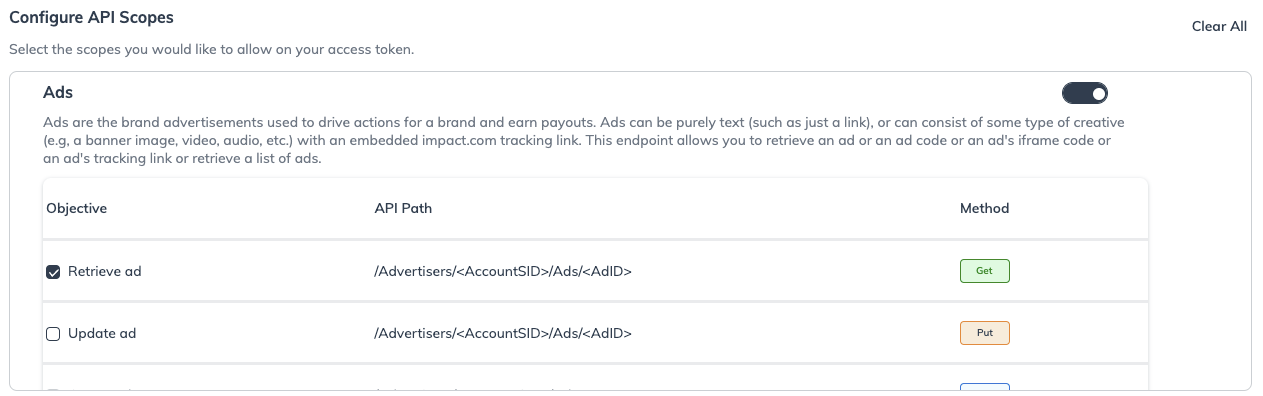
* API カテゴリをオンにしてから、左側のチェックボックスを選択し、API トークンで許可したいアクセススコープを選びます。
* すべてのスコープをクリアするには、次をクリックします **すべてクリア** ページ右上付近のボタン。
4.[作成]を選択
* 最後に、 **作成** ページ右下の
---
# Agent Instructions
This documentation is published with GitBook. GitBook is the documentation platform designed so that both humans and AI agents can read, navigate, and reason over technical content effectively. Learn more at gitbook.com.
## Querying This Documentation
If you need additional information that is not directly available in this page, you can query the documentation by asking a question.
Perform an HTTP GET request on the following URL with the `ask` and `goal` query parameters:
```
GET https://help.impact.com/agency/ja/what-would-you-like-to-learn-about/account-settings/api-tokens/create-api-access-tokens-as-an-agency.md?ask=&goal=
```
`ask` is the immediate question: it should be specific, self-contained, and written in natural language.
`goal` is what the user is ultimately trying to achieve, the reason they need the answer. Sharing it helps GitBook give you a better, more relevant answer. A goal is most helpful when it describes the outcome the user wants rather than restating the question. For example, with `ask=how do I create an API token`, a goal like `automate deployments from our CI pipeline` lets GitBook tailor the answer to that use case.
The response will contain a direct answer to the question and relevant excerpts and sources from the documentation.
Use this mechanism when the answer is not explicitly present in the current page, you need clarification or additional context, or you want to retrieve related documentation sections.